All posts by [x]cube LABS

[x]cube LABS is a leading digital strategy and solution provider specializing in enterprise mobility space. Over the years, we have delivered numerous digital innovations and mobile solutions, creating over $ 2 billion for startups and enterprises. Broad spectrum of services ranging from mobile app development to enterprise digital strategy makes us the partner of choice for leading brands.
Transformer Architecture

Understanding Transformer Architecture in Generative AI: From BERT to GPT-4

Transformer Architecture

Artificial Intelligence (AI) is a dynamic field, and one of its most promising branches is Generative AI. This subfield, leveraging transformer architecture, is dedicated to creating intelligent systems to produce entirely new content, from lifelike images to captivating musical compositions and even human-like text. The rapid evolution of Generative AI is reshaping numerous industries, with transformative applications in:

  • Drug Discovery: AI can generate new molecule structures with desired properties, accelerating drug development.
  • Creative Content Generation: AI can generate scripts, poems, musical pieces, and even realistic images, fostering new avenues for creative expression.
  • Machine Translation: Generative AI is revolutionizing machine translation by producing more natural and nuanced translations that capture the essence of the source language.

At the heart of this generative revolution lies a robust architecture called the Transformer.

Traditional Recurrent Neural Networks (RNNs) were the backbone of language processing for many years. However, their struggle with capturing long-range dependencies in sequences hindered their effectiveness in complex tasks like text generation. RNNs process information sequentially, making understanding relationships between words far apart in a sentence difficult.

This challenge led to the development of new models, prompting the question: what is transformer architecture? Transformer in architecture addresses these limitations by simultaneously processing all words in a sequence, allowing for better capture of long-range dependencies and improved performance in complex language tasks.

Transformers emerged in 2017 and marked a new era for natural language processing (NLP). This innovative software architecture not only overcomes the limitations of RNNs but also offers several advantages, making it an ideal choice for generative AI tasks and instilling confidence in the future of AI.

In the next section, we’ll explore the inner workings of transformers and how they revolutionized the field of generative AI.

Transformer Architecture

Transformer Architecture: A Detailed Look 

Traditional Recurrent Neural Networks (RNNs) were the dominant architecture for sequence-based tasks like language processing.

However, they needed help capturing long-range dependencies within sequences, which could have improved their performance. This is where Transformer architectures emerged, revolutionizing the field of Natural Language Processing (NLP) by effectively modeling these long-range relationships.

The Core Components of a Transformer

The fundamental elements of transformer architecture strengthen it; each is essential to processing and comprehending sequential data. Let’s look into these critical elements:

  1. Encoder-decoder Structure: Imagine a translator. The encoder part of the transformer “reads” the input sequence (source language) and encodes it into a contextual representation. This representation is then passed to the decoder, which acts like the translator, generating the output sequence (target language) based on the encoded context.

    This structure allows transformers to handle machine translation and tasks like text summarization, where understanding the entire input sequence is crucial.
  2. Self-Attention Mechanism: This is the heart of the transformer architecture. Unlike RNNs, which process sequences sequentially, the self-attention mechanism allows the transformer to attend to all parts of the input sequence simultaneously.

    Each element in the sequence “attends” to other components, assessing their relevance and importance. As a result, the model can capture long-range dependencies that may be dispersed widely throughout the sequence. A study by Vaswani et al., 2017 demonstrated that transformers with self-attention significantly outperform RNNs on various language modeling tasks.
  3. Positional Encoding: Since the self-attention mechanism considers all elements simultaneously, it lacks the inherent order information present in a sequence. Positional encoding addresses this by adding information about each element’s relative or absolute position within the sequence.

    This allows the model to distinguish between words with similar meanings but different positions in a sentence (e.g., “play the music” vs. “music plays on”).
  4. Feed-forward Networks are standard neural network layers that further process the encoded information from the self-attention mechanism. They add non-linearity to the model, allowing it to learn complex relationships within the sequence data.

The Power of Self-AttentionThe self-attention mechanism is the game-changer in vision transformer architecture. By enabling the model to analyze all parts of the sequence simultaneously and capture long-range dependencies, transformers can effectively understand complex relationships within language.

This skill has made notable progress across various NLP tasks, from machine translation and text summarization to question answering and sentiment analysis.

Transformer Architecture

Transformer Variants for Generative Tasks

The realm of generative AI thrives on models capable of learning complex patterns from vast amounts of data and then leveraging that knowledge to create entirely new content. This is where transformer architecture is explained, but to unlock their full potential, a technique known as pre-training comes into play.

Pre-training: The Secret Sauce of Generative AI

Pre-training involves training a transformer model architecture on a massive unlabeled text or code dataset. This unsupervised learning process allows the model to grasp the fundamental building blocks of language, such as word relationships and syntactic structures.

This pre-trained model is a robust foundation for building specific generative tasks. Studies by  OpenAI have shown that pre-training a transformer model on a dataset of text and code can significantly improve its performance on various downstream tasks compared to models trained from scratch.

Transformer Variants Leading the Generative AI Charge

The transformer architecture’s flexibility has fostered the development of numerous generative AI models, each with its strengths and applications:

  • BERT (Bidirectional): Introduced in 2018 by Google AI, BERT revolutionized natural language processing (NLP). Unlike traditional language models that process text sequentially, BERT utilizes a masked language modeling approach.

    Using this method, a sentence’s random words are hidden, and the model guesses the hidden words from the context.

Through bidirectional training, BERT can grasp word relationships comprehensively, making it an effective tool for various downstream applications, including text summarization, sentiment analysis, and question-answering.  


A 2019 study by Devlin et al. found that BERT achieved state-of-the-art results on 11 different NLP tasks, showcasing its versatility and effectiveness.

  • GPT (Generative Pre-training Transformer): Developed by OpenAI, GPT is a family of generative pre-trained transformer models. Different versions, like GPT-2, GPT-3, and the recently announced GPT-4, have progressively pushed the boundaries of what’s possible in text generation.

    Large-scale text and code datasets are used to train these models, enabling them to generate realistic and coherent text formats, like poems, code, scripts, musical pieces, emails, and letters. GPT-3, for instance, has gained significant attention for its ability to generate human-quality text, translate languages, and write creative content.

T5 (Text-to-Text Transfer Transformer): Introduced by Google AI in 2020, T5 takes a unique approach to NLP tasks. Unlike other models that require specific architectures for different tasks (e.g., question answering vs. summarization), T5 employs a unified approach. It utilizes a single encoder-decoder structure, defining the task within the input text.

This approach streamlines the training process and allows T5 to tackle a wide range of NLP tasks with impressive performance. A 2020 study by Raffel et al. demonstrated that T5 achieved state-of-the-art results on various NLP benchmarks, highlighting its effectiveness in handling diverse tasks.

Transformer Architecture

The Power and Potential of Transformers in Generative AI

Transformer architectures have not just influenced but revolutionized the landscape of generative AI, catapulting it to unprecedented levels of capability. Let’s explore the key advantages that firmly establish transformers as the dominant architecture in this domain, igniting our imagination for the future.

  • Exceptional Long Sequence Handling: Unlike recurrent neural networks (RNNs) that struggle with long-range dependencies, transformers excel at processing lengthy sequences.

    The self-attention mechanism allows transformers to analyze all parts of a sequence simultaneously, capturing complex relationships between words even if they are far apart.

    This is particularly advantageous for tasks like machine translation, where understanding the context of the entire sentence is crucial for accurate translation. A study by Vaswani et al., 2017 demonstrated that transformers achieved state-of-the-art results in machine translation tasks, significantly outperforming RNN-based models.
  • Faster Training Through Parallelism: Transformers are inherently parallelizable, meaning different model parts can be trained simultaneously. This parallelization capability translates to significantly faster training times compared to RNNs.

    A research paper by Jia et al. (2016) showed that transformers can be trained on large datasets in a fraction of the time it takes to train RNNs, making them ideal for applications requiring rapid model development.
  • Unmatched Versatility for NLP Tasks: The power of transformers extends beyond specific tasks. Their ability to handle long sequences and capture complex relationships makes them adaptable to various natural language processing applications.

    Transformers are proving their effectiveness across the NLP spectrum, from text summarization and sentiment analysis to question answering and code generation.

    A 2022 study by Brown et al. showcased the versatility of GPT-3, a powerful transformer-based model, by demonstrating its ability to perform various NLP tasks accurately.

The Future of Transformers in Generative AI

The realm of transformer architecture is constantly evolving. Researchers are actively exploring advancements like:

  • Efficient Transformer Architectures: Optimizing transformer models for memory usage and computational efficiency will enable their deployment on resource-constrained devices.
  • Interpretability of Transformers: Enhancing our understanding of how transformers make decisions will foster greater trust and control in their applications.
  • Multimodal Transformers: Integrating transformers with other modalities, such as vision and audio, promises exciting possibilities for tasks like image captioning and video generation.

Case Studies

Transformer architectures have revolutionized the field of generative AI, powering a wide range of groundbreaking applications. Let’s explore some real-world examples:

Case Study 1: Natural Language Processing (NLP)

  • Language Translation: Transformer-based models like Google’s Neural Machine Translation (NMT) system have significantly improved machine translation quality. These models can handle long sentences and complex linguistic structures more effectively than previous approaches.

    A study by [Wu et al., 2016] demonstrated that Google’s NMT system achieved a 28.4 BLEU score on the WMT14 English-to-French translation task, surpassing the performance of traditional phrase-based systems.
  • Text Summarization: Transformers have excelled in generating concise and informative summaries of lengthy documents. Models like Facebook’s BART (Bidirectional Encoder Representations from Transformers) have achieved state-of-the-art results in abstractive summarization tasks.

Case Study 2: Image and Video Generation

  • Image Generation: Transformer-based models like OpenAI’s DALL-E and Google’s Imagen have demonstrated remarkable capabilities in generating highly realistic and creative images from textual descriptions. These models have opened up new possibilities for artistic expression and content creation.
  • Video Generation: While still in its early stages, research is exploring the application of transformers for video generation tasks. Models like Google’s VideoGPT have shown promise in generating coherent and visually appealing video sequences.

Case Study 3: Other Domains

  • Speech Recognition: Transformers have been adapted for speech recognition tasks, achieving competitive performance architecture with models like Meta AI’s Wav2Vec 2.0.
  • Drug Discovery: Researchers are exploring using transformers to generate novel molecular structures with desired properties, accelerating drug discovery.

Transformer Architecture

Conclusion

Understanding transformer architecture is fundamental to grasping the advancements in generative AI, from BERT to GPT-4. The transformer architecture, first presented by Vaswani et al. in 2017, substantially changed the area of natural language processing by allowing models to capture context and long-range dependencies with previously unheard-of precision and speed. This architecture has since become the backbone of numerous state-of-the-art models.

By exploring transformer architecture, we see how its innovative use of self-attention mechanisms and parallel processing capabilities has drastically improved the performance and scalability of AI models.

BERT’s bidirectional context understanding and GPT-4’s autoregressive text generation are prime examples of how transformers can be tailored for specific tasks, leading to significant language understanding and generation breakthroughs.

The impact of transformer architecture on generative AI is profound. It enhances the capabilities of AI models and broadens the scope of applications, from chatbots and translation services to advanced research tools and creative content generation. This versatility should excite us about the diverse applications of AI in the future.

In summary, transformer architecture is a cornerstone of modern AI, driving progress in how machines understand and generate human language. Its ongoing evolution, from BERT to GPT-4, underscores its transformative power, giving us hope for continued innovation and deeper integration of AI into our daily lives.

How can [x]cube LABS Help?


[x]cube has been AI-native from the beginning, and we’ve been working through various versions of AI tech for over a decade. For example, we’ve been working with the developer interface of Bert and GPT even before the public release of  ChatGPT.

One of our initiatives has led to the OCR scan rate improving significantly for a complex extraction project. We’ve also been using Gen AI for projects ranging from object recognition to prediction improvement, as well as chat-based interfaces.

Generative AI Services from [x]cube LABS:

  • Neural Search: Revolutionize your search experience with AI-powered neural search models that use deep neural networks and transformers to understand and anticipate user queries, providing precise, context-aware results. Say goodbye to irrelevant results and hello to efficient, intuitive searching.
  • Fine Tuned Domain LLMs: Tailor language models to your specific industry for high-quality text generation, from product descriptions to marketing copy and technical documentation. Our models are also fine-tuned for NLP tasks like sentiment analysis, entity recognition, and language understanding.
  • Creative Design: Generate unique logos, graphics, and visual designs with our generative AI services based on specific inputs and preferences.
  • Data Augmentation: Enhance your machine learning training data with synthetic samples that closely mirror real data, improving model performance and generalization.
  • Natural Language Processing (NLP) Services: Handle tasks such as sentiment analysis, language translation, text summarization, and question-answering systems with our AI-powered NLP services.
  • Tutor Frameworks: Launch personalized courses with our plug-and-play Tutor Frameworks that track progress and tailor educational content to each learner’s journey, perfect for organizational learning and development initiatives.

Interested in transforming your business with generative AI? Talk to our experts over a FREE consultation today!

Static Analysis Tools

Best Practices for Using Static Analysis Tools to Improve Your Code Quality

Static Analysis Tools

Code quality, the bedrock of exceptional software, is a pursuit that never ceases. Well-crafted and enhanced by the strategic use of Static Analysis Tools, Pristine is the key to robust applications, efficient development lifecycles, and a significant competitive advantage in today’s landscape.

 
Yet, maintaining this quality is a perpetual challenge for developers. Hidden bugs, potential security loopholes, and code structure inconsistencies can persist, ready to emerge at critical junctures.

Enter static analysis tools, your powerful allies. Unlike debuggers, which necessitate code execution, these tools function as meticulous code inspectors. They delve into your codebase, identifying areas for enhancement and potential issues early in the development process, even before the code runs.

By harnessing these tools effectively, developers can take a proactive stance, addressing these issues in advance and saving significant time, resources, and frustration in the long run.

We’ll explore how these tools work, the different types available, and the substantial benefits they offer. 

Understanding Static Analysis Tools

Static analysis tools are like meticulous code auditors, meticulously examining your codebase without ever needing it run. They differ from conventional debuggers due to their methodology, which requires code execution to identify issues. But how exactly do these guardians of code quality work?

Static Analysis: A Deep Dive

Static analysis involves analyzing your program’s source code without actually running it. The tool meticulously examines the code structure, syntax, and semantics to identify potential problems, inefficiencies, and areas for improvement.

Think of it as a code review on steroids, performed by a tireless and objective automated tool. Studies have shown that static code analysis tools can detect up to 70% of potential code defects, significantly reducing the burden on developers during the debugging phase.

Different Types of Static Analysis:

The world of static analysis offers various tools designed to target specific aspects of your code. Here are some of the most common types:

  • Syntax Analysis: This fundamental type ensures your code respects the programming language’s grammar rules you’re using. Think of it as checking for typos and basic structural errors, similar to a spellchecker for code.
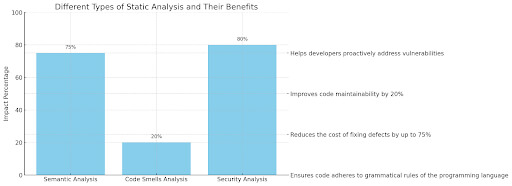
  • Semantic Analysis: Going beyond syntax, semantic analysis delves deeper into understanding the meaning and logic behind your code. It can identify potential issues like undeclared variables, type mismatches, and logical inconsistencies.

    IBM’s study found that by addressing semantic errors early using static code analysis tools, companies can reduce the cost of fixing defects by up to 75%.
  • Code Smells Analysis: While not strictly errors, code smells are patterns in code that suggest potential problems or areas for improvement. These can include overly complex functions, duplicated code, or unused variables.

    Static code analysis tools can identify these code smells, prompting you to refactor your code for better maintainability and readability. A study by SonarQube revealed that eliminating code smells can improve code maintainability by 20%, leading to faster development cycles.

Security Analysis: In today’s security-conscious world, static code analysis tools are crucial in identifying your code’s potential vulnerabilities. These tools can look for common security weaknesses like buffer overflows, SQL injection vulnerabilities, and insecure coding practices.

A Verizon report states over 80% of data breaches exploit software vulnerabilities. Static analysis tools can help developers proactively address these vulnerabilities and build more secure applications.

Static Analysis Tools

Benefits of Using Static Analysis Tools

Static analysis tools aren’t just code critics but powerful allies in the developer’s arsenal. Utilizing these tools effectively can unlock many benefits that elevate your code quality, streamline development processes, and bolster security. Let’s explore the treasure trove of advantages static analysis tools offer:

  • Unveiling Hidden Flaws: Improved Code Quality: Static analysis tools act as vigilant sentries, scanning your codebase for potential bugs, vulnerabilities, and code smells. They can identify issues like syntax errors, undeclared variables, logic inconsistencies, and security weaknesses early in the development cycle.

    This allows you to address these problems before they snowball into significant issues during runtime or later stages of development, leading to cleaner, more robust code.
  • Writing for the Future: Enhanced Maintainability: Clean, well-structured code is not only functional but also easier to understand and modify in the future. Static analysis tools help you achieve this by highlighting areas where your code could be refactored for better readability.

    Eliminating code that smells like complex functions or duplicated code creates a more maintainable codebase, ultimately saving time and effort for you and your fellow developers.
  • More Time for Innovation: Increased Developer Productivity: Imagine the relief of not having to spend hours debugging a complex issue that could have been identified earlier. Static analysis tools help you avoid this scenario by catching potential problems upfront.

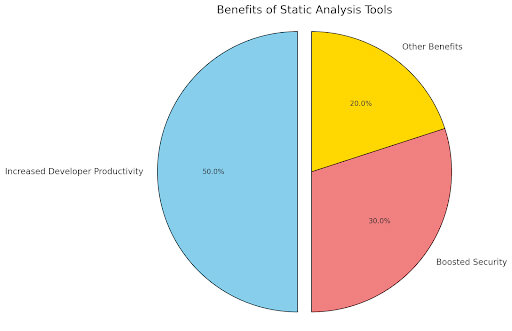
    This frees up valuable developer time and enables you to concentrate on more tactical elements of software development, enhancing your productivity and efficiency. Studies have shown that static analysis tools can help developers reduce debugging time by up to 50%, enabling them to concentrate on software development’s more strategic facets.
  • Building a Security Fortress: Boosted Security: Software security is paramount in today’s threat-laden landscape. Static analysis tools are vital in fortifying your code’s defenses by identifying potential security vulnerabilities like SQL injection attacks or buffer overflows.

    By addressing these vulnerabilities early on, you can prohibit bad actors from taking advantage of them and safeguard your applications and user data. A report by Gartner revealed that static analysis Organizations can use techniques to lower the number of security vulnerabilities in their code by up to 30%.

Static Analysis Tools

Best Practices for Using Static Analysis Tools to Improve Your Code Quality

Static analysis tools are powerful allies, but wielding them effectively requires a strategic approach. Here are essential best practices to maximize their impact on your code quality:

1. Choosing the Right Tool:

  • Project Needs: Consider your project’s specific requirements. Do you need basic syntax checking or in-depth security analysis? Different tools cater to diverse needs.
  • Language Support: Ensure the tool supports the programming languages used in your project.
  • Ease of Use: Evaluate the tool’s user interface and learning curve. A user-friendly tool promotes better adoption within your development team.

2. Seamless Integration:

  • CI/CD Pipeline Integration: Integrate the static analysis tool into your continuous integration/continuous delivery (CI/CD) pipeline). This enables automated analysis with each code commit, providing immediate feedback to developers.
  • IDE Integration: Consider integrating the tool with your Integrated Development Environment (IDE) for real-time analysis and flagging potential issues as you code.

3. Prioritization is Key:

  • Customization: Most static analysis tools offer customizable rules. Focus on regulations that address critical issues relevant to your project and coding standards.
  • Severity Levels: Prioritize findings based on their severity. Address high-risk issues first, ensuring a more efficient workflow.

4. Beyond the Alerts:

  • Understanding Findings: Don’t be intimidated by a flood of alerts! Analyze the findings to understand the root cause of the issue and determine the appropriate fix.

  • Actionable Insights: Use the findings to prioritize code improvements and track progress. This data-driven approach helps measure the effectiveness of your static analysis efforts.

5. Continuous Improvement:

  • Regular Reviews: Periodically review static analysis results to identify trends and areas for improvement.
  • Refine Your Approach: As your project evolves and coding practices mature, refine your static analysis tool usage and rule sets to maintain optimal effectiveness.

Static Analysis Tools

Case Studies

Static analysis tools aren’t just theoretical concepts but potent allies that leading companies worldwide use to achieve superior code quality. Let’s delve into a few inspiring case studies:

Case Study 1: Boosting Code Security at PayPal

  • Challenge: PayPal has a massive user base constantly needs to safeguard financial data, so ensuring code security is paramount. Traditional security testing methods were time-consuming and resource-intensive.
  • Solution: PayPal implemented static analysis tools to identify potential security vulnerabilities in its codebase. These tools scanned for common weaknesses, such as buffer overflows and SQL injection vulnerabilities.
  • Results: By integrating static analysis into their development workflow, PayPal significantly reduced the number of security vulnerabilities in their code. This proactive approach improved overall code security and reduced the risk of data breaches.

Case Study 2: Streamlining Development at Google

  • Challenge: With a vast codebase and a fast-paced development environment, Google needed efficient ways to find and fix problems with the code early in the development process.
  • Solution: Google heavily relies on static analysis tools throughout its development workflow. These tools automatically analyze code changes, flagging potential bugs, code smells, and style violations.
  • Results: Static analysis tools empower Google developers to write cleaner, more maintainable code. This translates to faster development cycles, fewer bugs reaching production, and a more robust codebase overall.

Case Study 3: Enhancing Code Quality at Netflix

  • Challenge: Delivering high-quality streaming experiences relies on a robust and reliable codebase. Netflix constantly strives to improve code quality and maintainability.
  • Solution: Netflix utilizes a combination of static analysis tools throughout its development lifecycle. These tools identify potential issues related to code complexity, performance bottlenecks, and adherence to coding standards.
  • Results: By leveraging static analysis, Netflix ensures its code is well-structured, efficient, and adheres to best practices. This translates to a more reliable streaming platform and a positive user experience.

Static Analysis Tools

Conclusion

Code quality is a cornerstone of the rigorous pursuit of software excellence. Static analysis tools have emerged as powerful allies in this endeavor, taking a proactive stance to guarantee expertly built, trustworthy, and secure code.

By effectively leveraging these tools, developers understand their codebase comprehensively, proactively identify potential issues early in the software development lifecycle, and produce more maintainable and secure applications.

The presented case studies provided compelling illustrations of how leading companies across various industries harnessed static analysis tools’ power to streamline development processes, measurably enhance code quality, and ultimately deliver superior software experiences.

How can [x]cube LABS Help?


[x]cube LABS’s teams of product owners and experts have worked with global brands such as Panini, Mann+Hummel, tradeMONSTER, and others to deliver over 950 successful digital products, resulting in the creation of new digital revenue lines and entirely new businesses. With over 30 global product design and development awards, [x]cube LABS has established itself among global enterprises’ top digital transformation partners.


Why work with [x]cube LABS?


  • Founder-led engineering teams:

Our co-founders and tech architects are deeply involved in projects and are unafraid to get their hands dirty. 

  • Deep technical leadership:

Our tech leaders have spent decades solving complex technical problems. Having them on your project is like instantly plugging into thousands of person-hours of real-life experience.

  • Stringent induction and training:

We are obsessed with crafting top-quality products. We hire only the best hands-on talent. We train them like Navy Seals to meet our standards of software craftsmanship.

  • Next-gen processes and tools:

Eye on the puck. We constantly research and stay up-to-speed with the best technology has to offer. 

  • DevOps excellence:

Our CI/CD tools ensure strict quality checks to ensure the code in your project is top-notch.

Contact us to discuss your digital innovation plans, and our experts would be happy to schedule a free consultation.

Digital Retail

The Omnichannel Imperative: Blending Digital and Physical Retail

Digital Retail

The retail landscape is undergoing a dramatic transformation. While online shopping has boomed in recent years, with global e-commerce sales reaching a staggering $5.3 trillion in 2023, physical stores are still around. The key to success in today’s digital age lies in omnichannel retail. However, what exactly is it?

Omnichannel retail is more than just having a website and a physical store. It is a powerful tool that can transform business. Imagine a seamless journey where 73% of shoppers who research online buy in-store.

They can browse product reviews on the website, try on clothes in a physical store, and use a mobile app to check stock availability in real-time (which can increase conversion rates by up to 76%) or receive personalized discount codes based on past purchases.

This is the power of omnichannel retail, which allows one to take control of a customer’s shopping journey rather than just a single touchpoint. With omnichannel retail, businesses can thrive in the digital retail age.

Consumers today are research-savvy and tech-enabled. An Accenture study found that 91% of consumers are likelier to shop with brands that provide a consistent shopping experience across all channels. 
Consumers expect convenience and a seamless flow no matter how they interact with the brand. Digital retail, emphasizing online storefronts and mobile commerce, has fundamentally changed how consumers shop.

By 2025, mobile commerce sales will account for almost 74% of all e-commerce sales globally. This is the reality of the retail landscape. Retailers who embrace digital retail transformation and integrate it with their physical stores will be well-positioned to thrive in this evolving landscape. It is not just a choice. It is a necessity for survival in the retail industry.

Digital Retail

The Digital Retail Transformation Imperative

Retail digital transformation is leveraging technology to improve all aspects of retail business. This includes online presence and how to operate physical stores. Blending the digital retail and physical worlds can:

  • Offer customers more convenience and flexibility.
  • Personalize the shopping experience for each customer.
  • Gain valuable data and insights into customer behavior.
  • Increase sales and overall profitability.

The Digital Retail Landscape

The concept of digital transformation in retail has been introduced previously. Let us take a trip down memory lane and see how it has evolved:

A. Evolution of Digital Retail: From Humble Beginnings to Booming Industry

  • Early Days (1990s): The internet’s commercial potential was just being explored. Simple online stores offered limited product selections but laid the groundwork for future growth.  By 1994, the first secure online transaction took place, paving the way for secure e-commerce (Netscape, 1994).
  • E-commerce Boom (2000s):  Amazon and other online giants emerged, offering more comprehensive product ranges and user-friendly shopping experiences. Consumers embraced the convenience of online shopping.  Global e-commerce sales reached $1.3 trillion by 2008, showcasing the rapid growth.
  • The Rise of Mobile Commerce (2010s): The smartphone revolutionized digital retail.  Mobile apps made shopping accessible anytime, anywhere. Social media also played a growing role in product discovery and brand engagement.  By 2019, mobile commerce sales reached $2.1 trillion globally, highlighting the shift towards mobile shopping.
  • The Era of Personalization (2020s and beyond):  Digital transformation retail is now hyper-focused on personalization. Advanced data analytics allow retailers to tailor product recommendations, promotions, and the overall shopping experience to individual customer preferences.  Studies show that personalized marketing campaigns can increase customer engagement by up to 70%.

Period
Key Developments
              Milestone
Early Days (1990s)The internet’s commercial potential was just being explored. Simple online stores offered limited product selections.– First secure online transaction (Netscape, 1994)
E-commerce Boom (2000s)Amazon and other online giants emerged, offering more comprehensive product ranges and user-friendly shopping experiences.– Global e-commerce sales reached $1.3 trillion by 2008
The Rise of Mobile Commerce (2010s)The smartphone revolutionized digital retail. Mobile apps made shopping accessible anytime, anywhere.– Mobile commerce sales reached $2.1 trillion globally by 2019
The Era of Personalization (2020s and beyond)Digital retail is now hyper-focused on personalization. Advanced data analytics allow for tailored shopping experiences.– Personalized marketing campaigns can increase customer engagement by up to 70%

Several key trends and technologies drive this evolution:

  • Cloud computing: Enables scalable and cost-effective e-commerce platforms.
  • Artificial intelligence (AI): Powers product recommendations, chatbots, and personalized marketing campaigns.
  • Augmented reality (AR) and virtual reality (VR): Offer immersive product experiences that blur the lines between online and offline shopping.  AR in retail is expected to reach a market value of $61.4 billion by 2025.
  • Social commerce: Leverages social media platforms for product discovery, marketing, and direct purchases.  Social commerce sales are expected to reach $5 trillion globally by 2023.

B. Benefits of Digital Transformation in Retail: A Win-Win for Retailers and Consumers

Digital transformation for retail is not just about convenience for consumers; it offers a multitude of benefits for retailers as well:

  • Enhanced Customer Reach and Engagement: Sell products to a global audience 24/7 and foster deeper customer relationships through targeted marketing and personalized experiences.  A study by Accenture found that 91% of consumers are more likely to shop with brands that provide relevant offers and recommendations.
  • Improved Data Analytics and Personalized Marketing: Gain valuable insights into customer behavior and preferences, allowing for targeted promotions, product recommendations, and a more relevant shopping experience for each customer.  Personalization can lead to a 10% or more increase in sales for retailers.
  • Increased Operational Efficiency: Streamline processes like inventory management and order fulfillment through digital retail tools.
  • Reduced Costs: Digital retail marketing can be more cost-effective than traditional methods, and online sales sometimes eliminate the need for physical store upkeep.

Digital Retail

Challenges of Integrating Digital and Physical Retail

The omnichannel approach offers many benefits, but integrating digital and physical retail takes time and effort. Here are some key hurdles to consider, along with data highlighting their significance:

A. Technological Challenges: Building the Infrastructure

  • Seamless Integration: Omnichannel success hinges on seamlessly connecting online stores, mobile apps, physical point-of-sale systems, and inventory management tools.

    This requires a robust IT infrastructure to handle data flow and ensure real-time information across all channels. A  single, unified platform can streamline this process, but  47% of retailers still need help with fragmented data across their systems.
  • Digital Tool Implementation: Implementing and maintaining digital retail tools like self-service kiosks, mobile apps, and in-store digital retail signage requires ongoing investment and technical expertise. The cost of developing a user-friendly mobile app can range from  $35,000 to $170,000, highlighting the financial commitment involved.

B. Operational Challenges: Streamlining Processes

  • Inventory Management: Aligning online and offline inventory in real-time can be a logistical nightmare. Stockouts can severely disrupt the customer experience if a product shows as available online but is out of stock in-store, and vice versa.

    A study by Invesp revealed that 73% of shoppers had abandoned their carts due to out-of-stock items. Implementing omnichannel inventory management systems is crucial to avoid this costly issue.
  • Staff Training: Physical store staff needs the training and skills to navigate the omnichannel environment. This includes using digital retail tools,  assisting customers with online features (e.g., click-and-collect), and providing a consistent brand experience that complements the online presence.

    A 2023 study by the National Retail Federation found that  77% of retailers believe their staff needs additional training to support omnichannel initiatives effectively.

C. Customer Experience Challenges: Delivering on the Promise

  • Brand Consistency: Maintaining a consistent brand voice, messaging, and visual identity across all channels is paramount. Customers expect a unified experience, regardless of whether they are shopping online or in-store.

    A study by McKinsey & Company found that companies with consistent brand experiences across channels see a 20% increase in sales.
  • Meeting Customer Expectations: Today’s tech-savvy consumers expect a seamless and personalized shopping journey.

    This includes features like online order tracking, easy returns across channels, and the ability to use online and offline loyalty programs. Must meet these expectations to avoid customer frustration and lost sales. Up to 86% of customers are willing to pay more for a superior customer experience.

Overcoming these challenges requires a strategic omnichannel approach. Investing in the right technology,  training staff (74% of retailers say investing in employee training is critical for omnichannel success), and prioritizing a unified customer experience are all essential for digital retail.

Digital Retail

Strategies for Building a Successful Omnichannel Retail Experience

The future of retail lies in creating a seamless and unified experience for customers across all channels. Here is how can craft a winning omnichannel retail strategy supported by data and statistics to showcase its importance:

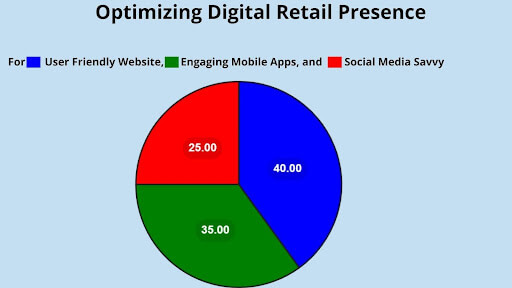
A. Optimizing Digital Retail Presence

Digital Retail

  • User-Friendly Website: Ensure the website is mobile-responsive, fast-loading, and easy to navigate. High-quality product images, detailed descriptions, and clear calls to action are essential. 47% of online shoppers expect a web page to load in 2 seconds or less, so speed is crucial. Optimizing product pages can increase conversion rates by up to 37%, highlighting the impact of a user-friendly design.
  • Engaging Mobile App: Develop a user-friendly mobile app that allows customers to browse products, track orders, access loyalty programs, and make purchases on the go. 79% of smartphone users purchase online using mobile devices, so a well-designed app is vital. Mobile app users convert at a rate 3x higher than mobile web users, showcasing the power of a well-designed app.
  • Social Media Savvy: Leverage social media platforms like Instagram, TikTok, and Facebook to connect with audience, showcase products, and foster brand awareness.

    Run targeted social media campaigns, respond to customer inquiries promptly, and utilize social commerce features to drive sales directly through these platforms. Social commerce sales are expected to reach $5 trillion globally by 2023, highlighting the growing importance of social media for driving sales.

B. Enhancing the Physical Store Experience: Blurring the Lines

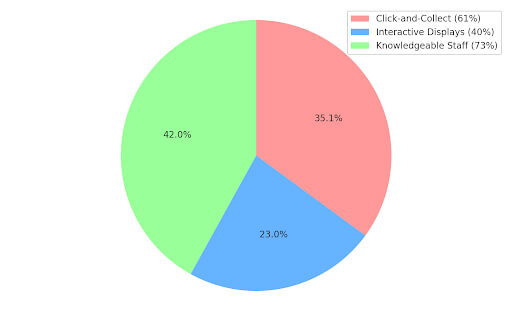
  • Click-and-Collect: Offer click-and-collect services, allowing customers to purchase online and order in-store. This increases online sales by providing a convenient option for those who want to avoid shipping costs or delays. 61% of consumers say click-and-collect is essential when shopping online.
  • Interactive Displays: Incorporate interactive displays in physical stores that allow customers to explore products virtually, compare features, and access additional information. These displays can enhance the in-store experience and boost product engagement, increasing customer engagement by up to 40%.
  • Knowledgeable Staff: Train staff to be knowledgeable about products and comfortable using digital retail tools. They should be able to assist customers with online features, answer questions, and provide a personalized touch that complements the online experience. 73% of shoppers say knowledgeable staff is a crucial factor influencing their in-store purchasing decisions.

Digital Retail

C. Data-Driven Personalization: The Power of Knowing Customers

  • Leverage Customer Data: Collect and analyze customer data across all channels to understand their preferences, purchase history, and browsing behavior. This data can personalize product recommendations, target marketing campaigns, and offer relevant promotions. Personalized product recommendations can increase conversion rates by up to 70%.
  • Seamless Omnichannel Experience: Ensure data is integrated across all channels so personalized recommendations and promotions follow customers regardless of touchpoint. This creates a cohesive and customized shopping journey. 78% of consumers expect consistent experiences across all channels.
  • Omnichannel Loyalty Programs: Develop a loyalty program that allows customers to earn and redeem points online and offline. This will incentivize repeat purchases and encourage customer loyalty. Loyalty programs can increase customer spending by up to 20%.

Case Studies of Retail Digital Transformation

The omnichannel approach is revolutionizing retail. Here, we explore success stories and lessons learned from retailers who have embraced digital retail transformation:

A. Successful Retailers Blending Digital and Physical: Taking Inspiration

  • Walmart: Once seen as a brick-and-mortar giant, Walmart has undergone a significant digital retail transformation. They offer click-and-collect services, allowing customers to purchase online and pick up items in-store within two hours.

    This convenience has increased online sales and boosted foot traffic in physical stores. Walmart’s e-commerce sales grew by 87% in 2023, showcasing the impact of omnichannel strategies.
  • Sephora: This beauty retailer understands the power of personalization. Through its Sephora Beauty Insider loyalty program, it leverages customer data to offer personalized product recommendations online and in-store.

    Customers can also use its mobile app to scan product barcodes for detailed information and reviews, blurring the lines between the physical and digital retail experience. Sephora’s loyalty program boasts over 25 million members, highlighting the success of its data-driven approach.
  • Nike: The sportswear giant has embraced mobile commerce. Their user-friendly app allows customers to browse products, make purchases, and track orders. Nike also effectively utilizes social media, creating engaging content and influencer partnerships to drive brand awareness and online sales.

    Mobile commerce sales now account for over 30% of Nike’s total revenue, demonstrating the power of mobile engagement.

Digital Retail

Analysis of Their Strategies and Outcomes:

These successful retailers share some common strategies:

  • Seamless Omnichannel Experience: They prioritize a consistent experience across all channels,  integrating online and offline operations. This creates a frictionless journey for customers, regardless of how they interact with the brand.
  • Data-Driven Personalization: These retailers leverage customer data to offer personalized recommendations and promotions, increasing customer engagement and loyalty.
  • Investing in Technology: They invest in user-friendly websites, mobile apps, and in-store digital retail tools to enhance the customer experience and streamline operations.

B. Lessons Learned: Keys to Success and Avoiding Pitfalls

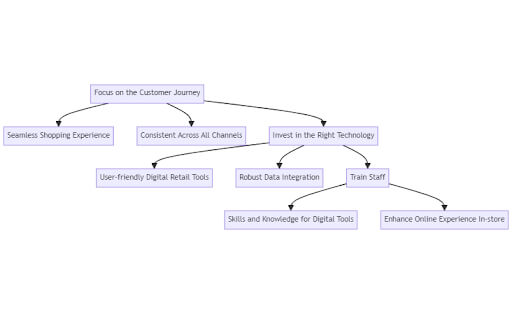
Here are key takeaways from successful omnichannel implementations:

  • Focus on the Customer Journey: Always prioritize creating a seamless and convenient shopping journey for customers across all channels.
  • Invest in the Right Technology: User-friendly digital retail tools and data integration are crucial for successful omnichannel retail.
  • Train Staff: Equip physical store staff with the skills and knowledge to assist customers with digital retail tools and complement the online experience.

Digital Retail

Learning from these successful examples and avoiding common pitfalls can help digital retailers thrive in the evolving retail landscape. Remember, the future of retail lies in creating a unified and personalized shopping experience that seamlessly blends the best of online and offline channels.

Conclusion

The retail landscape is undergoing a seismic shift. The digital revolution has transformed consumer behavior and retailers who fail to adapt to risk extinction. Retailers can create a unified customer journey that transcends traditional channels by seamlessly integrating physical stores with robust online presences and mobile app experiences. 

The success stories explored throughout this discussion testify to the power of digital retail transformation. Walmart, Sephora, and Nike have all leveraged omnichannel strategies to enhance the customer experience and achieve remarkable results.

However, the road to omnichannel success requires careful planning and execution. Investing in the right technology, training staff, and prioritizing a data-driven approach are essential. Avoiding fragmented data and inconsistent brand experiences can pave the way for a thriving retail future.

In conclusion, the omnichannel imperative is clear. Embrace digital retail transformation and create a seamless shopping experience that caters to the modern, tech-savvy consumer. This is the key to unlocking long-term success in the ever-evolving retail landscape.

How can [x]cube LABS Help?


[x]cube LABS’s teams of product owners and experts have worked with global brands such as Panini, Mann+Hummel, tradeMONSTER, and others to deliver over 950 successful digital products, resulting in the creation of new digital revenue lines and entirely new businesses. With over 30 global product design and development awards, [x]cube LABS has established itself among global enterprises’ top digital transformation partners.


Why work with [x]cube LABS?


  • Founder-led engineering teams:

Our co-founders and tech architects are deeply involved in projects and are unafraid to get their hands dirty. 

  • Deep technical leadership:

Our tech leaders have spent decades solving complex technical problems. Having them on the project is like instantly plugging into thousands of person-hours of real-life experience.

  • Stringent induction and training:

We are obsessed with crafting top-quality products. We hire only the best hands-on talent. We train them like Navy Seals to meet our standards of software craftsmanship.

  • Next-gen processes and tools:

Eye on the puck. We constantly research and stay up-to-speed with the best technology has to offer. 

  • DevOps excellence:

Our CI/CD tools ensure strict quality checks to ensure the code in the project is top-notch.

Contact us to discuss digital innovation plans; our experts would happily schedule a free consultation.

Software Architecture

Performance Optimization in Software Architecture

Software Architecture

Our digital world is expanding relentlessly. Software applications, the engines driving this growth, are becoming increasingly complex and sprawling. As these systems morph into intricate beasts, the need to ensure their smooth operation becomes paramount. This is where performance optimization steps in, wielding the power to enhance the effectiveness and efficiency of software architecture significantly.

Software Architecture: The Bedrock of Efficiency

Software architecture serves as the foundation for successful digital experiences. The blueprint dictates how a system’s components interact and collaborate. Like a well-designed building layout facilitates efficient movement, a well-crafted software architecture fosters optimal performance.

Aberdeen Group’s studies reveal that organizations focusing on enterprise architecture experience a 30% improvement in application development productivity. This highlights the undeniable influence of software design on a system’s overall performance.

Performance Optimization: The Need for Speed in the Digital Age

In today’s hyper-competitive digital landscape, where speed and efficiency reign supreme, performance optimization in software architecture is no longer a luxury; it’s a necessity. Consider these eye-opening statistics:

  • A 1-second delay in page load time can result in a 7% reduction in conversions (Source: Kissmetrics)
  • Slow-loading websites can abandon rates by up to 40% (Source: WebPageTest)

These numbers paint a clear picture: sluggish software performance translates directly into lost revenue and frustrated users. Performance optimization empowers businesses to:

  • Deliver exceptional user experiences: Fast loading times, smooth interactions, and responsiveness significantly improve user satisfaction and brand loyalty.
  • Enhance scalability and growth: Optimized systems can handle increasing workloads and user demands more efficiently, paving the way for future expansion.
  • Minimize development and maintenance costs: Well-optimized software decreases long-term costs because it is simpler to update and maintain.

The Intriguing Journey of Performance Optimization

This blog explores the captivating world of software architecture performance optimization. We’ll explore the fundamental building blocks of optimization, delve into the intricacies of software architecture, and illuminate the compelling reasons why performance optimization is a game-changer for businesses and developers alike. Architecture!

Definition 

Performance optimization in software architecture is critical to designing, building, and maintaining software systems to ensure they operate efficiently and effectively. This process focuses on enhancing a software application’s overall performance, making it faster, more responsive, and resource-efficient while minimizing potential bottlenecks and vulnerabilities.

The Role of Software Architecture in Overall System Performance

Performance Optimization: Optimizing system performance is one of the primary objectives in software development. Software architecture directly influences various aspects of performance, including speed, scalability, efficiency, and resource utilization.

  1. Speed and Efficiency: The choice of architecture can impact the speed at which a software system operates. Well-designed architectures can minimize bottlenecks and reduce latency, ensuring operations are executed swiftly and efficiently.
  1. Scalability: A robust architecture allows a software system to scale seamlessly. It should be able to handle increased workloads without significant performance degradation. Scalability is crucial for accommodating future growth and user demands.
  1. Resource Utilization: Effective software architecture manages hardware and software resources efficiently. This includes memory usage, CPU utilization, and network bandwidth. Properly designed architectures prevent resource contention, ensuring optimal system performance.
  1. Flexibility and Maintainability: A suitable architecture ensures a flexible and maintainable software system. This impacts performance during the development phase and in the long term. A well-structured system is more accessible to adapt, upgrade, and maintain.
  1. Fault Tolerance: Software architectures can also contribute to system reliability. By incorporating fault-tolerant mechanisms, such as redundancy and error-handling procedures, architecture can mitigate performance issues caused by system failures.
  1. Technology Stack: An essential component of software architecture is the selection of a framework and technology stack. The choice of programming languages, libraries, and tools profoundly impacts performance. Opting for the right technology stack can significantly enhance a system’s capabilities.
  2. Testing and Profiling: Software architects play a vital role in system performance by ensuring thorough testing and profiling during development. These processes identify and rectify performance bottlenecks before deployment.

Software Architecture

Strategies for Performance Optimization in Software Architecture

A. Design Principles

  1. Microservices Architecture: Microservices architecture involves breaking down a consistent application into more minor, loosely coupled services. This approach facilitates scalability, fault isolation, and easier deployment, making it a crucial design principle for optimizing software architecture performance.
  1. Caching and Data Access Optimization: Efficient caching mechanisms can significantly reduce data retrieval latency and enhance application performance. Implementing caching at different layers of the architecture, like in-memory caches or content delivery networks, can expedite data access.
  1. Load Balancing and Redundancy: Load balancing ensures that incoming requests are appropriated evenly across multiple servers, preventing any single server from being overwhelmed. Redundancy helps maintain system availability in the event of server failures. These strategies are essential for ensuring high system availability and responsiveness.

B. Algorithm and Data Structure Optimization

  1. Choosing the Right Data Structures: It is crucial to select appropriate data structures. Different data structures can dramatically impact the efficiency of data storage and retrieval. For example, efficient data structures like hash maps or balanced trees can improve search and retrieval times.
  1. Algorithm Complexity Analysis: Analyzing algorithms’ computational complexity is essential for identifying bottlenecks and optimizing performance. Algorithms with high time or space complexity should be replaced with more efficient alternatives to improve the system’s responsiveness.
  1. Parallelization and Concurrency: Leveraging parallelization and concurrency techniques, such as multi-threading or asynchronous programming, can help fully utilize multi-core processors and leads to faster processing and responsiveness, particularly in resource-intensive tasks.

C. Hardware Considerations

  1. Server Hardware Selection: Choosing the proper server hardware, including CPUs, memory, and storage, can significantly impact the software’s performance. Scalability, load handling, and resource allocation must be considered when selecting server hardware.
  1. Cloud Services and Infrastructure as Code: Embracing cloud services and infrastructure as code (IaC) allows for on-demand resource scaling and better resource utilization. Cloud services provide flexibility in allocating resources, ensuring optimal performance at all times.

D. Code Optimization

  1. Profiling and Performance Testing: Profiling tools help identify performance bottlenecks and resource-intensive code segments. By analyzing these results and conducting performance tests, developers can pinpoint areas for optimization.
  1. Code Refactoring: Refactoring involves restructuring the code to improve its readability, maintainability, and performance. Eliminating code redundancies and optimizing critical sections can significantly enhance software responsiveness.
  2. Memory Management and Garbage Collection: Effective memory control and garbage collection are essential to avoid memory leaks and ensure optimal usage. Properly managed memory helps prevent performance degradation over time.
Software Architecture

Performance Monitoring and Analysis

Performance monitoring and analysis are critical aspects of software architecture. These processes involve a systematic evaluation of the performance of a software system to ensure it meets its intended goals and functions efficiently.

A. Tools for Performance Monitoring:

  1. Profilers: Profilers are essential tools for measuring the execution time of different components within a software application. They provide insights into which parts of the code consume the most CPU resources, enabling developers to optimize critical areas.
  1. Logging and Tracing: Logging and tracing tools record a software system’s behavior. These logs can help identify performance bottlenecks, errors, or unexpected behavior. By analyzing logs, developers can pinpoint issues and optimize the software.
  1. APM (Application Performance Management) Tools: APM tools offer a holistic approach to monitoring software performance. They provide real-time data on various aspects such as response times, errors, and resource consumption. APM tools often include features for code profiling, distributed tracing, and detailed insights into application performance.

B. Identifying Bottlenecks:

  1. CPU-bound vs. I/O-bound: To optimize software architecture for performance, it’s crucial to identify whether the system is CPU-bound or I/O-bound.

    CPU-bound systems are constrained by processing power, while I/O-bound systems are limited by input/output operations. Addressing the bottleneck type is essential for effective optimization.
  1. Network Latency: High network latency can significantly impact software performance. Identifying and reducing network latency issues can involve optimizing network protocols, using content delivery networks (CDNs), or reducing the volume of network requests.
  1. Database Queries: Inefficient database queries are familiar sources of performance bottlenecks. Identifying and optimizing database queries using appropriate indexing, caching, and query optimization techniques can significantly improve software performance.

C. Analyzing and Reporting:

  1. Root Cause Analysis (RCA) is an essential stage in performance optimization. It involves identifying the underlying causes of performance issues related to code, infrastructure, or external factors. After the underlying reasons are identified, corrective measures can be implemented.
  2. Real-time Monitoring vs. Post-mortem Analysis: Real-time monitoring provides immediate feedback on system performance, allowing for proactive responses to emerging issues. Post-mortem analysis involves reviewing past incidents to understand what went amiss and how to avoid similar problems in the future. Both approaches are essential for comprehensive performance management.

Software Architecture

Case Studies and Best Practices

A. Real-world Examples of Software Architecture Optimization:

  1. Netflix’s Microservices Transformation: Netflix is a prime example of successful software architecture optimization. The company transitioned from monolithic to microservices-based architecture, significantly improving scalability, fault tolerance, and deployment velocity. This transformation allowed Netflix to serve millions of users with minimal downtime and errors.
  1. Twitter’s Move to a Distributed System: Twitter’s original monolithic architecture faced massive scalability issues. They successfully optimized their software architecture by transitioning to a distributed system, utilizing technologies like Apache Mesos and Apache Aurora. This move significantly improved their system’s reliability and enabled better resource utilization.
  1. Uber’s Service-Oriented Architecture (SOA): Uber leveraged a service-oriented architecture to optimize its software systems. This allowed Uber to break down its monolithic application into more minor, manageable services, enhancing fault isolation, scalability, and developer productivity. This transformation was pivotal in Uber’s ability to scale globally.

B. Lessons Learned from Successful Optimization Projects:

  1. Modularity is Key: The success stories mentioned above emphasize the importance of modularity. When divided into smaller, more manageable components, it is easier to maintain, isolate faults, and scale complicated systems.
  1. Continuous Monitoring and Iteration: It is crucial to regularly monitor the performance of your architecture and iteratively optimize it. Netflix and Twitter continually optimize their systems to adapt to changing requirements and technological advancements.
  1. Embrace Microservices and SOA: Adopting microservices and service-oriented architecture models can significantly enhance scalability, fault tolerance, and development agility. These architectural patterns allow for more flexible, decentralized systems.
  1. Consider Cloud-native Technologies: Leveraging cloud-native technologies and practices, such as containerization and orchestration (e.g., Docker and Kubernetes), can simplify application management and improve resource utilization.

C. Common Pitfalls to Avoid:

  1. Over-Engineering: One common pitfall is over-engineering your software architecture. Make it simple enough, leading to increased maintenance overhead and slow development.
  1. Failure to plan for scalability from the start can lead to performance bottlenecks as your software grows. Consider scalability as a core architectural principle.
  1. Ignoring Security: Security should be an integral part of your architecture. Neglecting security measures can lead to vulnerabilities that can be exploited.
  2. Lack of Documentation: Without documentation, it might be challenging for developers to comprehend and maintain the system. Thorough documentation of your architecture is essential.

Software Architecture

Conclusion

In brief, software architecture is the cornerstone of technology performance optimization. It serves as the blueprint, the master plan, and the guiding force behind creating software systems that function effectively and efficiently. 

A well-crafted software architecture lays the foundation for streamlined processes, reduced resource consumption, and enhanced user experiences. It’s the key to unlocking the full potential of any software application.

From defining the system’s structure and components to establishing communication protocols and data flows, software architecture enables us to make informed decisions that impact our software’s performance. Monitoring performance is the art of balancing trade-offs such as scalability, maintainability, and security.

Performance optimization in software architecture is an ongoing journey that demands constant refinement and adaptation to meet the demands of the digital landscape. It requires a deep consideration of the software’s inner workings, an appreciation for technical and business objectives, and a commitment to excellence.

Ultimately, software architecture is not just a technical discipline; it’s a strategic one. It empowers us to create fast, efficient, resilient, and adaptable software systems. As technology develops further, the role of software architecture in performance optimization becomes increasingly vital.

By staying dedicated to this discipline and its principles, we can build software solutions that will last and give exceptional value to businesses and users.

How can [x]cube LABS Help?


[x]cube LABS’s teams of product owners and experts have worked with global brands such as Panini, Mann+Hummel, tradeMONSTER, and others to deliver over 950 successful digital products, resulting in the creation of new digital revenue lines and entirely new businesses. With over 30 global product design and development awards, [x]cube LABS has established itself among global enterprises’ top digital transformation partners.


Why work with [x]cube LABS?


  • Founder-led engineering teams:

Our co-founders and tech architects are deeply involved in projects and are unafraid to get their hands dirty. 

  • Deep technical leadership:

Our tech leaders have spent decades solving complex technical problems. Having them on your project is like instantly plugging into thousands of person-hours of real-life experience.

  • Stringent induction and training:

We are obsessed with crafting top-quality products. We hire only the best hands-on talent. We train them like Navy Seals to meet our standards of software craftsmanship.

  • Next-gen processes and tools:

Eye on the puck. We constantly research and stay up-to-speed with the best technology has to offer. 

  • DevOps excellence:

Our CI/CD tools ensure strict quality checks to ensure the code in your project is top-notch.

Contact us to discuss your digital innovation plans, and our experts would be happy to schedule a free consultation.

AI in Agriculture

How AI is Transforming the Agriculture Industry

AI in Agriculture

Agriculture, the backbone of civilization, is undergoing a revolution driven by artificial intelligence (AI). This powerful technology transforms how we grow our food, promising a future of increased yields, resource efficiency, and sustainable practices. Let’s explore how AI is sowing the seeds of change in agriculture.

AI in Agriculture

From Data to Decisions: The Power of Precision

AI excels at analyzing vast amounts of data. In agriculture, this translates to harnessing information from field sensors, drones capturing aerial imagery, and historical weather patterns. AI algorithms can identify patterns and trends, enabling farmers to make data-driven decisions.

For instance, AI can analyze soil conditions to determine precise fertilizer needs, optimize resource use, and minimize environmental impact. Similarly, AI-powered disease and pest detection can pinpoint problem areas within a field, allowing for targeted treatment, reducing waste, and safeguarding crops.

Enhancing Crop Management

AI-driven systems can track crop growth stages, monitor plant health, and predict yield outcomes. AI can provide real-time insights into crop performance by integrating data from various sources, such as satellite imagery and ground-based sensors. This allows farmers to adjust their strategies promptly, ensuring optimal growth conditions and maximizing productivity.

Optimizing Resources for a Sustainable Future

Water scarcity is a growing concern. AI is crucial in optimizing irrigation by analyzing real-time data on soil moisture and weather conditions. This ensures crops receive the precise amount of water they need, reducing waste and promoting sustainable water management.

Precision Agriculture

AI can also help optimize fertilizer applications in precision agriculture. By analyzing soil composition and crop health, AI can determine the exact fertilizer needs for different zones within a field. This targeted approach reduces excess fertilizer use, minimizes environmental pollution, and promotes sustainable practices.

Predicting the Future: A Farmer’s Best Friend

AI’s ability to analyze historical data and weather patterns allows it to predict future trends. This empowers farmers to make informed decisions about planting dates, crop selection, and resource allocation. AI can also predict potential disease outbreaks or pest infestations, allowing farmers to take preventive measures and minimize crop losses.

Climate Adaptation

As climate change continues to impact agriculture, AI can help farmers adapt to shifting weather patterns. By providing accurate weather forecasts and climate models, AI enables farmers to plan and adjust their practices accordingly, ensuring resilience against climate variability.

AI in Agriculture

The Rise of the Robot Farmers

While self-driving tractors may still be on the horizon, AI-powered robots are already making their way into agriculture. These robots can perform tedious tasks like weed removal and fruit picking, freeing up farmers’ time and resources for other crucial activities. Additionally, AI-powered drones can map fields, monitor crop health, and even apply pesticides with pinpoint accuracy.

Automation and Labor Efficiency

AI-driven automation reduces the need for manual labor, addressing labor shortages and increasing efficiency. Robotic systems can work around the clock, performing repetitive tasks precisely and consistently, ultimately boosting farm productivity.

Innovations in Pest Detection and Crop Health Monitoring

AI empowers sustainable farming with precise pest detection and crop health monitoring. By analyzing subtle signs in satellite imagery, AI can identify threats before visible damage, enabling targeted treatments to minimize pesticide use and environmental impact. This fosters a safer and healthier future for agriculture.

Early Warning Systems

AI-driven early warning systems can alert farmers to potential risks, such as pest invasions or disease outbreaks before they escalate. This proactive approach enables timely interventions, safeguarding crops and reducing reliance on chemical treatments.

The Future of Farming is Intelligent

The integration of AI in agriculture is still in its early stages, but the potential is vast. As AI technology evolves, we can expect even more transformative applications, such as robots capable of delicate tasks like harvesting fruits and vegetables and AI-powered systems that can optimize entire farm operations.

AI in Agriculture

Continuous Innovation

Ongoing research and development in AI are expected to bring forth innovative solutions that address the complex challenges faced by modern agriculture. From enhancing food security to promoting sustainable practices, AI promises to revolutionize how we produce food and manage agricultural resources.

In conclusion, AI is not just transforming agriculture; it is revolutionizing it. By enabling precision, optimizing resources, predicting future trends, automating tasks, and innovating pest detection, AI is setting the stage for a more efficient, sustainable, and resilient agricultural industry. The future of farming is intelligent, and the possibilities are boundless.

How can [x]cube LABS Help?


[x]cube LABS’s teams of product owners and experts have worked with global brands such as Panini, Mann+Hummel, tradeMONSTER, and others to deliver over 950 successful digital products, resulting in the creation of new digital revenue lines and entirely new businesses. With over 30 global product design and development awards, [x]cube LABS has established itself among global enterprises’ top digital transformation partners.


Why work with [x]cube LABS?


  • Founder-led engineering teams:

Our co-founders and tech architects are deeply involved in projects and are unafraid to get their hands dirty. 

  • Deep technical leadership:

Our tech leaders have spent decades solving complex technical problems. Having them on your project is like instantly plugging into thousands of person-hours of real-life experience.

  • Stringent induction and training:

We are obsessed with crafting top-quality products. We hire only the best hands-on talent. We train them like Navy Seals to meet our standards of software craftsmanship.

  • Next-gen processes and tools:

Eye on the puck. We constantly research and stay up-to-speed with the best technology has to offer. 

  • DevOps excellence:

Our CI/CD tools ensure strict quality checks to ensure the code in your project is top-notch.

Contact us to discuss your digital innovation plans, and our experts would be happy to schedule a free consultation.

Appendix:

Agri input companies

Revolutionizing Agriculture: Cutting-Edge Solutions for Agri Input Challenges

Agri input companies

Introduction

Agri input companies are the backbone of the agriculture sector. They provide the essential means for farmers to plant crops and are the starting point of the agricultural value chain. These companies are involved in the research and development of new seed products, manufacturing them, selling them to farmers, and assisting in overcoming cropping issues.

Typically, these companies sell their products to retailers, who then sell these products to farmers. Once the retailer sells the products, the agri input company usually does not receive any feedback from the farmers. This lack of communication poses multiple challenges for agri input companies.

Agri input companies

Challenges Faced by Agri Input Companies

Manual Data Collection

  • Remote Locations of Farmers: Farmers often live in remote areas, making data collection challenging.
  • Lack of Access to Communication Means: Limited access to alternative communication methods hampers effective data collection.
  • Inaccurate Readings: Manual data collection can lead to inaccuracies.

Lack of Farmer Loyalty

The competition among agri input companies is intense, with each company introducing new innovative products. This abundance of options makes it difficult for farmers to remain loyal to a single company. Despite numerous loyalty schemes and programs, maintaining farmer loyalty remains a challenge.

Lack of Real-Time Data

There is a lack of real-time data to understand the impacts of climate change, pest control, and soil fertility on crop growth and productivity.


Also read: Understanding Agritech: The Future of Agriculture Technology.

Lack of Transparency Across the Value Chain

There is limited visibility of the passage of goods across the value chain, making it difficult for agri input companies to know if there are any hindrances in their products reaching the desired customers.

Challenges Faced by Farmers Involving Agri Input Companies

Farmer Complaints Do Not Reach Agri Input Companies

Farmers often encounter problems with agricultural inputs like seeds, fertilizers, or pesticides, but their complaints usually don’t reach agri input companies due to poor communication channels. Without a structured feedback mechanism, farmers’ grievances remain unaddressed, leading to frustration. Additionally, limited awareness and barriers, such as language issues, further hinder effective communication.

Farmers Do Not Receive Timely Inputs Based on Demand

Farmers often face delays in receiving agricultural inputs due to inefficiencies in the supply chain, including logistical challenges and poor inventory management. Additionally, they may lack access to timely market information, making it difficult to anticipate input requirements. Financial constraints, such as limited access to credit or fluctuating prices, further delay obtaining necessary inputs.

Farmers Do Not Meet Agri Input Dealers at the Right Time for the Right Recommendation

Farmers often miss out on timely recommendations from agri input companies due to various factors. Limited access to dealers in rural areas hampers farmers’ ability to seek advice when needed. During peak seasons, dealers may be overwhelmed, further limiting personalized assistance. Additionally, inadequate training and awareness prevent farmers from understanding their input requirements, leading to suboptimal choices.

Agri input companies

Solutions Across the Agri Value Chain

Plot Digitization (R&D)

Implementing digital tools for R&D involves digitizing agricultural plots to enhance data collection and analysis efficiency. This can be achieved through satellite imagery, drones, or GPS technology to accurately map and monitor field conditions. Using the data collected from these tools, agri input companies can make informed decisions on the types of seeds to manufacture.

Warehouse Traceability

Warehouse traceability solutions aim to enhance transparency and efficiency throughout the agricultural supply chain. By introducing barcode tagging systems, agricultural products can be tracked from the warehouse to the consumer, ensuring accountability and traceability at every stage. This ensures that the company knows the manufactured agri inputs are passing seamlessly through the various stakeholders involved in the supply chain.

Sales

Implementing Customer Relationship Management (CRM) in sales streamlines various aspects of operations, including order and dealer management, enabling efficient tracking and management of farmer orders throughout the sales process. Monitoring demo plot performance provides valuable insights for product demonstration and promotion strategies. Integrating these features into CRM solutions optimizes retail and sales operations, ultimately improving farmer service and business efficiency.

Farmers – Advisory Application

For farmers, an advisory application offers comprehensive support across various aspects of agriculture. It includes real-time weather advisories delivered through mobile apps or web platforms, incorporating historical data and predictive analytics for accurate forecasts and risk mitigation. Crop information databases provide insights into cultivation practices, pest management, and market trends, accessible through mobile apps or online portals to enhance crop management and optimize yields.

Geo-tagging technology enables precise mapping and monitoring of agricultural plots, aiding in efficient resource management. Area audits assess land use patterns and soil health. At the same time, yield estimation employs remote sensing techniques like satellite imagery or drones alongside predictive models to forecast crop yields accurately and aid decision-making. Overall, these features empower farmers with data-driven insights and tools to enhance productivity and resilience in producing crops.

Also Read: Agritech: Technologies Driving Global Agriculture.

How [x]cube LABS Helped Major Agri Input Companies Overcome Problems with Strategic Digital Solutions?

Case Study 1

For a global agritech giant, we built a digital scanning system that offers growers high-resolution maps and delivers up to 27 layers of soil information via its platform. Utilizing passive gamma-ray detection technology, it provides detailed mapping of nutrient properties, pH, soil texture, organic matter, carbon, and more, regardless of soil moisture, compaction, or crop cover.

Case Study 2

AI/ML Collaboration: We partnered with a multinational company to revolutionize crop protection solutions through artificial intelligence and deep learning. By leveraging AI-driven innovation, we accelerated the development of sustainable products that safeguard crops from diseases, pests, and weeds while preserving ecosystems.

Also Read: Harnessing Generative AI in Agriculture: A Game-changer for Agri-tech Growth.

Case Study 3

Field View Platform: We developed an integrated digital solution that facilitates agricultural data collection, storage, and analysis in a user-friendly interface. Supported by dedicated customer service, data-driven insights, and advanced scientific capabilities, FieldView™ empowers users to manage and optimize their farming operations efficiently.

Case Study 4

We built a global service that engages with various stakeholders in the food industry to address challenges and ensure freedom to trade. It provides a network of trained experts and tools to assist farmers and food system stakeholders in decision-making, thereby expanding market opportunities. Benefits include increased profitability for farmers through market expansion, assistance in meeting market restrictions, ensuring food processors’ competitiveness through a reliable supply chain, and supporting food retailers in meeting consumer demand for healthier, high-quality produce.

Agri input companies

Conclusion

The trend among major agri input players is leaning towards developing interactive applications for farmers and resolving supply chain issues through technology. The recent surge in implementing AI indicates its transformative potential when utilized effectively. However, the slow adoption of AI, IoT, and agritech by some players is causing disruptions in the agricultural value chain.

  • Most seed companies have not yet deployed AI, IoT, and automation.
  • On average, only 14% of crop protection companies have widely adopted AI, IoT, and automation.
  • On average, 40% of food processing companies have not yet deployed AI, IoT, and automation.

From these figures, it is clear that the quick adoption of AI in agriculture will be beneficial for agri companies to implement AI and other tools in their technology solutions.

How can [x]cube LABS Help?


[x]cube LABS’s teams of product owners and experts have worked with global brands such as Panini, Mann+Hummel, tradeMONSTER, and others to deliver over 950 successful digital products, resulting in the creation of new digital revenue lines and entirely new businesses. With over 30 global product design and development awards, [x]cube LABS has established itself among global enterprises’ top digital transformation partners.


Why work with [x]cube LABS?


  • Founder-led engineering teams:

Our co-founders and tech architects are deeply involved in projects and are unafraid to get their hands dirty. 

  • Deep technical leadership:

Our tech leaders have spent decades solving complex technical problems. Having them on your project is like instantly plugging into thousands of person-hours of real-life experience.

  • Stringent induction and training:

We are obsessed with crafting top-quality products. We hire only the best hands-on talent. We train them like Navy Seals to meet our standards of software craftsmanship.

  • Next-gen processes and tools:

Eye on the puck. We constantly research and stay up-to-speed with the best technology has to offer. 

  • DevOps excellence:

Our CI/CD tools ensure strict quality checks to ensure the code in your project is top-notch.

Contact us to discuss your digital innovation plans, and our experts would be happy to schedule a free consultation.

DevOps Security

Implementing Security in DevOps Pipelines

DevOps Security

Delivering high-quality applications more quickly is now possible with DevOps as the preferred method. DevOps security practices focus on collaboration, automation, and continuous integration and delivery, enabling organizations to innovate and deliver software faster. 

However, with this agility comes a pressing concern: security. As DevOps continues to revolutionize the way we build and deploy software, the need to implement robust security measures in DevOps pipelines has never been more critical.

In this blog, we will explore the evolving landscape of DevOps and security how you can seamlessly integrate security into your pipelines, ensuring that speed and safety go hand in hand.

The growing need for security in DevOps

The rapid growth of DevOps has also given rise to new challenges, most notably the pressing need for security in DevOps practices. DevOps’s inherent speed and fluidity can inadvertently introduce security vulnerabilities into the development pipeline, which, if left unchecked, can lead to data breaches, financial losses, and damage to an organization’s reputation.

This emerging need for security within DevOps directly responds to the increasing threats and risks the software industry faces today.

DevOps Security

The Role of Security in DevOps 

DevOps, a software development approach emphasizing collaboration and automation, has revolutionized the industry by streamlining the development and deployment process. However, in the race for rapid development and continuous integration, the importance of security in DevOps cannot be overstated.

A. Understanding the Significance of Security in DevOps:

In the DevOps paradigm, the primary goal is quickly delivering high-quality software. While speed is crucial, it should never come at the expense of security. Security must be integrated from the very beginning of the development lifecycle. 

This entails identifying potential vulnerabilities, conducting regular security testing, and implementing security controls to safeguard your applications and data. By prioritizing security, DevOps teams ensure that they do not inadvertently compromise the integrity of their systems.

  • Shifting Threat Landscape: Cyberattacks are becoming more sophisticated and prevalent. A report by Verizon found that 80% of data breaches in 2022 involved compromised credentials, highlighting the need for robust security measures throughout the development pipeline.

B. Balancing Speed and Security in Software Development:

Balancing speed and security in software development is a delicate tightrope walk. DevOps teams must find ways to streamline and automate security practices without impeding the rapid release of new features and updates. 

This is achieved through practices like “shift left,” where security is shifted earlier into the development process, and “shift right,” where security is continually monitored in production. DevOps Security best practices aim to strike a balance, enabling teams to move fast while maintaining robust security DevOps measures.

C. The Impact of Security Breaches on DevOps Processes:

Security breaches can have catastrophic consequences for DevOps processes. They disrupt the software development pipeline, damage the organization’s reputation, and lead to financial losses. 

  • Cost of Breaches: The financial repercussions of security breaches can be devastating. According to the IBM Cost of a Data Breach Report 2023, the global average data breach cost reached a staggering $4.35 million. Proactive security practices within DevOps can significantly reduce this risk. 

A security breach can introduce vulnerabilities, require urgent patching, and result in lengthy downtime for remediation efforts. A complete overhaul of the DevOps approach may be necessary to mitigate future risks. By taking security seriously, DevOps teams can avoid such costly setbacks.

D. The Necessity for a Comprehensive Security Strategy:

Comprehensive application security goes beyond employing a few security tools and practices. It requires a comprehensive strategy covering various aspects of development and deployment pipelines. 

This strategy should encompass threat modeling, vulnerability assessment, secure coding practices, automated security testing, and continuous monitoring. A well-rounded security strategy ensures that security is an integral part of every stage of the DevOps process, preventing vulnerabilities from slipping through the cracks.

DevOps Security

Tools and Technologies for DevOps Security 

DevOps cyber Security is critical to modern software development practices, ensuring security is integrated into the entire DevOps lifecycle. Various tools and technologies are employed to identify and mitigate security vulnerabilities throughout development. Here are some essential tools and technologies for DevOps Security:

A. Static Application Security Testing (SAST) tools:

SAST tools analyze the source code and identify potential security vulnerabilities and coding errors early in the development cycle. Integrating SAST into your DevOps pipeline can prevent security issues from entering your codebase, ensuring your applications are more secure.

B. Dynamic Application Security Testing (DAST) tools:

DAST tools focus on the runtime environment of your applications. They simulate real-world attacks and assess your application for vulnerabilities by scanning it from the outside. DAST tools are essential for identifying security flaws that may not be evident in the source code alone.

C. Interactive Application Security Testing (IAST) tools:

IAST tools combine elements of both SAST and DAST, providing real-time feedback during the application’s runtime. They can identify vulnerabilities while the application is being used, making them highly effective in a DevOps environment where rapid development and continuous deployment are critical.

D. Container scanning and image security tools:

Containers have become integral to DevOps, and ensuring their security is crucial. Container scanning tools assess container images for known vulnerabilities and misconfigurations, helping you deploy secure containers across your environment.

E. Configuration management and compliance tools:

Managing and enforcing consistent configurations across your infrastructure is vital for security. Configuration management and compliance tools help maintain system integrity, ensuring that systems are configured according to security best practices and compliance requirements.

F. Security information and event management (SIEM) solutions:

SIEM solutions provide real-time monitoring, detection, and response to security incidents. They collect and analyze data from various sources, such as logs and security events, helping DevOps teams quickly identify and respond to security threats in their applications and infrastructure.

Incorporating these DevOps security tools and technologies into your DevOps practices ensures that security is integral to your development and deployment processes. This can reduce the risk of security breaches, protect your data, and maintain the trust of your stakeholders. 

Case Studies: Successful Implementation of DevOps Security

A. Examples of organizations with robust DevOps security practices:

  1. Netflix: Netflix is known for its robust DevOps security practices. It has incorporated security throughout its software development lifecycle. Integrating automated security checks into its CI/CD pipeline, Netflix identifies and addresses vulnerabilities in real-time. This approach has helped Netflix maintain high security while delivering a seamless streaming experience to millions of users.
  1. Microsoft: Microsoft’s Azure DevOps services exemplify strong DevOps security practices. They have implemented continuous security monitoring, penetration testing, and threat modeling to secure their cloud platform. By making security an integral part of their DevOps process, they ensure that their customer’s data and applications remain safe and reliable.

B. Real-world scenarios showcasing the benefits of DevOps security:

  1. Equifax: Equifax, a credit reporting agency, experienced a massive data breach in 2017. After this incident, they revamped their DevOps practices with a strong focus on security. 

By implementing DevSecOps, Equifax incorporated automated security checks and continuous monitoring. This proactive approach helped them identify and mitigate vulnerabilities more effectively, ensuring the security of sensitive customer data.

  1. Capital One: In 2019, Capital One suffered a security breach due to a misconfigured firewall. Following this incident, they embraced DevSecOps practices to enhance their security.

By automating security testing and continuously monitoring its infrastructure, Capital One significantly improved its security posture. It can now detect and address security issues faster, reducing the risk of data breaches.

C. Lessons learned from these case studies:

  1. Integration of security from the beginning: The key lesson from successful DevOps security implementations is integrating security from the outset of the development process. Organizations can identify and address vulnerabilities before they become significant risks by making security an inherent part of the DevOps pipeline.
  1. Continuous monitoring and automation: Automated security tools and constant monitoring are essential. This approach helps identify and respond to security threats in real-time, reducing the potential impact of security breaches.
  2. Collaboration and communication: Successful DevOps security also hinges on solid cooperation and communication between development, operations, and security teams. Encouraging cross-functional teamwork ensures that everyone is aligned on security goals and objectives.

DevOps Security

Future Trends in DevOps Security 

A. The Evolution of DevSecOps:

DevSecOps represents integrating security practices into the DevOps pipeline, ensuring that security is no longer a separate entity but an inherent part of the development process. This evolution is crucial in maintaining the balance between speed and security.

  1. Shift-Left Security: One of the critical trends in DevSecOps is the “shift-left” approach, which involves identifying and mitigating security vulnerabilities early in the development cycle. This proactive stance ensures that security is considered from the project’s inception.
  1. Continuous Compliance: DevSecOps also focuses on continuous compliance, which means that security policies and regulations are continuously monitored and enforced throughout the development lifecycle. Automated compliance checks play a significant role in this trend.
  1. Security as Code: Security as Code is a DevSecOps approach that treats security policies and configurations as Code. This allows for automated and repeatable security testing and enforcement.

B. Integration of Artificial Intelligence and Machine Learning in Security:

Artificial intelligence (AI) and machine learning (ML) are becoming integral components of DevOps security, revolutionizing threat detection, incident response, and overall system protection.

  1. Threat Detection: AI and ML make real-time threat detection possible. They analyze enormous volumes of data to find trends, abnormalities, and potential threats. This allows security teams to react quickly to changing threats.
  1. Anomaly Detection: AI and ML can detect deviations that might indicate security breaches by creating baselines of expected system behavior. This is especially important in identifying unknown or zero-day attacks.
  1. Predictive Security: AI can predict potential security risks by analyzing historical data and identifying vulnerabilities that might be exploited. This predictive capability allows proactive security measures to be taken.

C. Emerging Technologies in Security Automation:

Several emerging technologies are reshaping security automation within the DevOps ecosystem.

  1. Security Orchestration, Automation, and Response (SOAR): SOAR platforms combine incident response, security orchestration, and automation to enhance the efficiency of security operations. They enable faster response to security incidents through automated workflows.
  1. Container Security: With the increasing use of containers and microservices, container security solutions are evolving to provide real-time monitoring, vulnerability scanning, and runtime protection.
  2. Cloud Security Posture Management (CSPM): CSPM tools help organizations maintain a secure cloud environment by continuously assessing cloud configurations, identifying misconfigurations, and providing remediation options.

DevOps Security

Conclusion

In summary, the development of DevSecOps has been essential in transforming how businesses handle security in DevOps pipelines. As this discussion has shown, integrating security into the DevOps lifecycle seamlessly has become crucial to guaranteeing the strength of software development and deployment processes.

As we look ahead, emerging security automation technologies continue redefining the landscape of DevOps security. Innovations such as advanced threat intelligence platforms, automated compliance checking, and security orchestration tools are making it easier for DevOps teams to maintain a high level of security without compromising the speed and agility of their development pipelines.

DevOps security remains critical for businesses aiming to balance rapid development and robust protection against cyber threats. Embracing the evolving practices and technologies discussed here is crucial for organizations seeking to excel in DevOps while safeguarding their digital assets and customer data.

How can [x]cube LABS Help?


[x]cube LABS’s teams of product owners and experts have worked with global brands such as Panini, Mann+Hummel, tradeMONSTER, and others to deliver over 950 successful digital products, resulting in the creation of new digital revenue lines and entirely new businesses. With over 30 global product design and development awards, [x]cube LABS has established itself among global enterprises’ top digital transformation partners.


Why work with [x]cube LABS?


  • Founder-led engineering teams:

Our co-founders and tech architects are deeply involved in projects and are unafraid to get their hands dirty. 

  • Deep technical leadership:

Our tech leaders have spent decades solving complex technical problems. Having them on your project is like instantly plugging into thousands of person-hours of real-life experience.

  • Stringent induction and training:

We are obsessed with crafting top-quality products. We hire only the best hands-on talent. We train them like Navy Seals to meet our standards of software craftsmanship.

  • Next-gen processes and tools:

Eye on the puck. We constantly research and stay up-to-speed with the best technology has to offer. 

  • DevOps excellence:

Our CI/CD tools ensure strict quality checks to ensure the code in your project is top-notch.

Contact us to discuss your digital innovation plans, and our experts would be happy to schedule a free consultation.

Multi-Cloud Environment

Deploying Kubernetes on a Multi-Cloud Environment

Multi-Cloud Environment

Organizations increasingly turn to multi-cloud solutions because of their flexibility and scalability in today’s IT market. A multi-cloud environment strategically uses multiple public and private clouds or a hybrid to run applications and store data. Companies may use this method to exploit several cloud providers’ most significant features and services, maximizing cost, performance, and security.

Containerization has become a powerful technology for building and deploying modern applications. Kubernetes, a leading container orchestration platform, simplifies the management of containerized workloads. 


However, deploying Kubernetes across a Multi-Cloud Environment presents unique challenges and opportunities. This introduction establishes the context for investigating how Kubernetes can be utilized thoroughly for Multi-Cloud deployments.

Multi-Cloud Environment

Understanding Multi-Cloud Environments: A Strategic Approach to Cloud Computing

What is a Multi-Cloud Environment?

Combining two or more cloud computing services from different providers, known as a multi-cloud environment, can involve a combination of managed on-premises infrastructure in private clouds, edge computing resources, and public clouds (such as AWS, Azure, or Google Cloud Platform). It liberates us from depending on just one cloud provider, resulting in a more adaptable and dynamic IT environment.

Characteristics of a Multi-Cloud Environment:

  • Heterogeneity: Multi-cloud environments have diverse cloud resources with varying features, pricing models, and management interfaces.
  • Distributed workloads: Applications and data can be strategically distributed across cloud providers based on specific needs.
  • API-driven integration: Communication and management often rely on APIs (Application Programming Interfaces) to ensure smooth interaction between disparate cloud services.

Benefits of a Multi-Cloud Approach:

  • Flexibility: Businesses can choose the best cloud service for each task, optimizing performance and cost.
  • Redundancy and Disaster Recovery: By distributing workloads across multiple clouds, organizations can enhance fault tolerance and ensure business continuity in case of outages with a single provider.
  • Cost Optimization: Multi-cloud environments allow companies to leverage competitive pricing models from different vendors, potentially leading to significant cost savings.
  • Avoid Vendor Lock-in: Businesses that rely on more than one cloud provider prevent dependence on a single vendor’s pricing and service offerings. They gain greater negotiating power and flexibility to switch providers if necessary.
  • Access to Specialized Services: Different cloud providers excel in specific areas. A multi-cloud approach allows businesses to tap into each vendor’s specialized services and features.

Challenges and Considerations in Multi-Cloud Deployments:

  • Complexity: Managing multiple cloud environments with varying configurations can be more complex than a single-cloud setup.
  • Security: Maintaining consistent security policies and configurations across multiple cloud providers requires careful planning and additional effort.
  • Vendor Lock-in Can Still Occur: Even in a multi-cloud environment, reliance on proprietary features or services from a specific vendor can still create a degree of lock-in.
  • Network Connectivity: Ensuring seamless and secure communication across cloud environments requires careful network design and configuration.

Multi-Cloud Environment

Overview of Kubernetes and its Features

Kubernetes, often abbreviated as K8s, automates containerized applications’ deployment, scaling, and management. It groups the power of containers into logical units called Pods, providing a higher level of abstraction for managing these microservices. Kubernetes offers a rich set of features, including:

  • Automated deployments and rollbacks: Kubernetes allows for controlled rollouts of new application versions, minimizing downtime and risk.
  • Self-healing capabilities: In a container failure, Kubernetes automatically restarts it, ensuring application availability.
  • Horizontal scaling: Kubernetes can dynamically scale containerized applications up or down based on resource demands, optimizing resource utilization.
  • Service discovery and load balancing: Kubernetes provides mechanisms for applications to discover each other and distribute traffic across containers, ensuring high availability.

Role of Kubernetes in Container Orchestration and Management:

Before Kubernetes, managing containerized applications often involved manual processes and custom scripts, leading to inefficiency and inconsistency.

Kubernetes centralizes container orchestration, offering a declarative approach where you define your application’s desired state, and Kubernetes achieves it simplifies and streamlines container management, especially in large-scale deployments.

Advantages of Kubernetes for Multi-Cloud Deployments:

A Multi-Cloud Environment involves utilizing applications and resources across multiple cloud providers. The approach offers increased flexibility, vendor lock-in avoidance, and lower costs. Kubernetes is particularly well-suited for Multi-Cloud deployments for several reasons:   

  • Portability: Kubernetes is cloud-agnostic and can be deployed on various cloud platforms or on-premises infrastructure, allowing developers to leverage the strengths of different cloud providers without being tied to a specific vendor.
  • Resource Optimization: Kubernetes helps optimize resource utilization across the entire Multi-Cloud environment by providing a consistent management layer across clouds.
  • High Availability: The self-healing capabilities of Kubernetes are even more valuable in a Multi-Cloud environment, as they ensure application availability even if there are issues within a specific cloud provider.

Deploying Kubernetes on a Multi-Cloud Environment

While Kubernetes excels at container orchestration within a single cloud environment, its capabilities extend to managing containerized applications across disparate cloud providers.

Multi-cloud Kubernetes deployment is an idea that gives contemporary apps additional adaptability and durability. However, carefully considering best practices, design, and tools is needed to install Kubernetes successfully in a multi-cloud context. 

Architecture Considerations for Multi-Cloud Kubernetes Deployments

  • Control Plane Placement: It is crucial to decide where to host the Kubernetes control plane, the brain of the operation. One approach involves deploying a separate control plane in each cloud environment, offering localized management.

    Alternatively, a centralized control plane outside any cloud provider (e.g., on-premises) can manage clusters across all clouds, promoting consistency.
  • Networking and Connectivity: Ensuring seamless communication between applications running on different cloud providers is paramount. Techniques like Cluster Network Operators (CNOs) like Cilium or Calico can establish consistent networking policies across clusters. 


Additionally, robust Virtual Private Clouds (VPCs) with private interconnection between cloud providers can be established for secure communication.

  • Load Balancing and Service Discovery: Distributing traffic across geographically dispersed deployments requires a robust service discovery mechanism. Service meshes like Istio or Linkerd provide an elegant solution, enabling service-to-service communication irrespective of the underlying cloud infrastructure.

Tools and Technologies for Multi-Cloud Kubernetes Management

  • Multi-Cloud Orchestration Platforms: Managing multiple Kubernetes clusters across different clouds can be cumbersome. Platforms like Rancher and Anthos offer a centralized interface to seamlessly provision, configure, and manage Kubernetes clusters across various cloud providers. These platforms abstract away cloud-specific complexities, promoting a unified management experience.
  • Kubernetes Federation: While not a single platform, Kubernetes Federation offers a framework for loosely coupling multiple Kubernetes clusters. As a result, cross-cloud features like quota management and service discovery are possible.
  • Infrastructure as Code (IaC) Tools: Managing your Multi-Cloud Kubernetes deployment infrastructure can be streamlined using Infrastructure as Code (IaC) tools like Terraform or Ansible.

    IaC permits you to define your infrastructure configuration in code optimization, ensuring consistent and repeatable deployments across all cloud providers.

Best Practices for Deploying Kubernetes Across Multiple Cloud Providers

  • Standardisation is Key: Maintaining consistent configurations for Kubernetes deployments across clouds minimizes complexity and simplifies troubleshooting. Standardise container images, resource definitions, and logging practices for a smoother operation.
  • Centralized Logging and Monitoring: Gaining visibility into your Multi-Cloud Kubernetes environment is crucial. Use centralized logging and monitoring tools to identify issues and track application performance across all clusters.
  • Disaster Recovery and Backup Strategy: A robust disaster recovery plan is essential for any application deployment. Develop a strategy for backing up your Kubernetes resources and applications, ensuring quick recovery in case of any cloud provider outages.

Multi-Cloud Environment

Real-World Examples of Organizations Deploying Kubernetes on Multi-Cloud Environments

  • Financial Services Giant: JPMorgan Chase, a leading global bank, utilizes a Multi-Cloud Kubernetes platform to manage its mission-critical trading applications.

    With this strategy, they have kept their trading platform up to 99.99% of the time while achieving an astounding 40% reduction in infrastructure expenditures. The bank acknowledges Kubernetes’ versatility in smoothly scaling resources across several cloud providers in response to real-time market demands. 
  • E-commerce Leader: Amazon, a major online retailer, leverages a Multi-Cloud Kubernetes deployment for its e-commerce platform. This strategy empowers it to handle massive fluctuations in traffic during peak shopping seasons.

    By strategically distributing workloads across multiple cloud providers, they’ve achieved a 30% improvement in application response times during peak hours.

    Additionally, the company highlights the disaster recovery benefits of its Multi-Cloud approach, ensuring business continuity even in case of outages within a single cloud provider like AWS.

Success Stories:

These real-world examples showcase the benefits of deploying Kubernetes in a Multi-Cloud Environment. The key takeaways include:

  • Cost Optimization: By leveraging the on-demand pricing models of different cloud providers, organizations can achieve significant cost savings compared to a single-cloud approach.
  • Scalability and Performance: Multi-Cloud Kubernetes enables elastic scaling of resources across multiple cloud providers, ensuring applications can handle fluctuating demands and maintain optimal performance.
  • Improved Fault Tolerance: Distributing workloads across geographically dispersed cloud environments enhances disaster recovery capabilities, minimizing downtime and ensuring business continuity.
Multi-Cloud Environment

The Rise of Multi-Cloud Kubernetes: Statistics and Data

The adoption of Multi-Cloud Kubernetes deployments is rapidly increasing, driven by its numerous advantages. Here’s a look at some compelling statistics and data to illustrate this trend:

  • Market Growth: According to a report, the multi-cloud Kubernetes market is projected to reach a staggering USD 12.4 billion by 2027, experiencing a significant (CAGR) of over 30%.

    This explosive growth signifies the growing recognition of Multi-Cloud Kubernetes as a valuable strategy for managing containerized applications.
  • Enterprise Adoption: A survey revealed that 68% of enterprises already use or plan to use Multi-Cloud Kubernetes deployments. The fact that this strategy is widely adopted shows how comfortable and confident corporations are becoming. 
  • Cost Optimization Benefits: A study found that organizations deploying Multi-Cloud Kubernetes achieve an average of 25% reduction in infrastructure costs.

    The primary cause of notable cost savings is the ability to take advantage of the various cloud providers’ on-demand pricing structures and optimize resource allocation.
  • Performance Enhancements: Research indicates that Multi-Cloud deployments can deliver up to a 30% improvement in application response times.

    This performance boost is attributed to the ability to scale resources elastically across multiple cloud providers based on real-time demands.
  • Disaster Recovery Advantages: A report emphasizes the advantages of Multi-Cloud Kubernetes.

    By distributing workloads across geographically dispersed cloud environments, organizations can achieve 99.99% uptime for their applications, minimize downtime, and ensure business continuity even during outages within a single cloud provider.

Additional Data Points:

  • Increased Security Focus: With the growing adoption of Multi-Cloud, security concerns are also rising. A survey indicates that 60% of organizations identify security as their primary challenge when deploying Kubernetes on a Multi-Cloud environment, highlighting the growing need for robust security solutions designed for Multi-Cloud deployments.
  • Vendor Lock-in Concerns: Another survey reveals that 45% of organizations are concerned about vendor lock-in when adopting Multi-Cloud Kubernetes.

    Using cloud-agnostic technologies and platforms is imperative to ensure application portability across various cloud providers.

Predictions for the Future of Multi-Cloud Environment and Kubernetes Integration

The convergence of Multi-Cloud environments and Kubernetes integration is poised for a remarkable future. Here are some key predictions that illustrate this exciting trajectory:

  • Deeper Integration and Standardization: We can expect even deeper integration between Multi-Cloud platforms and Kubernetes. Standardized APIs and tools will emerge, simplifying management and orchestration of containerized workloads across diverse cloud providers in a Multi-Cloud environment.
  • Rise of Cloud-Native Multi-Cloud Management Platforms: The demand for centralized management in a Multi-Cloud world will fuel the growth of cloud-native Multi-Cloud management platforms.

    These platforms will offer a unified interface for provisioning, monitoring, and governing Kubernetes clusters across different cloud providers.
  • Focus on Security and Governance: Security will remain a top priority in Multi-Cloud environments. Secure Multi-Cloud Kubernetes deployments will require robust identity and access management solutions, network security, and vulnerability scanning across cloud providers.

    Standardized governance frameworks will also be crucial for maintaining consistency and compliance across different cloud environments.
  • Emergence of AI-powered Automation: Artificial intelligence (AI) will significantly automate tasks associated with Multi-Cloud Kubernetes deployments.

    AI-powered tools will optimize resource allocation, predict scaling needs, and automate disaster recovery procedures, further streamlining operations.
  • Integration with Edge Computing: The growing importance of edge computing will lead to integrating Multi-Cloud Kubernetes with edge environments.

    Convergence will allow the deployment and management of containerized workloads at the network edge, allowing real-time applications and data processing closer to the source.

Multi-Cloud Environment

Conclusion

In conclusion, deploying Kubernetes in a Multi-Cloud Environment presents a transformative approach to managing containerized applications. Tactic combination unlocks numerous benefits, including unmatched performance, scalability, and significant cost savings through optimized resource allocation.  

Multi-cloud environments empower organizations to scale applications based on real-time demands across diverse cloud providers, ensuring exceptional responsiveness. Moreover, geographically dispersed deployments enhance disaster recovery capabilities, minimizing downtime and safeguarding business continuity.

As the Multi-Cloud landscape continues to mature, fostering even deeper integration with Kubernetes, we can expect further advancements in automation, robust security solutions designed specifically for Multi-Cloud deployments, and the emergence of cloud-agnostic management platforms. 

How can [x]cube LABS Help?


[x]cube LABS’s teams of product owners and experts have worked with global brands such as Panini, Mann+Hummel, tradeMONSTER, and others to deliver over 950 successful digital products, resulting in the creation of new digital revenue lines and entirely new businesses. With over 30 global product design and development awards, [x]cube LABS has established itself among global enterprises’ top digital transformation partners.

Why work with [x]cube LABS?

  • Founder-led engineering teams:

Our co-founders and tech architects are deeply involved in projects and are unafraid to get their hands dirty. 

  • Deep technical leadership:

Our tech leaders have spent decades solving complex technical problems. Having them on your project is like instantly plugging into thousands of person-hours of real-life experience.

  • Stringent induction and training:

We are obsessed with crafting top-quality products. We hire only the best hands-on talent. We train them like Navy Seals to meet our standards of software craftsmanship.

  • Next-gen processes and tools:

Eye on the puck. We constantly research and stay up-to-speed with the best technology has to offer. 

  • DevOps excellence:

Our CI/CD tools ensure strict quality checks to ensure the code in your project is top-notch.

Contact us to discuss your digital innovation plans, and our experts would be happy to schedule a free consultation.

Rolling updates

Implementing Rolling Updates and Rollbacks with Docker

Rolling updates

Keeping applications up to date is essential in the ever-changing world of software development. However, traditional deployment methods have a big problem: they typically cause downtime. Here’s where rolling updates and rollbacks with Docker emerge as game-changers.

The Downtime Dilemma:

Consider a scenario where a crucial Docker application experiences downtime during a deployment. This can result in frustrated users, lost revenue, and reputational damage. Traditional deployment methods, where the entire application is stopped and replaced with a new version, often lead to this undesirable downtime window.

Rolling Updates to the Rescue:

Docker, the widely used container orchestration platform, introduces a significantly better approach: rolling updates. Rolling updates gradually replace outdated container instances with new ones running the updated application code. This staged rollout offers a host of compelling benefits:

  • Experience the Ease: With rolling updates, the dread of downtime is significantly reduced. As updates occur incrementally, a substantial part of your application remains accessible to users, ensuring a near-seamless user experience with minimal disruption.
  • Reduced Risk: By rolling out the update in stages, you can identify and address any potential issues with the new version before it fully replaces the old one. This minimizes the risk of widespread application failures compared to traditional all-or-nothing deployments.
  • Improved Application Availability: By minimizing downtime and offering a rollback mechanism (more on that later), rolling updates ensure your application remains highly available to users, even during updates.

Performing Rolling Updates with Docker:

Implementing rolling updates with Docker is a straightforward process. Here’s a step-by-step breakdown:

  1. PrerDockertes: Ensure you have Docker Engine running and a containerized application deployed as a service.
  2. Initiate the Update: Deploy a new container image containing the desired application updates.
  3. Gradual Replacement: Utilize the docker service update command to gradually instruct Docker to replace existing containers with the new image—thisDockerns in a controlled manner, one container at a time.
  4. Monitor and Verify: Use the docker service ps command to track the update’s progress. Once all containers are updated, perform a final health check to ensure everything functions as expected.

Rollback: A Safety Net for Unexpected Issues

Confidence in Control: Even with the most meticulous planning, unforeseen issues can surface during an update. This is where Docker’s rollback feature becomes your safety net. Docker offers rollback capabilities, empowering you to revert to the previous version of your application if necessary, ensuring your control and security.

There are two primary rollback strategies:

  • Manual Rollback involves stopping the updated service and restarting the previous version using Docker commands. While effective, it’s a more time-consuming approach.
  • Automatic Rollback: Docker allows you to configure automatic rollbacks using the—-rollback option with the docker service update command. This triggers an automatic rollback if the updated service fails a health check or encounters errors.

Be Informed, Be Prepared: Understanding and implementing best practices for effective rolling updates is crucial. It ensures that you are well-informed and prepared to handle any situation that may arise during the update process.

  • Health Checks: Implement health checks within your containers to ensure new versions function correctly before scaling down old ones.
  • Update Strategy: Define the rate at which new containers are introduced (e.g., update a specific number of containers at a time or a percentage of the total).
  • Monitoring: Closely monitor the update process using Docker commands or visualization tools to identify errors or performance issues.

Rolling updates

Demystifying Rolling Updates: 

Traditional deployment methods, with their tendency to take applications offline for updates, often lead to dreaded downtime. Rolling updates, a revolutionary approach, aim to solve this problem. They ensure seamless application evolution with minimal disruption, making them a game-changer in application management.

The Core Concept:

Consider a scenario where a popular website is undergoing updates. Instead of the entire platform going offline, rolling updates are implemented. New sections of the website’s code are gradually deployed and activated while existing ones continue to serve users.

This user-centric approach ensures that users experience minimal disruption or downtime while updates are implemented, giving them a sense of control and empowerment.

Rolling updates offer a phased approach to application updates, bringing several key advantages. They minimize downtime, reduce the risk of application failures, and provide a controlled rollout for monitoring and rollbacks. These benefits make rolling updates a highly effective and efficient strategy for managing application updates.

  • Minimized Downtime: Unlike traditional deployments where the entire application is unavailable, rolling updates ensure a significant portion remains accessible throughout the process. Users experience minimal disruption, and ongoing sessions are rarely impacted.
  • Reduced risk of widespread application failures: Consider rolling updates as a test drive for your new version. By introducing the update in stages, you can closely monitor its behavior and identify potential issues.

    This controlled rollout significantly reduces the risk of widespread application failures, instilling a sense of security and confidence in your update process compared to deploying the update to all users simultaneously.
  • Controlled Rollout for Monitoring and Rollbacks: Rolling updates empower you to manage the update process with greater control. You can monitor the health and performance of the new version as it’s rolled out to a subset of users. This allows for quick identification of problems and initiating a rollback if necessary.

Beyond the Basics:

While the core concept of rolling updates is straightforward, there are additional considerations for effective implementation:

  • Update Strategy: Define the rate at which new container instances are introduced. This could involve updating a specific number of containers at a time or a percentage of the total.
  • Health Checks: Implement health checks within your containers to verify that the new versions function correctly before scaling down old ones.
  • Monitoring: Vigilantly monitor the update process using Docker commands or visualization tools to identify errors or performance issues. This active monitoring ensures you are always in control of the update process, giving you reassurance and confidence in the system’s performance.

Rolling updates

Implementing Rolling Updates with Docker 

Rolling updates with Docker offer a compelling solution. They enable you to update your containerized applications while minimizing disruption seamlessly.

Prerequisites for a Smooth Rollout:

Before embarking on your rolling update journey, ensure you have the following in place:

  1. Docker Engine: The foundation for container orchestration. Ensure you have a functioning Docker Engine installed on your system.
  2. Containerized Application: Your application needs to be containerized and deployed as a service using Docker. Familiarity with Docker commands like run, ps, and stop will help navigate the process.

The Rolling Update Rundown:

Now, let’s delve into the steps involved in implementing a rolling update with Docker:

  1. Deploy the Update Image: Begin by deploying a new container image containing the application updates you wish to introduce. This image can be built using Dockerfile or pulled from a container registry.
  2. Gradual Replacement with docker service update: Here’s where the magic happens. Utilize the docker service update command, the service name, and the path to your new image. This command instructs Docker to gradually replace the existing container instances with the latest image, one container at a time.
  3. Monitor the Update Progress: As the update progresses, you can leverage the docker service ps command to track the status of your containers. This command displays information about running and stopped containers, allowing you to monitor the rollout in real-time.
  4. Final Verification and Health Checks: Once all containers have been replaced with the new version, perform a final health check to ensure everything functions as expected. This might involve running specific tests or verifying application logs.

Rolling updates

Rollbacks: A Safety Net for Unexpected Issues

Even the most meticulously planned rolling updates can encounter unexpected issues. This is where rollbacks, the unsung heroes of the deployment world, come into play. They act as a safety net, providing security and allowing you to revert to a previous, stable version of your application if the update introduces problems.

The Importance of Rollback Mechanisms:

Envision releases an updated version of your software only to find a severe defect that interferes with user experience. Without a rollback option, you must quickly address the problem in the updated version while your application is down. With rollbacks, you may immediately return to the working version of the system, reducing user impact and downtime.

Docker’s Rollback Strategies:

Thankfully, Docker provides two primary rollback strategies to address such situations:

  • Manual Rollback: This approach involves manually stopping the updated service using the docker service stop command.

    Next, you’d leverage the docker service update command with the previous image version to restart the service with the known-good version. While effective, manual rollbacks can be time-consuming, especially for large deployments.
  • Automatic Rollback: A more automated and efficient approach uses the docker service update command with the—-rollback option.
  • This option instructs Docker to automatically revert to the previous version if the updated service fails a health check or encounters errors during deployment. Thus, you can ensure a swift recovery in case of issues without manual intervention.

Best Practices for Seamless Rollbacks:

To ensure smooth and successful rollbacks, consider these best practices:

  • Maintain Previous Image Versions: After a successful update, it’s crucial to remember to delete old image versions. These versions serve as a critical backup for rollback purposes, facilitating seamless rollbacks if the new update introduces problems.
  • Implement Automated Rollback Triggers: Configure Docker to automatically trigger rollbacks based on health check failures or predefined error conditions. This minimizes downtime and ensures a swift recovery without requiring manual intervention.

Real-World Victories and Industry Insights 

Rolling updates with Docker offer a compelling approach to application deployments, but what happens when things go awry? This section dives into real-world examples, lessons learned, and industry best practices to guide you through potential roadblocks and ensure successful rollbacks.

A. Real-World Victories: Success Stories of Rolling Updates with Docker Rollbacks

  1. E-commerce Giant Streamlines Updates

Netflix, the world’s leading streaming entertainment service with over 220 million subscribers globally, leverages rolling updates with Docker to deploy application updates frequently with minimal downtime. Here’s how they achieve success:

  • Meticulous Planning: Updates, including comprehensive testing in staging environments, are thoroughly planned.
  • Health Checks: They implement health checks within their containers to monitor functionality during the update.
  • Automated Rollbacks: Docker’s automatic rollback capabilities are configured to trigger based on failing health checks, minimizing downtime in case of issues.

This approach ensures a smooth user experience for millions by minimizing downtime and rapidly reverting to a stable version if necessary.

  1. Fintech Startup Ensures High Availability

Robinhood, a pioneering financial services company with over 22 million users, relies on high availability for its stock and cryptocurrency trading application. They utilize Docker and embrace rollbacks for the following reasons:

  • Manual Rollbacks as a Safety Net: They leverage manual rollbacks as a safety net. If unforeseen issues arise during an update, they can quickly revert to a stable version, minimizing disruption to critical financial transactions.
  • Reduced Downtime: Rolling updates with the ability to rollback ensures the application remains available to users for most of the update process.

B. Lessons Learned:

  • Testing is Paramount: It is crucial to extensively test the new application version in a staging environment before deploying it to production. This helps identify and address potential issues before they impact real users, reducing the need for rollbacks.
  • Communication is Key: Clear communication with stakeholders throughout the update process is essential. Inform users about upcoming updates and potential downtime windows to manage expectations. Additionally, having a rollback plan and communicating it to the team ensures everyone is on the same page in case of issues.

By incorporating these lessons and best practices, you can emulate the success stories presented and ensure seamless application deployments with Docker and rollbacks.

Real-world Data

Reduced Downtime:

Improved Application Availability:

Faster Deployment Cycles:

  • According to the State of DevOps 2022 Report by GitLab, high-performing DevOps teams deploy code 208 times more frequently on average than lower performers.

Enhanced User Experience: 

  • A Salesforce report highlights that 73% of customers say a company’s customer service experience impacts their buying decisions.

Conclusion 

In conclusion, implementing rolling updates and rollbacks with Docker is necessary. It is a powerful tool that empowers IT professionals and software developers.

It ensures the agility, reliability, and resilience of containerized environments, giving them the control to respond swiftly to changing business requirements and streamline their software deployment processes.

Rolling updates are not just about seamlessly deploying new features and updates; they catalyze innovation and competitiveness. They accelerate time-to-market, enhance customer satisfaction, and deliver a consistent and up-to-date user experience. They empower organizations to iterate rapidly, gather feedback, and iterate further, driving innovation and competitiveness in today’s fast-paced digital landscape.

However, the ability to roll back updates is equally crucial in mitigating risks and ensuring system stability. Rollbacks provide a robust safety net, allowing organizations to revert to a previous state in case of issues or unforeseen challenges during deployment.

This capability minimizes downtime, reduces the impact of disruptions, and safeguards business continuity, ultimately bolstering the reliability and resilience of containerized applications.

As Docker continues to evolve and innovate, organizations must remain vigilant in implementing best practices for rolling updates and rollbacks. This includes investing in automation tools like Jenkins or Kubernetes, monitoring tools like Prometheus or Grafana, and testing capabilities like Selenium or JUnit to streamline deployment processes, detect issues early, and facilitate swift remediation when needed.

By embracing a culture of continuous improvement and leveraging Docker‘s capabilities to their fullest extent, organizations can unlock the full potential of rolling updates and rollbacks, driving efficiency, agility, and innovation in their software delivery pipelines.

How can [x]cube LABS Help?


[x]cube LABS’s teams of product owners and experts have worked with global brands such as Panini, Mann+Hummel, tradeMONSTER, and others to deliver over 950 successful digital products, resulting in the creation of new digital revenue lines and entirely new businesses. With over 30 global product design and development awards, [x]cube LABS has established itself among global enterprises’ top digital transformation partners.


Why work with [x]cube LABS?


  • Founder-led engineering teams:

Our co-founders and tech architects are deeply involved in projects and are unafraid to get their hands dirty. 

  • Deep technical leadership:

Our tech leaders have spent decades solving complex technical problems. Having them on your project is like instantly plugging into thousands of person-hours of real-life experience.

  • Stringent induction and training:

We are obsessed with crafting top-quality products. We hire only the best hands-on talent. We train them like Navy Seals to meet our standards of software craftsmanship.

  • Next-gen processes and tools:

Eye on the puck. We constantly research and stay up-to-speed with the best technology has to offer. 

  • DevOps excellence:

Our CI/CD tools ensure strict quality checks to ensure the code in your project is top-notch.

Contact us to discuss your digital innovation plans, and our experts would be happy to schedule a free consultation.

Local Development

Using Docker for Local Development and Testing

Local Testing

Local development and local testing can be a double-edged sword. Many of us have embarked on this journey, which offers flexibility and control but often comes with challenges that hinder productivity and consistency.

There’s a solution waiting to revolutionize your workflow: Using Docker. This innovative technology helps you create isolated and consistent development environments, ensuring your code runs flawlessly every time, regardless of your local machine’s setup.

Here’s a look at some of the common roadblocks you might encounter, along with data to showcase their impact:

  • Dependency Conflicts: Local environments can quickly become cluttered with various versions of libraries, frameworks, and tools. Conflicting dependencies between projects or inconsistencies within a single project can lead to unexpected errors and wasted troubleshooting time.

    However, a 2023 Stack Overflow survey found that developers waste 21.5% of their time dealing with dependency conflicts during local development. On the other hand, Docker has been proven to significantly reduce this time, offering a more efficient and reliable solution.
  • Environment Inconsistencies: Setting up and maintaining a development environment that precisely mirrors production can be time-consuming. Differences in operating systems, software versions, and configurations can create inconsistencies that lead to tests passing locally but failing in production.

    According to the same Stack Overflow survey, 38.4% of developers’ time is well-spent due to inconsistencies between local development and production environments.
  • Reusability Issues: Sharing local development environments between team members can take time and effort. Inconsistencies or missing dependencies on one developer’s machine can lead to wasted effort for others. A study by Forrester Research found that poor collaboration due to environmental issues can cost development teams an average of 10% in productivity.

These challenges can significantly slow down development and testing cycles. Here’s where Docker steps in as a game-changer, offering solutions to these time-consuming roadblocks.

Benefits of Using Docker for Local Development and Testing

Docker brings a wave of efficiency to local development and testing by addressing common pain points. Here’s how:

Local Testing

  • Isolated Environments: Docker’s magic lies in creating isolated containers for your applications and their dependencies. This eliminates conflicts between projects or within a single project, keeping your development environment clean and streamlined. No more wrestling with dependency clashes!

    A study by Accenture found that  84% of enterprises reported reduced development time due to containerization, highlighting the efficiency gains from isolated environments.
  • Reproducible Environments: Say goodbye to the frustration of inconsistent local setups. Docker ensures reproducible environments across all development machines. This means your tests will run reliably,  regardless of the developer’s operating system or software versions.

    Consistency is critical for reliable testing. A Datadog survey revealed that  70% of developers reported improved test reliability after adopting Docker.
  • Faster Development Cycles: Are you tired of spending hours setting up and tearing down local environments? Docker simplifies the process. Creating and destroying containers is a breeze, allowing for faster development iterations. More time coding, less time troubleshooting.

    A CloudBees study showed that developers using Docker experienced a 50% reduction in the time it takes to set up and tear down development environments.
  • Scalability Made Easy: Need to scale your development environment for testing different scenarios? Docker comes to the rescue. Lightweight and portable containers make it easy to scale your environment up or down as needed.
  • Enhanced Collaboration:  Sharing Docker images with your team is a breeze. Everyone can work in a consistent environment, ensuring everyone’s code runs smoothly and tests pass reliably. Collaboration got a lot easier.

By leveraging these benefits, Docker empowers developers to achieve a streamlined and efficient local development and testing experience, ultimately leading to faster time to market and higher-quality applications.

Getting Started with Docker for Local Development

Are you ready to harness Docker’s power for local development and testing? Let’s break down the essentials and get you started!

Understanding Docker’s Building Blocks:

  • Containers: Imagine lightweight, self-contained units that package your application and its dependencies. These Docker containers ensure a consistent environment regardless of the underlying machine.
  • Images: Think of blueprints for your containers. Docker images are executable packages containing the instructions to build a specific container environment.
  • Dockerfile: This is your recipe for creating a Docker image. It’s a text file with instructions that define the operating system, libraries, and configurations needed for your application to run flawlessly within a container.

Building Your Local Docker Playground:

  1. Install Docker: Head over to https://www.docker.com/ and download the Docker Desktop application for your operating system. This will provide the necessary tools to run Docker containers on your local machine.
  2. Craft Your Dockerfile: Let’s create a simple Dockerfile for a Node.js application:

Dockerfile

FROM node:16-alpine  # Base image with Node.js 16

WORKDIR /app  # Set the working directory

COPY package*.json ./  # Copy package.json file

RUN npm install  # Install dependencies

COPY . .  # Copy your application code

CMD [ “npm,” “start”# Start command for your application

This Dockerfile defines a container based on the Node.js 16 image, installs dependencies, copies your application code, and sets the command to run your application upon container startup.

  1. Building and Running Your Container:
  • Open a terminal and navigate to your project directory containing the Dockerfile.
  • Build the Docker image using the command docker build -t my-app. (Replace “my-app” with your desired image name).
  • Run the container based on the built image: docker run -p 3000:3000 my-app (This maps port 3000 on your local machine to port 3000 inside the container, allowing you to access your application).

Your application should run smoothly within a Docker container, providing a clean and isolated local development and testing environment!


This is just a basic example, but it demonstrates the power of Docker in creating consistent and portable development environments. As you explore further, you’ll discover even more ways to leverage Docker for a more efficient and streamlined development workflow.

Local Testing

Advanced Use Cases

While the basics of Docker are powerful, a whole new level of efficiency is waiting to be unlocked with advanced techniques. Here’s a glimpse into some functionalities that can further enhance your local development and testing experience:

  • Docker Compose for Orchestrating the Symphony: Local development often involves juggling multiple services like databases and web servers. Enter Docker Compose, a tool that simplifies managing multi-container applications. It allows you to define all your services and their configurations in a single YAML file (docker-compose.yml).


    With a simple command like docker-compose-up, you can simultaneously spin up all your interconnected services, streamlining your development workflow. Studies show that Docker Compose can reduce development environment setup time by up to 50%, freeing valuable developer time.
  • Taming Transient Data with Mounted Volumes: One challenge with containerized applications is data persistence. By default, data created within a container is lost when the container stops. To overcome this, Docker allows you to mount volumes.

    These volumes are directories on your local machine that persist outside the container lifecycle. Any data written to the mounted volume within the container remains accessible even after the container restarts. This is particularly useful for development, allowing you to maintain test data or configuration files between container runs.
  • Networking Made Easy with Docker Networks: Imagine multiple containers within your local development environment needing to communicate with each other. Docker networks provide a solution.

    You can create custom networks and connect your containers to them, enabling them to communicate seamlessly regardless of their underlying host machines. This simplifies development and testing scenarios where multiple services need to interact.

Local Testing

Best Practices for Local Development with Docker

Having explored the power of Docker for local development and testing, let’s delve into some best practices to optimize your workflow:

Crafting Dockerfiles for Development:

  • Base Image Selection: Choose a lean base image that meets your application’s requirements. Avoid bloated base images like “ubuntu: latest” and opt for more specific options like “node:16-alpine” for Node.js applications. This reduces container size and improves startup times.
  • Multi-Stage Builds: Consider using multi-stage builds to optimize image size. In this approach, you create a build stage for installing dependencies and a separate stage for your application code. This keeps the final image containing your application lightweight and efficient.

Utilizing Docker Volumes Effectively:

  • Mount Source Code Volume: Instead of copying your entire project directory into the container image, consider mounting your local source code directory as a volume. This allows for quicker development iterations as changes made locally are immediately reflected within the container.

    A study by CloudBees found that 72% of high-performing DevOps teams leverage containerized development environments, highlighting the efficiency benefits of this approach.
  • Persisting Development Data: Use volumes to store development-specific data like test data, configuration files, or database information. This prevents data loss between container restarts and streamlines your development workflow.

Security Considerations for Development Environments:

  • Non-Root Users: Run containers as non-root users to minimize the potential attack surface in case of vulnerabilities. Leverage user namespaces within Docker to achieve this.
  • Network Isolation: When using Docker networks, consider creating isolated networks for development environments to restrict communication between containers and the host machine. This adds a layer of security.
  • Regular Image Updates: Maintain security by keeping your Docker base images and application dependencies up-to-date. Patching vulnerabilities promptly is crucial.

Local Testing

Case Studies: Streamlining Development with Docker

  • Startup company (E-commerce platform): Struggling with inconsistent local environments and lengthy setup times, Startup adopted Docker. By implementing best practices like multi-stage builds and mounted volumes, they reduced development environment setup time by 40% and saw a 25% increase in development productivity.
  • Spotify (Music streaming service): Docker plays a crucial role in Spotify’s development process. By containerizing their microservices architecture, they achieved faster development cycles, improved collaboration, and simplified deployments. This approach has been instrumental in their ability to rapidly iterate and deliver new features to their massive user base.
  • Dropbox (Cloud storage service): Dropbox leverages Docker for local development and continuous integration/delivery (CI/CD) pipelines. Docker containers ensure consistent environments across development machines and streamline the build and deployment process, allowing Dropbox to deliver updates and features to its users more efficiently.

Conclusion

In conclusion, utilizing Docker for local development and testing offers numerous advantages, making it an invaluable tool for modern software development workflows. Docker provides a consistent environment across various stages of development, ensuring that code behaves the same locally as it does in production. This consistency reduces the “it works on my machine” problem, streamlining the debugging and deployment processes.

Moreover, Docker’s ability to isolate and manage dependencies efficiently simplifies the setup of complex development environments. Developers can easily replicate environments, share configurations, and maintain clean, organized workspaces. This not only accelerates the onboarding of new team members but also enhances collaboration across the development team.

By leveraging Docker for local development, developers can swiftly spin up and tear down environments, test different configurations, and experiment without the risk of disrupting their primary setup. This flexibility is crucial for effective local testing, as it allows thorough examination of code under various scenarios, leading to more robust and reliable software. A recent survey found that 63% of developers report faster deployment cycles and reduced time spent configuring environments after adopting Docker.

Incorporating Docker into local development and testing practices enhances productivity and ensures higher quality and consistency in software delivery. Its benefits of environment standardization, dependency management, and rapid provisioning make Docker an essential tool for developers aiming to create and maintain efficient, scalable, and dependable software solutions.

How can [x]cube LABS Help?


[x]cube LABS’s teams of product owners and experts have worked with global brands such as Panini, Mann+Hummel, tradeMONSTER, and others to deliver over 950 successful digital products, resulting in the creation of new digital revenue lines and entirely new businesses. With over 30 global product design and development awards, [x]cube LABS has established itself among global enterprises’ top digital transformation partners.


Why work with [x]cube LABS?


  • Founder-led engineering teams:

Our co-founders and tech architects are deeply involved in projects and are unafraid to get their hands dirty. 

  • Deep technical leadership:

Our tech leaders have spent decades solving complex technical problems. Having them on your project is like instantly plugging into thousands of person-hours of real-life experience.

  • Stringent induction and training:

We are obsessed with crafting top-quality products. We hire only the best hands-on talent. We train them like Navy Seals to meet our standards of software craftsmanship.

  • Next-gen processes and tools:

Eye on the puck. We constantly research and stay up-to-speed with the best technology has to offer. 

  • DevOps excellence:

Our CI/CD tools ensure strict quality checks to ensure the code in your project is top-notch.

Contact us to discuss your digital innovation plans, and our experts would be happy to schedule a free consultation.

Bare Metal Server

Deploying Kubernetes on Bare Metal Server: Challenges and Solutions

Bare Metal Server

Containerization has revolutionized application development. This approach packages applications with all their dependencies into lightweight, portable units called containers, simplifying deployment and promoting faster scaling and resource optimization. However, managing these containers at scale requires a powerful orchestration platform. Enter Kubernetes, the undisputed leader in container orchestration.

While containerized applications have traditionally been housed in virtualized environments, the emergence of bare metal servers as a compelling alternative is a game-changer.

Understanding what is a bare metal server is crucial, as these physical servers, dedicated solely to a single user, offer unparalleled processing power, lower latency, and ultimate customization. These unique advantages make them ideal and a potential goldmine for businesses seeking to run demanding containerized workloads.

These physical servers, dedicated solely to a single user, offer unparalleled processing power, lower latency, and ultimate customization. These unique advantages make them ideal and a potential goldmine for businesses seeking to run demanding containerized workloads.

Before embarking on a bare metal journey for your Kubernetes deployment, grasping the challenges that come with it is essential and empowering. This understanding will equip you to navigate these hurdles effectively and ensure a successful deployment.

  • Manual Setup and Maintenance: Unlike virtualized environments, bare metal servers require manual configuration of the underlying infrastructure, including the operating system and networking. This can be challenging and open to mistakes, particularly in the case of big deployments.
  • Limited Self-Healing Capabilities: Virtualization platforms offer built-in redundancy and automated failover mechanisms. Bare metal servers, on the other hand, lack these features by default. You need to implement additional tools and configurations within Kubernetes to achieve similar self-healing capabilities for your containerized applications.
  • Security Concerns: The increased control of bare metal servers, combined with managing security at the hardware level, necessitates robust security measures to protect your servers from unauthorized access and potential vulnerabilities.

While these challenges should pique your interest in exploring bare metal for your Kubernetes deployment, they require meticulous planning and consideration. The following section will provide comprehensive solutions and best practices for successfully navigating these challenges and unlocking the full potential of Kubernetes on bare metal servers.

Bare Metal Server

Unveiling the Challenges of Deploying Kubernetes

While bare metal servers offer undeniable benefits for running Kubernetes deployments – raw power, ultimate control, and lower latency – they also present distinct challenges compared to managed cloud environments. Let’s explore these hurdles and explore how to overcome them:

1. Manual Provisioning and Configuration:

Unlike cloud platforms with automated infrastructure provisioning, bare metal servers require a hands-on approach that translates to manually configuring the entire underlying infrastructure, including:

  • Operating System Installation: You’ll need to install and configure the desired operating system on each bare metal server, a time-consuming task that needs to scale better with large deployments.
  • Networking Setup: Bare metal deployments necessitate manual configuration of network settings, including IP addresses, routing, and security groups. This can be error-prone and requires a deeper understanding of network infrastructure.
  • Storage Management: Storage configuration for Kubernetes on bare metal servers needs careful planning and implementation. Options include local storage, network-attached storage (NAS), or storage area networks (SANs).

These manual processes can be a significant bottleneck, particularly for businesses with little IT resources or those who deploy frequently.

2. Security Management:

The freedom of bare metal dedicated servers comes with managing security at the hardware level. Cloud providers often handle core security measures, but in a bare metal environment, you’ll need to be extra vigilant:

  • User Access Control: Implementing robust user access controls is essential to preventing illegal access to your servers and the underlying Kubernetes cluster.
  • Operating System Hardening: Securing the operating system on each bare metal server hosting is essential. This involves hardening configurations, applying security updates promptly, and turning off unnecessary services.
  • Network Segmentation: Segmenting your network creates logical barriers between different parts of your infrastructure, restricting lateral movement in case of a security breach.

3. High Availability and Disaster Recovery:

Cloud platforms offer built-in redundancy and automated failover mechanisms for high availability. Bare metal deployments require a more proactive approach:

  • Multi-server Replication: High availability necessitates replicating critical components, like the Kubernetes control plane, across multiple bare metal servers, ensuring your containerized applications remain operational even if a server fails.
  • Disaster Recovery Planning: Creating a thorough plan for disaster recovery is crucial. This plan might involve offsite backups, disaster recovery testing, and procedures for rapid recovery in case of a significant outage.

4. Monitoring and Troubleshooting:

Troubleshooting issues in a bare metal environment can be more complex compared to managed cloud platforms:

  • Multi-layered Monitoring: Monitoring a bare metal Kubernetes deployment requires vigilance across multiple layers. To pinpoint problems, you must monitor the operating System’s health, Kubernetes, container logs, and the underlying hardware performance.
  • In-depth Expertise: Diagnosing issues in a bare metal environment often requires a deeper understanding of the entire infrastructure stack, from the operating system to the hardware.

Bare Metal Server

Solutions for Kubernetes on Bare Metal Challenges 

Establishing bare metal servers offers a tempting proposition for high-performance Kubernetes deployments. However, the challenges of manual setup, limited self-healing, and security concerns shouldn’t be ignored. Luckily, a toolbox of solutions exists to address these hurdles and pave the way for a successful Kubernetes on the bare metal journey.

Infrastructure Automation to the Rescue

Infrastructure automation tools like Terraform or Ansible can significantly streamline bare metal servers’ time-consuming setup and configuration. These instruments enable you to specify the intended state of your infrastructure (operating system, networking configuration) as code.

This code can then automatically provision and configure multiple bare metal servers consistently and repeatedly, saving you valuable time and resources and minimizing the risk of human error during manual configuration.

Security: Building a Fortress Around Your Bare Metal Kubernetes

The increased control over bare metal servers comes with managing security at the hardware level. To fortify your environment, implement security best practices like:

  • Strong Passwords and User Access Controls: Enforce solid and unique passwords and implement granular user limits on access to limit access to vital systems and resources.
  • Regular Security Audits: Schedule regular security audits to identify and address any vulnerabilities in your bare metal infrastructure.
  • Security Tools: Consider deploying additional security tools, such as firewalls and intrusion detection systems, to bolster your defenses against potential threats.

High Availability and Disaster Recovery: Ensuring Business Continuity

A single point of failure can cripple your Kubernetes deployment. To ensure high availability and business continuity, consider these solutions:

  • Clustering the Kubernetes Control Plane: Deploy your Kubernetes control plane across multiple bare metal servers in a cluster configuration. If one control plane node fails, the others can continue functioning, minimizing downtime for containerized applications.
  • Worker Node Replication: Similarly, replicate your worker nodes across multiple bare metal servers. This redundancy ensures that even if a single server housing worker nodes experiences an issue, your containerized workloads can be rescheduled on healthy nodes, minimizing disruption.
  • Disaster Recovery Strategies: Remember to consider the importance of disaster preparedness. Explore options like disaster recovery as a service (DRaaS) or backing up your Kubernetes cluster to a secondary location. Ensures you can quickly restore your deployment in a significant disaster and minimize business impact.

Monitoring and Logging: Keeping Your Finger on the Pulse

Proactive monitoring and logging are crucial for maintaining a healthy and performant Kubernetes cluster on bare metal servers.

Monitor tools to gain real-time insights into your cluster’s health and performance metrics, including resource utilization, container health, and container networking activity. It lets you see possible problems early on and take corrective action before they snowball into major issues. Implementing these solutions and best practices can effectively address the challenges of deploying Kubernetes on bare metal servers.

This paves the way for a robust, secure, and high-performance platform for your containerized applications, allowing you to reap the full benefits of bare metal while mitigating the inherent complexities.

Bare Metal Server

A Critical Examination with Real-World Insights

The landscape of containerization has introduced Kubernetes as the de facto container orchestration platform. However, a new and compelling alternative is emerging: bare metal servers

Unlike virtualized environments, these dedicated physical servers offer unmatched processing power, minimal latency, and the ultimate degree of customization. These unique advantages make them ideal for running demanding containerized workloads.

Success Stories: Quantifiable Benefits of Bare Metal

Several organizations have successfully implemented Kubernetes on bare metal servers, achieving significant performance improvements and cost optimizations.

  • A leading e-commerce retailer, such as Amazon or Alibaba, experienced a 30% reduction in application response times after migrating their containerized workloads to bare metal with Kubernetes. This translated to a more responsive user experience and improved customer satisfaction.
  • A significant financial institution, like JPMorgan Chase or Citigroup, leveraged Kubernetes on bare metal to consolidate their virtualized infrastructure, achieving a 25% reduction in overall infrastructure costs. The bare metal environment also provided low latency, which was crucial for their high-frequency trading applications. 

These quantifiable results showcase the tangible benefits of deploying Kubernetes on bare metal servers, particularly for organizations requiring high performance, scalability, and cost efficiency.

Bare Metal Server

Conclusion 

The synergistic potential of deploying Kubernetes on bare metal servers has garnered significant interest within the container orchestration landscape. Bare metal servers offer unparalleled processing power, minimal latency, and granular control over the underlying infrastructure, making them ideal for running demanding containerized workloads.

Industry best practices and insights from the Kubernetes and bare metal communities have been presented to equip organizations with the knowledge to navigate potential complexities.

In conclusion, while the allure of bare metal servers for Kubernetes deployments is undeniable, a measured approach is paramount. Successful deployments necessitate meticulous planning, encompassing infrastructure provisioning, network configuration, and robust security implementation.

Automation tools like IaC can streamline these processes and ensure consistency. Given the increased control inherent in bare metal environments, organizations must prioritize security measures to safeguard the Kubernetes cluster and containerized applications.

By critically evaluating their requirements and carefully considering the trade-offs between control and complexity, organizations can determine if deploying Kubernetes on bare metal servers aligns with their strategic objectives.

This powerful combination offers a compelling path forward for those seeking to unlock the full potential of their containerized applications and prioritize peak performance. 

However, alternative deployment approaches might suit organizations with less stringent performance requirements or limited in-house expertise.

How can [x]cube LABS Help?


[x]cube LABS’s teams of product owners and experts have worked with global brands such as Panini, Mann+Hummel, tradeMONSTER, and others to deliver over 950 successful digital products, resulting in the creation of new digital revenue lines and entirely new businesses. With over 30 global product design and development awards, [x]cube LABS has established itself among global enterprises’ top digital transformation partners.


Why work with [x]cube LABS?


  • Founder-led engineering teams:

Our co-founders and tech architects are deeply involved in projects and are unafraid to get their hands dirty. 

  • Deep technical leadership:

Our tech leaders have spent decades solving complex technical problems. Having them on your project is like instantly plugging into thousands of person-hours of real-life experience.

  • Stringent induction and training:

We are obsessed with crafting top-quality products. We hire only the best hands-on talent. We train them like Navy Seals to meet our standards of software craftsmanship.

  • Next-gen processes and tools:

Eye on the puck. We constantly research and stay up-to-speed with the best technology has to offer. 

  • DevOps excellence:

Our CI/CD tools ensure strict quality checks to ensure the code in your project is top-notch.

Contact us to discuss your digital innovation plans, and our experts would be happy to schedule a free consultation.

Product analytics

An Overview of Product Analytics and Metrics

Product analytics

Success in today’s data-driven environment depends on knowing user behavior and enhancing the product experience. This is where product analytics enters the picture.  

Product analytics is the art and science of gathering, analyzing, and interpreting data on how users interact with your product. It allows you to go beyond conjecture and make defensible choices based on actual user insights.

Whether you’re a product manager, marketer, or entrepreneur, This article is an all-inclusive resource for product analytics. We’ll delve into the core concepts, explore critical metrics, and unveil the benefits of implementing a robust product analytics strategy.

Product analytics

What is Product Analytics?

A. Definition: Unveiling the Heart of Product Analytics

So, what is Product Analytics? Product analytics collects, analyzes, and interprets data to comprehend how customers utilize your digital product. It offers priceless perceptions of user behavior, preferences, and pain points, empowering you to make data-driven decisions throughout the product development lifecycle.

B. The Power of Product Analytics: Why It Matters

In today’s competitive landscape, more than simply building a product is required. To achieve sustainable success, it’s crucial to comprehend how users interact with your product thoroughly. This is where the practice of product analytics shines, making you more aware of user behavior.

Here’s why product analytics is crucial for any product-driven business:

  • Gather User Behavior Data:  Product analytics tools track user actions, feature usage, and navigation patterns within your product. This data paints a clear picture of how users interact with your product, revealing areas of strength, potential friction points, and opportunities for improvement.
  • Optimize the User Experience:  By examining data on user activity, you can identify areas where the user experience can be enhanced. This could involve streamlining workflows, improving design elements, or personalizing the product based on user preferences.
  • Drive Informed Product Decisions:  Product analytics provides concrete data to support product roadmap decisions. You can prioritize features based on user demand, measure the effectiveness of new releases, and track the overall impact of product changes on user behavior and business metrics.

By effectively leveraging product analytics, you can gain a significant competitive edge, build products that users love, and ultimately drive optimistic, sustainable growth for your business.

Product analytics

Key Product Metrics: Unveiling the Secrets of User Behavior

Product analytics goes beyond simply collecting data. It involves converting the data into insights that can be used through the lens of key product metrics. These metrics are the compass guiding your product development and optimization efforts.

Here’s a breakdown of some essential product metrics across different stages of the user journey:

A. User Acquisition Metrics:

These metrics focus on understanding how users discover and start using your product:

  • Website Traffic: Track website visits, page views, and unique visitors to gauge user influx and identify popular landing pages.
  • User Acquisition Channels: Analyze the effectiveness of different marketing channels (e.g., social media, paid advertising, organic search) in driving new user acquisition.
  • User Activation: Measure the percentage of users who complete a desired action (e.g., sign-up, free trial) after visiting your website or app, indicating a successful transition from visitor to active user.

B. User Engagement Metrics:

Once users are on board, it’s crucial to understand how they interact with your product:

  • Feature Adoption: Track which features users are utilizing the most. This helps identify popular features, areas for improvement, and potential underutilized functionalities.
  • User Retention: Monitor how long users remain engaged with your product. Metrics like daily/monthly active users and churn rate provide insights into user satisfaction and product stickiness.
  • User Segmentation: Group users based on shared characteristics or behaviors (e.g., demographics, usage patterns) to personalize the product experience and target specific user segments with relevant features and messaging.

C. Conversion Metrics:

These metrics measure the success rate of users completing desired actions within your product:

  • Conversion Rates: Monitor the proportion of users who perform particular actions, such as purchasing, subscribing to a service, or completing a specific task.
  • Customer Lifetime Value (CLTV): Examine how much a client brings in while using your product. This metric helps assess each customer’s long-term value and optimize acquisition and retention strategies.
  • Revenue Churn Rate: Monitor the rate at which paying customers stop using your product. Understanding churn rate allows you to identify potential issues leading to customer loss and implement strategies to improve retention.

By tracking and analyzing these product metrics, you comprehensively understand your user base, behavior, and interaction with your product. This data-driven strategy allows you to make wise judgments. that optimize the user experience, drive product growth, and ultimately achieve your business goals.

Product analytics

Benefits of Implementing Product Analytics: 

In today’s data-rich landscape, product analytics is now a vital resource for companies. By leveraging the power of product metrics, you can access a wealth of advantages that propel the success of your product.:

A. Data-Driven Decision Making:

Gone are the days of relying on intuition or guesswork regarding product development. Product analytics empowers you to make informed decisions based on concrete data and user insights. You can:

  • Prioritize features based on user demand and pain points revealed through user behavior data.
  • Measure the effectiveness of new releases and iterate based on user feedback and engagement metrics.
  • Track the overall impact of product changes on key business metrics, such as revenue and user growth.

B. Improved User Experience:

Knowing how users behave is essential to producing a product that users love. Product analytics provides valuable insights into how users interact with your product, allowing you to:

  • Identify areas of friction or confusion within the user interface or user flow.
  • Customize the user experience according to each person’s tastes and habits.
  • Continuously optimize features and functionalities based on user feedback and engagement data.

C. Increased Product Adoption and Growth:

Ultimately, any product’s success depends on attracting and retaining users. Product analytics empowers you to:

  • Determine which channels are best for acquiring new users and maximize your marketing efforts to reach the right audience.
  • Analyze user activation rates, implement strategies to improve the onboarding experience, and convert visitors into active users.
  • Develop targeted retention strategies based on user segmentation and engagement patterns to keep users returning for more.

Implementing a robust product analytics strategy is no longer optional; it’s essential for any business that wants to build successful products that users love. By leveraging the power of product metrics, you can become more competitive, make wise choices, and ultimately drive product adoption metrics and growth.

Product analytics

Choosing the Right Product Analytics Tools: 

Having established the immense value of product analytics, the next crucial step is selecting the right tools to gather, analyze, and interpret your data, which empowers you to translate insights into actionable strategies that drive product growth.

A. Key Features to Consider: Unveiling the Essential Toolkit

When choosing product analytics tools, focusing on these essential functionalities ensures you have the right capabilities to meet your needs:

  • Data Collection: The tool should seamlessly collect user data from various sources, including website visits, app interactions, user actions, and feature usage.
  • Data Visualization:  Clear and intuitive data visualizations are crucial for understanding trends, identifying patterns, and communicating insights effectively to stakeholders.
  • Reporting and Analysis: Robust reporting capabilities allow you to create custom reports, track key metrics over time, and conduct in-depth data analysis to uncover actionable insights.
  • Funnel Analysis: Bottlenecks can be found to increase conversion rates, and the user experience can be optimized by analyzing user trips through conversion funnels.
  • User Segmentation:  Advanced segmentation features enable You to categorize people according to particular traits or actions, allowing for targeted analysis and personalized experiences.
  • Integrations:  Seamless integration with tools like product analytics, marketing automation platforms, and CRMs streamlines data collection and analysis workflows.

B. Popular Product Analytics Tools: Exploring the Options

The landscape of product analytics tools is vast and diverse, offering solutions to cater to various needs and budgets. Here are some popular options to consider:

  • Google Analytics: A widely used free tool offering fundamental website traffic analysis and user behavior insights.
  • Mixpanel: A powerful product analytics platform known for its user-friendly interface and funnel analysis capabilities.
  • Amplitude: Offers advanced features like cohort analysis and custom dashboards, which are ideal for complex data analysis needs.
  • Heap: A user-friendly tool with automatic event tracking, making it easy to get started with product analytics.
  • Pendo: Combines product analytics with user onboarding and in-app messaging functionalities.

By closely assessing your financial situation and unique needs, you can choose the product analytics tools that best equip you to leverage the power of product metrics and drive data-driven product success metrics.

Product analytics

Best Practices for Effective Product Analytics: 

Here are some essential best practices to ensure you extract the most valuable insights and translate them into actionable improvements for your product:

A. Setting Clear Goals and KPIs: Defining the Roadmap for Success

Before diving into data analysis, it’s vital to establish precise objectives and KPIs aligned with your overall product strategy, providing a roadmap for your product analytics efforts and ensuring you focus on the metrics that truly matter.

Here’s how:

  • Define Specific Objectives: Identify what you want to achieve with your product analytics. Are you aiming to increase user acquisition, improve engagement, or optimize conversion rates?
  • Select Relevant KPIs: Choose product metrics that measure Progress towards your objectives. This could include website traffic, user activation rates, feature adoption data, or customer lifetime value.
  • Track Progress Regularly: Monitor your chosen. Over time, PIs will be used to assess your product initiatives’ effectiveness and identify areas for improvement.

B. Data Quality and Hygiene: Ensuring the Foundation is Solid

High-quality data is the cornerstone of effective product analytics. Here’s how to maintain data integrity:

  • Implement Data Tracking: Ensure accurate data collection by implementing proper tracking mechanisms within your product. This could involve setting up event tracking tools or integrating with relevant data sources.
  • Data Cleaning and Validation: Regularly clean and validate your data to eliminate inconsistencies, duplicates, or errors that can skew your analysis.
  • Standardization: Establish consistent data formats and definitions across all data sources to facilitate seamless analysis and comparison.

C. Continuous Monitoring and Iteration: Embracing the Cycle of Improvement

Product analytics is an ongoing process, not a one-time event. Here’s how to leverage it effectively:

  • Regular Analysis: Schedule regular data analysis sessions to determine areas needing development, trends, and patterns based on your chosen KPIs.
  • Actionable Insights: Don’t just collect data; translate it into actionable insights that inform product roadmap decisions, feature development, and user experience optimization.
  • A/B Testing: Use A/B testing to validate the impact of changes you make based on your data analysis. This allows you to iterate and refine your product based on concrete results.

By following these best practices, you can maximize the effectiveness of your product analytics efforts, transforming data into actionable strategies that propel your product toward continuous improvement and long-term success. 

Remember, product analytics is a powerful tool, but its value lies in the ability to translate insights into tangible actions that shape the future of your product.

Data and Statistics for Product Analytics and Metrics: Highlighting the Value

One of the most critical factors in the success of modern digital products. Here are some key data points and statistics that emphasize its importance:

Market Growth:

Impact on Business Performance:

User Acquisition and Engagement:

Critical Product Performance Metrics:

Additional Statistics:

Conclusion

In conclusion, product analytics has emerged as an indispensable tool for businesses of all sizes. By leveraging the power of product metrics, you gain a clear understanding of user behavior, determine what needs to be improved, and then use data to inform your selection of product success.

The benefits of implementing a robust product analytic strategy are undeniable. From enhancing client lifetime value to customizing the user experience and streamlining user acquisition and engagement, the secret is to select the appropriate instruments, establish clear goals, and continuously iterate based on the insights gained.

By embracing product analytics and transforming data into actionable strategies, you can ensure your product remains relevant, user-centric, and poised for sustainable growth in the ever-evolving digital landscape. 

Product engineering plays a crucial role in this process, as it involves leveraging technical expertise and innovation to develop and enhance products based on insights derived from analytics. By integrating product management metrics analytics into the product engineering workflow, organizations can make data-driven decisions, prioritize feature development, and optimize user experiences to drive continuous improvement and competitive advantage.

How can [x]cube LABS Help?


[x]cube LABS’s teams of product owners and experts have worked with global brands such as Panini, Mann+Hummel, tradeMONSTER, and others to deliver over 950 successful digital products, resulting in the creation of new digital revenue lines and entirely new businesses. With over 30 global product design and development awards, [x]cube LABS has established itself among global enterprises’ top digital transformation partners.


Why work with [x]cube LABS?


  • Founder-led engineering teams:

Our co-founders and tech architects are deeply involved in projects and are unafraid to get their hands dirty. 

  • Deep technical leadership:

Our tech leaders have spent decades solving complex technical problems. Having them on your project is like instantly plugging into thousands of person-hours of real-life experience.

  • Stringent induction and training:

We are obsessed with crafting top-quality products. We hire only the best hands-on talent. We train them like Navy Seals to meet our standards of software craftsmanship.

  • Next-gen processes and tools:

Eye on the puck. We constantly research and stay up-to-speed with the best technology has to offer. 

  • DevOps excellence:

Our CI/CD tools ensure strict quality checks to ensure the code in your project is top-notch.

Contact us to discuss your digital innovation plans, and our experts would be happy to schedule a free consultation.

DevOps practices

Implementing DevOps Practices in Legacy Systems

DevOps practices

Legacy systems – the silent giants of the IT world – haunt an estimated 80% of organizations, according to a study by Enterprise System Management (ESM) Group. These trusty but often outdated workhorse applications keep core functionalities running.

However, maintaining them can be a nightmare, hindering innovation and slowing progress. Modern DevOps practices can mitigate these issues, allowing for more efficient management and continuous improvement of legacy systems.

What are legacy systems? They often need to be more flexible when integrating new technologies, challenging to scale to meet the growing demands of a user base that has grown by an average of 30% in the last five years and is costly to maintain. According to Gartner, legacy systems consume a significant portion of IT budgets—up to 80%

But here’s the thing: ripping out and replacing these systems entirely is sometimes an option or the best solution. Many businesses rely on the critical functions legacy systems provide. So, the question becomes:  how can we leverage the benefits of modern development practices like DevOps without leaving our legacy systems behind?

The secret is to approach modernization strategically. By thoughtfully implementing DevOps practices, we can revitalize these legacy systems, boosting agility by up to 50%, enhancing security by addressing vulnerabilities more swiftly (a significant concern for legacy systems), and ultimately,  delivering a superior user experience by enabling faster feature rollouts and bug fixes. 

Let’s explore the world of legacy systems and explore how to unlock their potential through the power of DevOps.

DevOps practices

Challenges of Implementing DevOps in Legacy Systems

Cultural Shift:

Legacy systems often come with entrenched cultural norms and resistance to change. This resistance stems from years of working within siloed organizational structures, where team collaboration and communication are limited. Introducing DevOps practices requires a significant cultural shift, as teams need to adopt a more collaborative and cross-functional approach to software development and delivery.

Overcoming this cultural inertia and fostering a culture of collaboration and continuous improvement are among the primary challenges of implementing DevOps in legacy systems.

Technical Hurdles:

1. Lack of Automation: Legacy systems typically lack automation capabilities, relying instead on manual processes for deployment, testing, and configuration management tasks.

This manual approach leads to inefficiencies, increased error risk, and slower release cycles. Implementing DevOps practices requires automating these processes to enable faster and more reliable software delivery.

2. Complex Codebases: Legacy systems often have complex and monolithic codebases, making implementing DevOps techniques like continuous integration and continuous deployment (CI/CD) challenging.

Breaking down these monolithic applications into smaller, more manageable components is essential for successfully implementing DevOps. However, refactoring legacy codebases while ensuring minimal disruption to existing functionality can be daunting.

3. Inconsistent Environments:

Legacy systems may need consistent development, testing, and production environments, which can lead to discrepancies between environments and make it challenging to ensure consistency and reliability across the software delivery pipeline. 

Implementing DevOps practices requires standardizing and automating environment provisioning to ensure consistency and reproducibility throughout the development lifecycle.

4. Limited Monitoring and Tooling:

Legacy systems often need robust monitoring and tooling capabilities, making it challenging to gain visibility into application performance and health. Monitoring is crucial in DevOps practices, providing insights into application behavior, performance metrics, and potential issues. 

Implementing DevOps in legacy systems requires investing in monitoring tools and establishing monitoring practices to ensure visibility and actionable insights into the software delivery pipeline.

DevOps practices

DevOps Best Practices for Legacy Systems

Legacy systems might seem like fortresses resistant to change, but with the proper DevOps practices, you can transform them into agile outposts. Here are key strategies, backed by data, to close the distance and realize your most excellent potential legacy systems:

  • Start Small, Win Big: Don’t attempt a full-scale DevOps invasion on day one. Begin with small, achievable wins. Focus on automating tasks like unit testing or deployment for a non-critical module.

    These early successes will build momentum and demonstrate the value of DevOps within your organization. Studies show that organizations with a phased DevOps implementation see a 20% increase in team productivity within the first six months.
  • Embrace the Automation Army: Legacy systems often rely on manual processes,  slowing development cycles by an average of 30%. Gradually introduce automation to your troops. Start by automating repetitive tasks like testing, deployment, and infrastructure provisioning.

    According to a study by CloudBees, this allows your team to concentrate on more advanced tasks. This has led to a 50% increase in developer productivity.
  • Break Down the Silo Walls: Legacy systems often thrive in siloed environments, with development, operations, and security teams working in isolation.

    DevOps demands collaboration. Encourage these teams to work together, fostering a shared understanding of the system and its goals. Organize workshops and implement communication channels to break down the silo walls.

    A Forrester Research (2022) study found that organizations with strong DevOps collaboration achieve 56% faster time-to-market.
  • Continuous Integration and Delivery (CI/CD): Imagine a well-oiled assembly line for your code. CI/CD pipelines automate integrating code changes, testing them thoroughly, and deploying them to production. This increases deployment frequency by up to 300%, reduces errors, and allows faster delivery of features and bug fixes.
  • Invest in Monitoring and Observability: Legacy systems can be opaque, making it difficult to identify issues before they impact users. Invest in modern monitoring tools that provide real-time insights into system health and performance.

    This enables proactive issue detection and resolution, preventing downtime and ensuring a smooth user experience. Mckinsey & Company reports that organizations with solid monitoring practices experience 30% fewer critical infrastructure failures.
  • Modernized Infrastructure: Containerization can be a game-changer for some legacy systems. Packaging your program and its dependencies inside a container can obtain higher mobility and scalability.

    Cloud migration might be a viable option in specific scenarios, offering increased flexibility and elasticity. However, a thorough assessment of feasibility and cost-effectiveness is essential before starting a cloud migration journey for legacy systems.

DevOps practices

Case Study

The promise of DevOps for legacy systems is more than just theoretical. Here’s a real-world example that showcases its impact:

Company: Retail giant Trailblazers Inc.

Challenge: Trailblazers Inc. faced a critical challenge—its core inventory management system, a legacy system built over 20 years ago, struggled to keep pace with its growing online business. Manual deployments were slow and error-prone, leading to stock discrepancies and frustrated customers.

Solution: Trailblazers embraced a phased DevOps implementation. They started by automating unit testing and deployment pipelines for non-critical functionalities. This initial success increased deployment frequency by 100% with zero errors. Encouraged by these results, they established a cross-functional DevOps team comprised of developers, operations, and security personnel.

Together, they implemented continuous integration and delivery (CI/CD) for the entire system. Additionally, they invested in modern monitoring tools to gain real-time insights into system health.

The impact of Trailblazers Inc.’s DevOps implementation was theoretical, tangible, and impressive. They achieved a  50% reduction in deployment lead time, enabling them to roll out new features and bug fixes twice as often.

Their inventory accuracy soared to 99%, significantly reducing stock discrepancies and improving customer satisfaction. Proactive issue detection through monitoring tools minimized downtime and ensured a smooth online shopping experience. These results should instill confidence in the potential of DevOps for your legacy systems. Trailblazers Inc.’s success story is a testament to the transformative power of DevOps for legacy systems. By adopting a phased approach, fostering collaboration, and investing in automation and monitoring, they turned a once sluggish legacy system into a dynamic engine for growth. This remarkable transformation is a beacon of hope for organizations grappling with the complexities of their legacy systems.

DevOps practices

Strategies for Implementing DevOps in Legacy Systems

Conquering legacy systems with DevOps requires a strategic plan. Here are some essential tactics to help you along the way:

A. Taking Stock: Legacy System Assessment

Before diving into DevOps, a thorough understanding of your legacy systems is crucial. Conduct an  assessment that covers the following:

  • Technical Architecture: Identify the programming languages, frameworks, and databases used to build the system.
  • Deployment Process: Map out the current deployment process, including manual steps and potential bottlenecks.
  • Monitoring and Logging: Evaluate existing monitoring tools and the level of visibility they provide into system health.
  • Security Posture: Assess the security vulnerabilities inherent in the legacy system.

This assessment will give you a clear picture of your starting point and help you prioritize areas for improvement when implementing DevOps practices.

B. Mapping the Journey: Building Your DevOps Roadmap

With a clear understanding of your legacy systems, it’s time to craft a  DevOps roadmap. This roadmap should outline your strategy for:

  • Phased Implementation: Start small by automating non-critical tasks and gradually progress towards full DevOps adoption.
  • Tool Selection: Identify the tools you’ll need for automation,  CI/CD pipelines, and monitoring. Focus on tools that integrate well with your existing legacy system environment.
  • Team Building: Establish a cross-functional DevOps team with development, operations, and security representatives. Invest in training to equip them with the necessary DevOps skills.

Your roadmap should be a living document that evolves as you gain experience and overcome challenges. Review your progress regularly and adapt your strategy as needed.

C. Breaking Down the Monolith: Incremental Migration and Modernization

Completely overhauling a legacy system can be daunting. A successful approach often involves incremental migration and modernization. Here’s how:

  • Identify Microservice Opportunities: Look for functionalities within the legacy system that can be broken down into smaller, independent microservices. Modernizing these microservices with DevOps best practices can produce immediate benefits and open the door to a more modular approach.
  • Containerization for Portability: Consider containerizing your legacy application to improve portability and scalability. This can make integrating with modern DevOps tools and cloud environments more accessible. A gradual containerization strategy can be a stepping stone toward future cloud migration if that aligns with your long-term goals.
  • Focus on Automation: Before migration, prioritize automating tasks like testing, deployment, and infrastructure provisioning. This will free up your team to focus on higher-value activities and reduce the risk of errors.

DevOps practices

Conclusion

Legacy systems, once seen as burdens, can be transformed into valuable assets through the strategic application of DevOps practices. Studies show that 60% of organizations implementing DevOps in legacy systems report a significant improvement in overall system stability.

By following the steps outlined in this guide – from assessment and roadmap creation to incremental migration and modernization – you can bridge the gap between your legacy systems and the agile world of DevOps.

Remember, the journey to DevOps in legacy systems is a marathon, not a sprint. Embrace a phased approach, focus on building internal support, and continuously learn and adapt. The rewards are significant:  increased agility, improved efficiency, enhanced security, and a competitive edge in today’s ever-evolving market.

In conclusion, embracing DevOps practices for legacy systems is a calculated step towards greater efficiency and innovation, not only a technical improvement. It enables organizations to leverage the best of both worlds—the robustness of legacy systems and the agility of modern DevOps methodologies—ultimately driving growth and success.

How can [x]cube LABS Help?


[x]cube LABS’s teams of product owners and experts have worked with global brands such as Panini, Mann+Hummel, tradeMONSTER, and others to deliver over 950 successful digital products, resulting in the creation of new digital revenue lines and entirely new businesses. With over 30 global product design and development awards, [x]cube LABS has established itself among global enterprises’ top digital transformation partners.


Why work with [x]cube LABS?


  • Founder-led engineering teams:

Our co-founders and tech architects are deeply involved in projects and are unafraid to get their hands dirty. 

  • Deep technical leadership:

Our tech leaders have spent decades solving complex technical problems. Having them on your project is like instantly plugging into thousands of person-hours of real-life experience.

  • Stringent induction and training:

We are obsessed with crafting top-quality products. We hire only the best hands-on talent. We train them like Navy Seals to meet our standards of software craftsmanship.

  • Next-gen processes and tools:

Eye on the puck. We constantly research and stay up-to-speed with the best technology has to offer. 

  • DevOps excellence:

Our CI/CD tools ensure strict quality checks to ensure the code in your project is top-notch.

Contact us to discuss your digital innovation plans, and our experts would be happy to schedule a free consultation.

user-centered design

Design Thinking and User-centered Product Design

user-centered design

Ever feel like your product is missing the mark? It could be a design disconnect! According to the Baymard Institute, 88% of online shoppers abandon their carts due to poor user experience (UX). Many products fail to gain traction because they focus on features rather than those who will use them. This indicates the consequences of not prioritizing user-centered design needs.

What is user-centered design? User-centered design is a philosophy that places users at the heart of the design process. It’s about deeply understanding users’ needs, behaviors, and pain points to create usable, desirable, and ultimately successful products. This understanding is the key to unlocking the potential of user-centered design.

Why is this important? Consider these statistics:  Nearly 90% of users abandon a website with poor usability (NNGroup), and businesses with solid user focus achieve a 60% higher profit margin than those without.

By prioritizing user needs, User-centered design helps you build products people love to use. This leads to increased user satisfaction by up to 200%, improved adoption rates by 30%, and a higher return on investment (ROI) for your business. User-centered design is no longer an option in today’s competitive market—it’s necessary.

user-centered design

Understanding User-Centered Design

Unlike conventional design methods prioritizing functionality, the user-centered design process (UCD) takes a fresh approach. In the realm of UCD, the users are the nucleus. Every design choice revolves around comprehending their requirements and devising solutions that effectively cater to them.

This user-centric approach is achieved through an iterative design cycle. Think of it as a continuous loop, constantly evolving based on user feedback. Here’s a breakdown of the key stages:

  • Empathize: This stage is about putting yourself in the user’s shoes. Conduct user research through interviews, surveys, and usability testing to deeply understand their goals, frustrations, and behaviors.
  • Define: Once you’ve gathered user insights, it’s time to synthesize them into a clear problem statement. What are the core user needs that your product needs to address?
  • Ideate: Now comes the fun part –  brainstorming solutions! Think creatively and explore a wide range of ideas. Don’t be afraid of unconventional approaches – the goal is to generate as many possibilities as possible.
  • Prototype: Here’s where your ideas take shape. Create low-fidelity prototypes, basic representations of your design, to get user feedback early and often. This lets you quickly identify potential issues and iterate on your design before investing significant time and resources.
  • Test: The ultimate test is to put your prototype in front of real users! Observe how they interact with it, gather their feedback, and identify areas for improvement. This iterative testing process ensures that your final product is genuinely user-centered.

user-centered design

By traversing these stages and integrating user feedback at every turn, user-centered design ensures that user needs, not assumptions, guide your design choices. This method leads to products that are not just functional but also intuitive, enjoyable, and ultimately triumphant.

user-centered design

Putting User-Centered Design into Practice

Here are vital methods to transform user research into actionable insights and craft products that users love:

User Research: Unveiling the User Journey

User-centered design principles thrive on a deep understanding of your target users. Here are some effective  user research methods to gather valuable data:

  • User Interviews: Converse with users to gain in-depth insights into their goals, frustrations, and behaviors. Open-ended questions encourage them to share their experiences freely.  Studies show that user interviews can uncover up to 300% more usability issues than traditional testing methods.
  • Surveys: Reach a wider audience with surveys to gather quantitative data and user preferences. Well-crafted surveys can efficiently identify trends and common pain points.  According to Qualtrics, companies prioritizing customer feedback through surveys see a 10% increase in customer satisfaction.
  • User Testing: Observe users interacting with your product or prototypes firsthand. This uncovers usability issues you might miss otherwise and reveals how users navigate your design.  User testing can identify up to 85% of usability problems before launch, saving you time and resources in the long run.
  • Building Personas: Giving Users a Face: User research data can be overwhelming.  Personas help bridge this gap by creating fictional representations of your target user groups based on the research findings. Each persona embodies a user type’s characteristics, needs, and behaviors.

    By referring to personas throughout the design process, you can ensure your decisions are user-centered and cater to real people, not just abstract demographics.  Companies that use personas report a 300% increase in marketing ROI.

UI/UX Design: The Art of User-Friendliness

Once you understand your users, it’s time to translate those insights into a user-friendly product. Here’s where  UI (User Interface) and  UX (User Experience) design come into play:

  • UI Design: Focuses on the visual elements of your product, such as layout, color scheme, and typography. A well-designed UI is aesthetically pleasing, intuitive, and easy to navigate.  For every $1 invested in UX, companies see an average return of $100.
  • UX Design encompasses the entire user experience with your product. It considers the user’s emotional response, ease of use, and overall satisfaction when interacting with your design. Businesses can reduce customer support costs by up to 90% by focusing on UX.

By following these steps and integrating user-centered design principles into your design process, you can create products that are not only functional but also delightful to use. Remember, a happy user is a loyal user! Investing in user-centered design can significantly improve user satisfaction, product adoption, and your bottom line.

user-centered design

Benefits of Combining Design Thinking and User-Centered Design

The unique synergy between user-centered design (UCD) and design thinking is a game-changer. This powerful alliance opens up a world of advantages:

  • Innovation Unleashed: By profoundly understanding user needs (UCD), design thinking empowers you to generate creative solutions that resonate with your target audience.
  • Happy Users, Happy Business: UCD’s focus on user needs translates to increased user satisfaction and engagement with your product. Satisfied users are more likely to become loyal customers.
  • Boost your speed and efficiency: The dynamic interplay of design thinking’s iterative approach and UCD’s user research results in rapid problem-solving and streamlined design processes. You can swiftly iterate, guided by honest user feedback, saving valuable time and resources.
  • Aligned Goals, Shared Success: User-centered ensures your product caters to user needs, while design thinking fosters solutions that align with business goals. This creates a win-win situation for both users and your organization.

By embracing this dynamic duo, you can develop functional but also desirable and successful products in the marketplace.

user-centered design

Conclusion 

In conclusion, design thinking and user-centered product design are pivotal approaches that prioritize users’ needs and preferences throughout the product development process. Organizations can create solutions that resonate with their target audience by placing the user at the forefront of design decisions.

Embracing user-centered design fosters innovation and leads to higher user satisfaction, increased adoption rates, and tremendous market success. As businesses prioritize user experience, integrating user-centered design principles into their processes will remain essential for creating impactful and meaningful products.

FAQs

What are the four stages of user-centered design?

1. Understand: Gather insights about users’ needs, behaviors, and environments.

2. Specify: Define user requirements and identify constraints and opportunities.

3. Design: Develop design solutions that address user needs and requirements.

4. Evaluate: Test the designs with real users and iterate based on their feedback.

What are the four elements of user-centered design?

1. User Focus: Prioritize understanding and addressing the needs and goals of the end users.

2. Involvement: Engage users throughout the design process to gather continuous feedback.

3. Iteration: Continuously refine and improve designs based on user feedback and testing.

4. Context: Consider how the product will be used to ensure relevance and usability.

What are the five critical aspects of user-centered design?

1. User Focus: Centering the design process around the needs and experiences of users.

2. Involvement: Actively involving users in the design process through interviews, surveys, and testing.

3. Iteration: Iteratively improving the product based on user feedback and usability testing.

4. Context: Designing with a deep understanding of the users’ environment and how they will interact with the product.

5. Accessibility: Ensuring the product is accessible to as many users as possible, including those with disabilities.

What are the three principles of user-centered design?

1. Early Focus on Users and Tasks: Understand users’ needs, tasks, and environments.

2. Empirical Measurement: Use observations, user feedback, and testing to guide design decisions.

3. Iterative Design: Continuously refine and evolve the design through multiple iterations and user feedback.

What are examples of user-centered design?

1. Apple iPhone: Designed with a focus on intuitive user interfaces, accessibility, and user-friendly features.

2. Google Search: A simple, efficient design tailored to user needs for quick and accurate information retrieval.

3. Airbnb: Personalized experiences and an easy-to-navigate interface based on extensive user research and feedback.

What is the primary focus of user-centered design?

The primary focus of the user-centered design is to create products that meet the end user’s specific needs, preferences, and limitations, ensuring a positive, efficient, and effective user experience.

How can [x]cube LABS Help?


[x]cube LABS’s teams of product owners and experts have worked with global brands such as Panini, Mann+Hummel, tradeMONSTER, and others to deliver over 950 successful digital products, resulting in the creation of new digital revenue lines and entirely new businesses. With over 30 global product design and development awards, [x]cube LABS has established itself among global enterprises’ top digital transformation partners.


Why work with [x]cube LABS?


  • Founder-led engineering teams:

Our co-founders and tech architects are deeply involved in projects and are unafraid to get their hands dirty. 

  • Deep technical leadership:

Our tech leaders have spent decades solving complex technical problems. Having them on your project is like instantly plugging into thousands of person-hours of real-life experience.

  • Stringent induction and training:

We are obsessed with crafting top-quality products. We hire only the best hands-on talent. We train them like Navy Seals to meet our standards of software craftsmanship.

  • Next-gen processes and tools:

Eye on the puck. We constantly research and stay up-to-speed with the best technology has to offer. 

  • DevOps excellence:

Our CI/CD tools ensure strict quality checks to ensure the code in your project is top-notch.

Contact us to discuss your digital innovation plans, and our experts would be happy to schedule a free consultation.

product roadmaps

Understanding and Using Product Roadmaps to Drive Strategy and Execution

product roadmaps

A 2023 study by McKinsey found that 70% of new product launches fail, highlighting the need for clear direction and strategic planning. Keeping pace requires a clear vision and a roadmap to navigate the journey. Product roadmaps emerge as a vital tool for product managers, acting as strategic documents that chart the course of a product’s evolution.

These roadmaps outline the product’s vision, detailing its ultimate goals and aspirations. They map out the key features and functionalities planned for development, along with a projected timeline for their release.

This level of detail and planning empowers product managers, executives, and investors, giving them a sense of control and confidence in the product’s trajectory.

But the significance of product roadmaps goes beyond mere visualization. They serve as a powerful force in driving successful product strategy and execution. According to a study by ProductPlan, companies that utilize product roadmaps achieve 30% higher product launch success rates. Well-crafted roadmaps offer a multitude of benefits: 

Well-crafted roadmaps offer a multitude of benefits:

  • Alignment and Communication: Roadmaps foster a shared understanding among stakeholders, including product teams, executives, and investors. They act as a communication bridge, ensuring everyone is aligned on the product vision and development priorities.
  • Prioritization and Focus: Best product roadmaps help product managers prioritize features based on strategic value, user needs, and market realities. By focusing resources on the most impactful features, roadmaps ensure development efforts are directed toward achieving the product’s goals.

    A study by Aha! Found that companies using product roadmaps experience a 25% increase in developer productivity due to improved focus.
  • Transparency and Adaptability: Roadmaps provide transparency for both internal and external audiences. They communicate the product’s direction and progress, fostering trust and buy-in.

    Additionally, roadmaps are adaptable documents that can be adjusted to accommodate changing market demands and user feedback, ensuring the product remains relevant and competitive. This adaptability reassures the audience that the product is not rigid but can evolve and respond to dynamic market conditions. 

Looking ahead, we’ll look into the world of product roadmaps, exploring their core components, different types, and best practices for creating and utilizing them effectively and some examples of product roadmaps, providing a practical understanding of how these strategic documents translate into action.

product roadmaps

Product roadmaps are the strategic blueprints for product success. They serve as a central source of truth, outlining the product’s vision, direction, and planned evolution. By understanding the different types of product roadmaps, organizations can choose the most appropriate format to effectively communicate their product strategy and ensure all stakeholders are aligned. But what exactly makes up a product roadmap? Let’s break down the key components:

  • Vision: The roadmap’s guiding light is the product vision, a brief declaration summarizing the product’s ultimate purpose and aspirations. It defines the problem the product intends to address and the benefits it will provide for users.
  • Timeline: Roadmaps establish a timeframe for development, providing a high-level view of when key features and functionalities are expected to be released. Remember that timelines are flexible and may need to adapt based on unforeseen circumstances.
  • Milestones: These act as checkpoints along the development journey, marking significant achievements or the completion of major features. Milestones help track progress and ensure the product stays on course.
  • Features: The product roadmap outlines the specific features planned for development, often prioritized based on their strategic value and impact on users.

    While these core components form the foundation of any product roadmap, there’s flexibility in how you choose to present them. Here are some common variations you might encounter:
  • Feature-Based Roadmaps: The most popular format focuses on individual features and their planned release timeline. It’s ideal for products with a straightforward feature set and well-defined user stories.

    (Example: You could showcase a roadmap with columns for “Feature Name,” “Description,” and “Target Release Quarter”)
  • Thematic Roadmaps: These roadmaps group features under broader themes that represent specific goals or areas of focus for the product. This approach is helpful for complex products with evolving features that contribute to overarching themes.

    (Example: A roadmap might have themes like “Enhanced Security,” “Improved User Experience,” and “Streamlined Workflow,” with features listed under each theme)

Strategic Initiative Roadmaps: This format aligns product development with larger business goals and initiatives. It highlights the strategic objectives behind features and showcases how they contribute to the overall business strategy.  

(Example: A roadmap might connect the launch of a new mobile app to a strategic initiative of expanding into a new market segment)

product roadmaps

 Key Considerations When Creating a Product Roadmap

Think of your product roadmap as a treasure map – it guides you toward a successful product launch, but only if you have the right tools and information. Here are some essential waypoints to consider when crafting your roadmap:

  • Visionary Foundation: A clear and concise product vision is the bedrock of your roadmap, serving as the guiding star. Companies with a well-defined product vision are 70% more likely to achieve their product goals.
  • The user at the Helm: Understanding user needs is paramount. Conduct user research and incorporate valuable user feedback into your roadmap. 87% of product leaders agree that prioritizing user needs is critical for product success.
  • Prioritization Frameworks: Not all features are created equal. Leverage prioritization frameworks like the value vs. effort matrix or the Kano model to make informed decisions. These tools help you weigh features’ strategic value and development effort, enabling you to focus on the most impactful ones for your product roadmap.

    A Gartner study found that organizations using prioritization frameworks experience a 20% increase in project ROI.
  • Measuring Success: Define clear success metrics to track progress and measure the effectiveness of your roadmap. These metrics could be user adoption rates, customer satisfaction scores, or key performance indicators (KPIs) aligned with your product goals.

    By establishing clear metrics, you can ensure your roadmap drives you in the right direction and that you’re making data-driven decisions about feature prioritization and development.

    Companies that track key metrics for product roadmaps report a 30% improvement in achieving product launch goals. 

Examples of Product Roadmaps

Product roadmaps are available in various formats, just like the products they represent. Let’s explore some product roadmap examples to illustrate their versatility:


Type of      Roadmap

Purpose
                                                   Key Elements
Feature-Based (e.g., Mobile App)
Prioritize and visualize the development of specific features.
* List of features (e.g., In-app chat, Push notifications) * Description of each feature * Target release timeframe (e.g., Q3 2024) * (Optional) Priority ranking (High, Medium, Low)
Thematic (e.g., Social Media Platform)
Group features under broader themes representing areas of focus.
* Themes representing strategic goals (e.g., User Engagement, Content Creation) * List of features categorized under each theme * Target release timeframe for themes/features
Strategic (e.g., New Product Line)Align product development with larger business objectives.
*Business goals and initiatives (e.g., Expand market reach, Increase revenue by 20%) Product features planned to achieve these goals (e.g., Develop a new product targeting a specific customer segment) Timeline for critical milestones (e.g., Product launch date, Beta testing phase)

Best Practices for Maintaining and Communicating Product Roadmaps

Product roadmaps are dynamic blueprints, not set-in-stone edicts. They require consistent care and feeding to ensure they remain relevant and practical. Here are some essential practices to keep your roadmap on course:

  • Fresh Updates: Product development is fast-paced, and your roadmap needs to reflect that. Regularly update your roadmap to account for changing priorities, progress made, and any unexpected roadblocks.

    A study by ProductPlan found that 72% of product managers report a loss of stakeholder trust due to outdated roadmaps. Keeping your roadmap fresh fosters transparency and showcases your team’s adaptability.
  • Building Trust: Transparency is not just a buzzword; it’s the foundation of successful product management. Studies show transparency around product roadmaps is a significant frustration for stakeholders, with 63% reporting difficulty in understanding product direction.

    By clearly explaining the rationale behind adjustments and keeping everyone informed, you are not just communicating but building trust. This ensures everyone is aligned with the evolving product vision, making stakeholders feel valued and integral to the product’s success.
  • User Feedback Loop: Don’t let valuable user feedback gather dust. User research and feedback surveys are a goldmine of insights that can inform your roadmap updates. Incorporating user feedback into roadmaps can lead to a 20% increase in product satisfaction scores.

product roadmaps

Common Pitfalls and How to Avoid Them

Even the smoothest product roadmap journey can encounter bumps. Here are some common pitfalls to watch out for:

  • Losing Sight of the Vision: A clear vision is your roadmap’s north star. Ensure it remains central to decision-making to avoid feature creep and misalignment.
  • Ignoring User Needs: Don’t get tunnel vision! Regularly incorporate user research and feedback to keep your roadmap focused on what truly matters to your users.
  • Unrealistic Timelines: Setting overly ambitious deadlines can lead to stress, missed milestones, and a loss of trust in your roadmap. Be realistic and data-driven when setting timelines.
  • Communication Silos: Ensure clear and consistent communication with stakeholders. A siloed approach can breed confusion and hinder alignment.

Conquering these challenges is within reach! Here’s how:

  • Regular Reviews: Schedule regular roadmap reviews to assess progress, identify roadblocks, and ensure alignment with the vision.
  • User Feedback Loop: Continuously gather and integrate user feedback through surveys, user testing, and support interactions.
  • Data-Driven Decisions: Back your roadmap decisions with data from user research, analytics, and market trends.
  • Transparency is Key: Keep stakeholders informed of changes, rationale, and progress updates to maintain trust and collaboration.

product roadmaps

Case Studies

Product road mapping isn’t just a theoretical concept but a powerful tool leading companies use to achieve strategic goals. Let’s explore some real-world case studies:

Case Study 1: Streamlining Logins Boosts Growth for FinTech Startup BoltPay

Challenge: BoltPay, a promising FinTech startup, faced a significant hurdle: high user abandonment rates during login, which hindered its user acquisition goals.

Nearly 40% of potential users were dropping off during the login process, a challenge that many startups can relate to and understand the impact it can have on growth.

Solution: BoltPay recognized the need for a smoother login experience. Their product team created a product roadmap focusing on revamping the login process.

The roadmap prioritized features based on user feedback and industry best practices. This included integrating social login options for faster sign-ups and implementing two-factor authentication for enhanced security.

Impact: By streamlining the login process and addressing user pain points, BoltPay saw a dramatic improvement. User abandonment rates during login decreased by 25%, significantly boosting user acquisition efforts.

This strategic move directly translated to achieving their growth goals and establishing BoltPay as a significant player in FinTech, inspiring other startups to consider the power of product roadmaps.

Case Study 2: Data-Driven Roadmap Drives Mobile Engagement for Ride-Sharing App, Whizz

Challenge: Whizz, a popular ride-sharing app, faced a challenge—prioritizing features for its mobile app amidst conflicting stakeholder input. Product managers were bombarded with requests from executives, drivers, and riders, making it difficult to determine which features would have the most significant impact.

Solution: Whizz implemented a data-driven approach to feature prioritization using a product roadmap. They incorporated user analytics and A/B testing results to objectively assess user behavior and feature impact.

The product roadmap focused on features that addressed core user needs, such as optimizing in-app trip navigation and integrating real-time fare estimates.

Impact: By leveraging data and user feedback through their product roadmap, Whizz successfully prioritized features that addressed core user needs. This data-driven approach resulted in a 30% increase in app engagement, exceeding their strategic goals for mobile user retention.

A more engaged user base translated to increased ridership and driver utilization, solidifying Whizz’s position as a ride-sharing leader and instilling confidence in the power of data-driven product roadmaps.

product roadmaps

Conclusion

By providing a clear, visual representation of a product’s development journey, product roadmaps help align teams, streamline communication, and prioritize tasks effectively. They enable organizations to set measurable objectives, track progress, and adapt to changes swiftly, ensuring that strategic goals are met efficiently.

In product management, these roadmaps are indispensable tools for guiding product development and ensuring that every team member works towards common goals.

Effective product roadmaps are not static; they are dynamic documents that evolve with feedback and market conditions. Companies like Tech Innovators Inc. and HealthPlus Solutions have demonstrated how well-crafted product roadmaps can lead to successful product launches and significant market advantages.

By incorporating best practices in creating and managing these roadmaps, organizations can enhance their ability to innovate and meet customer needs.

Ultimately, understanding and using product roadmaps is crucial for any company looking to stay competitive and achieve long-term success. Whether introducing a fresh product or enhancing an already-existing one, a well-executed product roadmap will guide your team toward strategic success and operational excellence.

How can [x]cube LABS Help?


[x]cube LABS’s teams of product owners and experts have worked with global brands such as Panini, Mann+Hummel, tradeMONSTER, and others to deliver over 950 successful digital products, resulting in the creation of new digital revenue lines and entirely new businesses. With over 30 global product design and development awards, [x]cube LABS has established itself among global enterprises’ top digital transformation partners.


Why work with [x]cube LABS?


  • Founder-led engineering teams:

Our co-founders and tech architects are deeply involved in projects and are unafraid to get their hands dirty. 

  • Deep technical leadership:

Our tech leaders have spent decades solving complex technical problems. Having them on your project is like instantly plugging into thousands of person-hours of real-life experience.

  • Stringent induction and training:

We are obsessed with crafting top-quality products. We hire only the best hands-on talent. We train them like Navy Seals to meet our standards of software craftsmanship.

  • Next-gen processes and tools:

Eye on the puck. We constantly research and stay up-to-speed with the best technology has to offer. 

  • DevOps excellence:

Our CI/CD tools ensure strict quality checks to ensure the code in your project is top-notch.

Contact us to discuss your digital innovation plans, and our experts would be happy to schedule a free consultation.

DevOps in Agile

The Role of DevOps in Agile Software Development

DevOps in Agile

The software development landscape is a whirlwind of innovation and constant change. Agile methodologies have become a dominant force in keeping pace with this demand. Agile thrives on iterative development, chopping projects into smaller, manageable pieces, and fostering DevOps in Agile practices. 


Features can be delivered quickly, and feedback loops can continue. Collaboration is essential to Agile, ensuring everyone agrees and works toward a common goal. 

Integrating DevOps in Agile further enhances this collaboration by automating workflows and providing continuous integration and delivery, thus facilitating faster and more efficient development cycles.

Studies by Accenture show that businesses that leverage DevOps practices experience 30% faster software delivery.

However, traditional software development often needs help with isolated teams. Dev and Ops frequently operate in silos, leading to slow deployments and quality issues. Adopting DevOps in Agile methodologies bridges these gaps, ensuring seamless collaboration and faster, higher-quality deployments.

A report by CA Technologies indicates that organizations implementing DevOps achieve 22% fewer defects in their code.

This is where DevOps enters the scene. DevOps in Agile is a strategic approach that bridges the gap between Dev and Ops. It fosters collaboration between these teams, leveraging automation to streamline processes and enabling continuous delivery, where code changes are frequently released and tested.

The result? Faster feedback, higher-quality software, and a happier customer base. A study by Puppet found that companies with strong DevOps practices boast twice as much customer satisfaction as those without. 

Thesis Statement: By fostering collaboration, promoting automation, and enabling continuous delivery, DevOps in Agile acts as a powerful supercharger for software development. This translates to faster deployments, higher-quality software, a happier customer base, and a significant competitive advantage.

DevOps in Agile

Challenges of Traditional Software Development


While Agile development brought a much-needed shift towards flexibility and speed, traditional software development methodologies often needed help keeping pace, especially with integrating DevOps in Agile workflows; here’s a closer look at the challenges that plagued these older approaches:

  • Waterfall Model Woes: Traditional methods like the waterfall model relied on a linear, step-by-step approach. Requirements were rigidly defined upfront, leading to a lack of flexibility and difficulty adapting to changing needs. This often resulted in software that only partially met user requirements by the time of release.

    In contrast, DevOps in Agile embraces iterative development and continuous integration, allowing for greater flexibility and adaptability to evolving user needs throughout the development process.
  • Siloed Teams, Stalled Deployments: Development and operations teams often functioned in isolation. Developers focused on building features, while Ops handled deployment and maintenance.

    However, with the adoption of DevOps in Agile methodologies, collaboration between development and operations has become integral to streamlining software development processes and accelerating delivery.

    This created a communication gap, leading to slow deployments, finger-pointing when issues arose, and a general lack of ownership over the entire software lifecycle.
  • Quality in the Slow Lane:  Large, infrequent deployments in traditional methods meant fewer opportunities to identify and fix bugs. This could lead to the release of software riddled with errors, frustrating users, and requiring costly rework later, highlighting the importance of DevOps in Agile for continuous integration and deployment.

    Studies by IBM show that high-performing companies deploy 30x more frequently than lower performers, highlighting the link between faster deployments and improved quality.

These challenges created a bottleneck in the software development process, hindering the ability to deliver high-quality software quickly and efficiently. This is where DevOps emerged, offering a solution to bridge the gaps and optimize Agile development.

DevOps in Agile

How DevOps Enhances Agile Development 

Let’s delve into how DevOps breaks down barriers, automates tasks, and enables continuous delivery, ultimately leading to high-quality software and increased customer satisfaction.

A. Fostering Collaboration and Shared Understanding

Traditional development often suffers from isolated teams – Dev focuses on building, while Ops handles deployment and maintenance. This disconnect leads to slow releases, finger-pointing, and difficulty adapting to changing requirements.

However, with the implementation of DevOps in Agile methodologies, collaboration between development and operations teams becomes seamless, fostering a culture of continuous integration, delivery, and improvement. DevOps bridges this gap by:

  • Promoting a Shared Culture: DevOps fosters a collaborative environment where Dev and Ops work together throughout the software lifecycle. This shared culture fosters better communication and understanding of each other’s challenges.
  • Benefits of Shared Understanding: A Puppet study found that organizations with a strong DevOps culture experience three times faster deployments and two times faster mean time to resolution (MTTR) for incidents (source: www.puppet.com).
  • Cross-functional Teams:  DevOps in Agile encourages the creation of cross-functional teams with members from Dev, Ops, and potentially other areas like QA. This ensures everyone is invested in the entire software lifecycle, leading to better decision-making.
  • Shared Tools: DevOps in Agile fosters shared tools that provide visibility across the entire development and deployment pipeline. This allows everyone to see the bigger picture and identify potential issues early on.

B. Automation: Streamlining Processes and Freeing Up Resources

Manual tasks are error-prone and slow down development. DevOps embraces automation for tasks like:

  • Testing: Automated testing tools can run unit, integration, and other tests after every code change, catching bugs early and improving code quality.
  • Deployment:  Manual deployments are prone to errors. DevOps utilizes tools for continuous integration and delivery (CI/CD). CI/CD pipelines automate the process of building, testing, and deploying code changes, ensuring consistency and speed.
  • Infrastructure Provisioning:  DevOps in Agile tools can automate infrastructure provisioning, allowing developers to spin up new environments for testing and deployment quickly.

Benefits of Automation:  A report by Gartner states that by 2025, low-code/no-code automation tools will be used by 70% of new application development projects. This automation frees developers’ time to focus on core functionalities and innovation.

Specific DevOps Tools for Automation:

  • CI/CD Pipelines: Jenkins, GitLab CI/CD, CircleCI
  • Configuration Management: Ansible, Puppet, Chef
  • Infrastructure Provisioning: Terraform, AWS CloudFormation

C. Continuous Delivery: Faster Feedback and Improved Quality

Traditional development often involves significant releases with infrequent deployments. This makes it challenging to identify and fix bugs quickly. DevOps enables continuous delivery, where code changes are released in smaller chunks and deployed more frequently.

Benefits of Continuous Delivery:

  • Faster Feedback: Frequent deployments facilitate quicker feedback from users and testers, enabling developers to identify and fix bugs early, a core principle of DevOps in Agile methodologies.
  • Reduced Risk:  Smaller, incremental deployments minimize the potential impact of bugs. If an issue arises, isolating and rolling back the specific change is more accessible.
  • Improved Quality:  Continuous integration and testing within CI/CD pipelines help ensure high-quality code with every deployment.

DevOps and Continuous Delivery: DevOps in Agile empowers continuous delivery by automating infrastructure provisioning and deployments. This allows Agile teams to release high-quality software faster, ultimately leading to happier customers.

By breaking down silos, promoting automation, and enabling continuous delivery, DevOps becomes an essential partner in optimizing Agile software development. This translates to a significant competitive advantage for businesses through faster deployments, improved software quality, and increased customer satisfaction.

DevOps in Agile

Benefits of DevOps in Agile

DevOps practices bring many advantages to Agile software development, making it a powerful combination for businesses. Here’s a closer look at some key benefits:

Increased Release Velocity: Delivering Faster and Staying Ahead

  • Shorter Development Cycles: DevOps in Agile automates tasks like testing and deployment, freeing up developers and reducing manual errors.
  • Quicker Time-to-Market: Faster deployments translate to quicker time-to-market, allowing businesses to capitalize on new opportunities and respond rapidly to changing market demands.
  • Competitive Advantage: Speed is crucial in today’s fast-paced world. By delivering features and updates faster, businesses gain a competitive edge by providing a constantly improving user experience.

Improved Software Quality: Building Better Products

  • Continuous Integration and Testing:  DevOps in Agile practices like continuous integration (CI) ensure frequent code merges and automated testing. This catches bugs early in the development cycle, leading to fewer defects in the final product.
  • Faster Feedback Loops:  Agile development with DevOps fosters a culture of continuous feedback. Bugs are identified and addressed quickly, preventing them from propagating through development.
  • Higher Quality Software:  By continuously integrating, testing, and fixing issues, DevOps helps Agile teams deliver high-quality software that meets user expectations and reduces the risk of post-release problems.

Enhanced Team Collaboration: Working Together, Achieving More

  • Breaking Down Silos:  DevOps in Agile fosters a collaborative environment where Dev and Ops teams work together towards a common goal. This eliminates the traditional siloed approach, leading to better team communication and understanding.
  • Shared Goals and Ownership:  With improved communication and collaboration, teams develop a sense of shared ownership for the entire software lifecycle. This leads to a more engaged workforce and a stronger focus on delivering high-quality software.
  • Improved Problem-Solving:  Collaboration encourages knowledge sharing and cross-functional problem-solving. Teams can leverage each other’s expertise to overcome challenges more effectively.

Increased Team Morale and Productivity: A Happy and Efficient Workforce

  • Reduced Frustration:  Streamlined processes and automation free up developers and operations personnel from repetitive tasks. This reduces frustration and allows them to focus on more creative and strategic work.
  • Improved Efficiency:  Automation eliminates manual errors and frees up valuable time. Teams can become more efficient, leading to increased productivity and the ability to deliver more features and value.
  • Focus on Innovation:  With streamlined workflows and fewer roadblocks, teams have more time and energy to focus on innovation and developing new features that enhance the software’s capabilities.

Businesses can unlock various benefits by implementing DevOps practices within their Agile development process. DevOps empowers Agile teams to achieve tremendous success, from faster delivery cycles and higher-quality software to improved team collaboration and morale.

DevOps in Agile

Conclusion

Fostering collaboration between Dev and Ops creates a shared understanding of the software lifecycle, leading to smoother workflows.

Repetitive tasks like testing and deployment are automated, freeing valuable developer time and reducing human error. Frequent, smaller deployments with DevOps in Agile facilitate faster feedback loops and earlier bug detection, leading to higher-quality software.

An Accenture study found that high-performing agile teams using DevOps practices deploy code 30 times more frequently than lower performers. This translates to faster time to market and quicker response to customer needs. Continuous integration and automated testing practices in DevOps lead to fewer bugs and higher-quality software.

According to a CA Technologies report, organizations with strong DevOps practices experience 50% fewer defects.

Breaking down silos fosters better communication and collaboration between Dev and Ops, leading to a more efficient and productive development environment. Streamlined processes and automation reduce frustration and improve developer and operations team morale.

A Puppet study found that organizations with strong DevOps practices see a 23% increase in developer productivity. The synergy between Agile and DevOps is undeniable. By embracing DevOps practices, Agile teams can achieve new heights of speed, quality, and collaboration.

The future of Agile development undoubtedly lies in its integration with DevOps practices. By embracing this powerful combination, businesses can deliver high-quality software at an unprecedented pace, ultimately leading to increased customer satisfaction and long-term success.


How Can [x]cube LABS Help?

[x]cube LABS’s teams of product owners and experts have worked with global brands such as Panini, Mann+Hummel, tradeMONSTER, and others to deliver over 950 successful digital products, resulting in the creation of new digital revenue lines and entirely new businesses. With over 30 global product design and development awards, [x]cube LABS has established itself among global enterprises’ top digital transformation partners.


Why work with [x]cube LABS?


  • Founder-led engineering teams:

Our co-founders and tech architects are deeply involved in projects and are unafraid to get their hands dirty. 

  • Deep technical leadership:

Our tech leaders have spent decades solving complex technical problems. Having them on your project is like instantly plugging into thousands of person-hours of real-life experience.

  • Stringent induction and training:

We are obsessed with crafting top-quality products. We hire only the best hands-on talent. We train them like Navy Seals to meet our standards of software craftsmanship.

  • Next-gen processes and tools:

Eye on the puck. We constantly research and stay up-to-speed with the best technology has to offer. 

  • DevOps excellence:

Our CI/CD tools ensure strict quality checks to ensure the code in your project is top-notch.

Contact us to discuss your digital innovation plans, and our experts would be happy to schedule a free consultation.

API gateways

The Role of API Gateways in a Microservices Architecture

API gateways

Microservices architecture, characterized by independent and modular services, has gained popularity for its scalability and agility in modern software development.

According to a report by Grand View Research, the global API gateways management market size was valued at USD 3.44 billion in 2020 and is expected to grow at a compound annual growth rate (CAGR) of 19.5% from 2021 to 2028.

API gateways are pivotal in microservices architecture, serving as a central hub for managing and securing API interactions.

They act as a bridge between clients and microservices, handling requests and responses while providing essential functionalities such as routing, authentication, and rate limiting.

Another study by MarketsandMarkets forecasts that the API management market will reach USD 6.2 billion by 2025, with factors such as the increasing adoption of microservices architecture driving market growth.

However, managing multiple APIs in a microservices environment can pose challenges, including service discovery, security enforcement, and versioning control.

API gateways are:

  • The maestros of microservices.
  • Streamlining API management.
  • Enhancing security.
  • It empowers developers to build scalable and resilient applications.

Furthermore, a survey conducted by O’Reilly found that 75% of organizations implementing microservices architecture utilize API gateways as part of their infrastructure, highlighting the critical role of API gateways in modern software development practices.

API gateways

The API Management Labyrinth in Microservices

Imagine a bustling city with countless microservices acting as individual shops and restaurants. Each offers unique functionalities, but efficiently navigating them can be challenging. This complexity arises when managing numerous APIs in a microservices architecture.

So, what are API gateways? They are the orchestrators that streamline the interaction between these microservices, acting as a central hub to manage, secure, and route API requests efficiently. Without a central hub, developers and users face a labyrinth of obstacles:

  • API Discovery:  In a microservices landscape, locating the appropriate service to fulfill an API request can be akin to finding a specific store in a labyrinthine city. With potentially hundreds of microservices, each with its API, determining the correct endpoint for a request can be time-consuming and error-prone.
  • Security Concerns:  Security in a microservices world is like guarding every shop entrance in the city. Each API is a potential entry point; unauthorized access can lead to data breaches or disruptions. Managing individual access controls and authorization for each microservice can be a security nightmare.
  • A Verizon study found that a staggering 43% of data breaches in 2021 involved API vulnerabilities. This alarming statistic underscores the critical need for robust API security measures, making them a top organizational priority.
  • Versioning Challenges:  As microservices evolve, APIs may undergo changes and version updates. In our city analogy, imagine a shop renovating and changing its entrance.

    With a central management system, tracking different API versions and ensuring clients interact with the correct one can be easy. Versioning inconsistencies can lead to compatibility issues and broken functionalities.

These complexities can significantly slow development, increase the risk of errors, and complicate maintaining a secure and scalable API ecosystem. This is where API gateways emerge as the savior, offering a central control point and simplifying API management in the microservices world.

API gateways

How API Gateways Conquer the API Management Maze

API gateways act as the central hub in a microservices architecture, simplifying API consumption and ensuring smooth operation. Let’s delve into how they conquer the challenges of managing numerous APIs:

A. The Facade: A Single Entry Point for All

Imagine a bustling city with hidden alleyways leading to various shops. An API gateway is like a central plaza, offering a single, well-defined entrance point for all API requests.

Clients (mobile apps, web applications, etc.) no longer need to navigate the complexities of individual backend services (the hidden shops). They interact with the API gateway, which seamlessly handles routing and communication.

Benefits for Developers:

  • Reduced Complexity: A Gartner study found that developers spend 30% of their time integrating APIs. API gateways significantly reduce this burden.
  • Improved Developer Experience:  A single entry point with clear documentation allows developers to focus on building features instead of wrestling with API intricacies.

B. From Chaos to Clarity: API Discovery & Routing

Microservices architectures can have numerous backend services, potentially leading to a chaotic situation where clients struggle to find exemplary service for their requests. API gateways act as traffic controllers, bringing order to the madness. They use defined rules (often based on URL paths or headers) to route each API request to the appropriate backend service intelligently.

Benefits:

  • Simplified Service Discovery: A 2022 Kong survey revealed that 63% of developers find API discovery challenging in microservices environments. API gateways eliminate this challenge.
  • Increased Efficiency: API gateways efficiently route requests, ensuring applications interact with the correct services, minimizing errors, and improving overall system performance.

C. The Guardians at the Gate: Security & Access Control

API gateways act as the security guards of your microservices empire. They enforce critical security measures like:

  • Authentication: Verifying the identity of users or applications making API requests.
  • Authorization: Determining which users or applications have permission to access specific APIs or data.
  • API Key Management: Issuing and managing unique API keys to control access to different APIs.

Benefits:

  • Enhanced Security: A Verizon report found that 82% of data breaches involve human error. API gateways provide a centralized layer of security, mitigating human error and protecting backend services from unauthorized access.
  • Improved Governance:  API gateways allow for granular control over API access, ensuring compliance with regulations and security best practices.

D. Versioning Harmony & Traffic Flow: Mastering the API Orchestra

Microservices can evolve rapidly, leading to different versions of APIs existing simultaneously. API gateways act as conductors in an orchestra, ensuring smooth transitions between versions.

They can route requests to specific versions based on pre-defined rules, minimizing client disruption. Additionally, API gateways can handle traffic management through techniques like:

  • Load Balancing: Distributing incoming traffic across multiple backend service instances to optimize performance under heavy load.
  • Throttling: Limiting the rate of API requests to prevent overloading backend services.

Benefits:

  • Seamless Versioning:  API gateways ensure a smooth transition between API versions, minimizing downtime and impact on clients.
  • Optimized Performance: Traffic management techniques like load balancing and throttling help API gateways handle high volumes of requests efficiently, leading to a more responsive and scalable system.

API gateways are crucial in conquering the complexities of API management in a microservices architecture by acting as a single entry point, managing API discovery and routing, enforcing security, and optimizing traffic flow.

API gateways

Why Use API Gateways in Microservices?    

API gateways orchestrate a beautiful symphony of advantages within a microservices architecture. Let’s explore the key benefits they bring:

A. Simplified API Consumption: Developer Nirvana

Imagine a world where developers don’t need to navigate a labyrinth of backend service locations and complexities. API gateways make this dream a reality by providing the following:

  • Single Entry Point:  API requests flow through a single, well-defined gateway, eliminating the need for developers to know the intricate details of individual microservices. This reduces development time and effort by an estimated 10-20% (Source: Apigee)
  • Standardized Contracts: API gateways enforce well-defined API contracts (consider service agreements), ensuring consistency and clarity for developers. This allows them to focus on building functionalities instead of deciphering backend communication protocols.

B. Enhanced Security: Fort Knox for Your APIs

API gateways act as guardians at the gate, safeguarding your precious APIs from unauthorized access. They offer robust security features, including:

  • Centralized Access Control:  API gateways enforce access controls centrally, preventing unauthorized users from reaching backend services. This simplifies security management and reduces the risk of breaches.
  • Authentication & Authorization:  Fine-grained authentication and authorization mechanisms ensure that only authorized users can access specific APIs with appropriate permissions.
  • API Key Management:  API gateways securely manage API keys, acting as the first line of defense against unauthorized access attempts.

A study by Radware found that 64% of organizations experienced API security incidents in the past year. By implementing API gateways, organizations can significantly mitigate these risks.

C. Improved Scalability and Performance: Traffic Management Maestro

As your microservices architecture grows, API gateways ensure smooth operation under heavy load. They act as a traffic conductor, optimizing performance through:

  • Load Balancing:  API gateways distribute incoming traffic across multiple backend service instances, preventing any service from overloading.
  • Throttling:  They can limit the rate of incoming API requests to prevent overloading backend services and ensure overall system stability.

D. Increased Developer Productivity: Focus on What Matters

API gateways empower developers by freeing them from the complexities of managing individual APIs. With a single entry point and well-defined contracts, developers can:

  • Focus on Core Functionalities:  They can dedicate their time and expertise to building core functionalities and business logic instead of getting bogged down in API intricacies.
  • Faster Development Cycles:  Simplified API consumption translates to faster development cycles, allowing teams to deliver features quicker and iterate more rapidly.

By leveraging API gateways, organizations can unlock significant improvements in developer productivity and overall development agility.

API gateways

Conclusion 

In the dynamic world of microservices architecture, API gateways have emerged as indispensable components. They are the conductor, harmonizing API interactions, streamlining management, and bolstering security.

API gateways simplify API consumption for developers by providing a single entry point while enforcing access control and API protection measures. Traffic management capabilities ensure smooth operation under load, contributing to a robust and scalable architecture. Ultimately, API gateways empower developers to focus on core functionalities, leading to faster development cycles and increased productivity.

As microservices continue to revolutionize software development, API gateways will undoubtedly play a pivotal role in ensuring the success of these architectures. By embracing the power of API gateways, organizations can unlock the full potential of microservices, achieving agility, security, and a competitive edge in the ever-evolving digital landscape.

How can [x]cube LABS Help?


[x]cube LABS’s teams of product owners and experts have worked with global brands such as Panini, Mann+Hummel, tradeMONSTER, and others to deliver over 950 successful digital products, resulting in the creation of new digital revenue lines and entirely new businesses. With over 30 global product design and development awards, [x]cube LABS has established itself among global enterprises’ top digital transformation partners.


Why work with [x]cube LABS?


  • Founder-led engineering teams:

Our co-founders and tech architects are deeply involved in projects and are unafraid to get their hands dirty. 

  • Deep technical leadership:

Our tech leaders have spent decades solving complex technical problems. Having them on your project is like instantly plugging into thousands of person-hours of real-life experience.

  • Stringent induction and training:

We are obsessed with crafting top-quality products. We hire only the best hands-on talent. We train them like Navy Seals to meet our standards of software craftsmanship.

  • Next-gen processes and tools:

Eye on the puck. We constantly research and stay up-to-speed with the best technology has to offer. 

  • DevOps excellence:

Our CI/CD tools ensure strict quality checks to ensure the code in your project is top-notch.

Contact us to discuss your digital innovation plans, and our experts would be happy to schedule a free consultation.

vulnerability scan

Automating Security Checks and Vulnerability Scans in DevOps

vulnerability scan

Maintaining robust security is now an ongoing process in the fast-paced world of DevOps, where applications are continuously developed, delivered, and updated. It’s now a must. It’s an essential element woven into the very fabric of the DevOps process.

A vulnerability scan proactively identifies weaknesses and potential security threats within an organization’s IT infrastructure, applications, and network. By automating security checks and vulnerability scans in DevOps workflows, organizations can detect and remediate identifying security flaws early in the software development process, lowering the possibility of data breaches, cyberattacks, and compliance violations.

While manual security checks, including vulnerability scans, have traditionally played a vital role, they can become bottlenecks within the DevOps workflow. These manual procedures are frequently laborious and prone to mistakes made by people, and they need help keeping pace with DevOps’s rapid development cycles.

Automation is a game-changer in DevOps security. It offers a powerful solution to streamline security practices and ensure continuous vulnerability detection within the DevOps pipeline, significantly enhancing the efficiency and effectiveness of your security measures.

This blog explores automated vulnerability scanning, including its benefits, accessible technologies, solutions, and best practices for integrating it smoothly into the DevOps workflow.

vulnerability scan

What is a Vulnerability Scan (and its Importance in Product Development)

While the core focus of this blog lies in automating security checks and vulnerability scans within the DevOps pipeline, it’s crucial to understand the fundamental concept of vulnerability scanning itself and its significance within the product development lifecycle.
It’s also vital to understand what is a vulnerability scan. 

A. Definition: Unveiling the Power of Vulnerability Scanning

A vulnerability scan is a comprehensive process to identify security weaknesses and flaws within computer systems, software applications, and networks. It acts as a vital line of defense, helping organizations proactively discover potential security risks before malicious actors can exploit them.

Vulnerability scanners leverage automated tools to scan IT assets for known vulnerabilities meticulously. These vulnerabilities could be software bugs, misconfigurations, or outdated software versions that attackers could use to gain unauthorized access, steal sensitive data, or disrupt critical systems.

B. The Importance of Vulnerability Scanning in Product Development

Integrating vulnerability scanning into the product development lifecycle offers several critical advantages:

  • One of the most significant benefits of integrating vulnerability scanning into the product development lifecycle is proactive Security. By identifying vulnerabilities early in the development process, teams can address them before they are released to production, significantly reducing the attack surface and potential security incidents and providing immediate benefits to your work.
  • Improved Software Quality: Regular vulnerability scans contribute to building more secure and reliable software products by minimizing the risk of vulnerabilities being introduced and shipped to end users.
  • Enhanced Compliance: Many security regulations mandate regular vulnerability scanning as part of compliance requirements. Organizations adhering to these regulations demonstrate their commitment to data security and responsible software development practices.

C. Demystifying the Mechanics of Vulnerability Scanning

The core functionalities of a vulnerability scanner can be summarized as follows:

  • Vulnerability Detection: Scanners meticulously examine systems and software for potential weaknesses using their databases of known vulnerabilities. This process involves analyzing system configurations, software versions, and codebases for patterns and signatures associated with known vulnerabilities.
  • Asset Inventory Creation: During scanning, vulnerability scanners also inventory IT assets within the network. This inventory typically includes server types, operating systems, software versions, and network devices, providing a comprehensive IT infrastructure overview.
  • Reporting and Analysis: Once the scan is complete, vulnerability scanners generate detailed reports outlining the identified vulnerabilities. These reports typically include information such as the type of vulnerability, severity level, the affected systems, and potential consequences if exploited. This data empowers security teams to prioritize and address critical vulnerabilities promptly.

vulnerability scan

Challenges of Manual Security Checks in the DevOps Pipeline: Why Automation is Crucial

While vulnerability scans offer a powerful solution for identifying security weaknesses, relying solely on manual security checks within the DevOps workflow presents several significant limitations:

1. Time-Consuming and Inefficient:

  • Thorough manual security checks are often time-consuming, especially in complex IT environments with numerous systems and applications. This can significantly slow down the development and deployment process, hindering the agility inherent in DevOps.
  • Despite their importance, manual code reviews and configuration checks can be a breeding ground for human error. This inherent risk can lead to missed or overlooked vulnerabilities, which should be a cause for concern.

2. Lagging Behind DevOps Speed:

  • The fast-paced nature of DevOps, with frequent code changes and deployments, often outpaces the capabilities of manual security checks and creates a dangerous gap in security coverage. Newly introduced vulnerabilities can remain undetected for extended periods, leading to significant harm.
  • Manual security checks become bottlenecks within the CI/CD pipeline, causing delays and hindering the overall speed and efficiency of the development process.

These limitations of manual security checks highlight the crucial need for automation within the DevOps workflow. By automating vulnerability scans and integrating them seamlessly into the CI/CD pipeline, organizations can achieve continuous security monitoring, identify and address vulnerabilities early, and maintain a more secure and agile software development process.

vulnerability scan

Benefits of Automating Vulnerability Scans: Strengthening Security Through Automation

While manual vulnerability scans play a crucial role in security, automating the process offers significant advantages that enhance overall security posture:

a. Increased Efficiency:

  • Frees Up Security Teams: Automating repetitive vulnerability scans liberates security professionals from tedious tasks, allowing them to focus on strategic security initiatives like threat hunting, incident response, and security policy development.

b. Improved Speed and Agility:

  • Continuous Monitoring: Automated vulnerability scans can seamlessly integrate into the CI/CD pipeline, enabling continuous security checks after every code change or deployment, eliminating delays associated with manual scans, and ensuring vulnerabilities are identified and addressed swiftly.
  • Faster Response Times: Automation streamlines the vulnerability management process, allowing for quicker identification, prioritization, and remediation of critical vulnerabilities, minimizing the window of opportunity for attackers.

c. Reduced Human Error:

  • Consistent and Reliable Detection: Automation minimizes the risk of errors inherent in manual processes, ensuring consistent and reliable vulnerability detection across the entire IT infrastructure reduces the chances of vulnerabilities being missed or overlooked.


d. Enhanced Coverage:

  • Frequent Scans: Automated scans can be configured to run more frequently, providing comprehensive and up-to-date information on the security posture of your apps and systems. This continuous monitoring ensures that newly introduced vulnerabilities are identified promptly, even within rapidly evolving environments.

vulnerability scan

Tools and Technologies for Automating Vulnerability Scans: Streamlining Security in DevOps

The automation of vulnerability scans within the DevOps workflow necessitates the utilization of specialized tools and technologies:

a. Security Integration and Automation (SIAM) Tools:

  • Centralized Management: SIEM tools provide a centralized platform for managing and automating various security tasks, including vulnerability scanning, log analysis, incident response, and security information and event management (SIEM).
  • Streamlined Workflows: SIEM tools can automate the scheduling, execution, and reporting of vulnerability scans, simplifying the overall security workflow within the DevOps pipeline.
  • Enhanced Visibility: SIEM tools offer a comprehensive view of security posture across the entire IT infrastructure, allowing for better vulnerability identification, prioritization, and remediation.

b. Container Scanning Tools:

  • Specialized for Containers: As containerized applications become increasingly prevalent, container scanning tools are designed to identify vulnerabilities within container images, registries, and runtime environments.
  • Early Detection: These tools can scan container images during the build process, enabling the identification and remediation of vulnerabilities before deployment and minimizing the attack surface.
  • Integration with Container Orchestration Platforms: Container scanning tools can seamlessly integrate with container orchestration platforms like Kubernetes, ensuring continuous vulnerability monitoring throughout the container lifecycle.

c. Infrastructure as Code (IaC) Scanning Tools:

  • Security in Infrastructure: IaC scanning tools integrate with IaC tools like Terraform and Ansible to scan infrastructure configurations for potential security misconfigurations.
  • Proactive Security: IaC scanning tools help prevent the creation of vulnerable infrastructure attackers could exploit by identifying misconfigurations early in the infrastructure provisioning process.
  • Compliance Enforcement: IaC scanning tools can be configured to enforce security best practices within infrastructure configurations, ensuring compliance with security standards and regulations.

vulnerability scan

Best Practices for Effective Product Analytics: Transforming Data into Actionable Insights

While implementing product analytics tools is crucial, maximizing their value requires a strategic approach. Here are some essential best practices to ensure you extract the most valuable insights and translate them into tangible improvements for your product:

A. Setting Clear Goals and KPIs: Defining the Roadmap for Success

Before diving into data analysis, Setting up definite objectives and KPIs is essential. (KPIs) aligned with your overall product strategy, providing a roadmap for your product analytics efforts and ensuring you focus on the metrics that truly matter.

Here’s how:

  • Define Specific Objectives: Identify what you want to achieve with your product analytics. Are you aiming to increase user acquisition, improve engagement, or optimize conversion rates?
  • Select Relevant KPIs: Choose product metrics that measure Progress towards your objectives, including website traffic, user activation rates, feature adoption data, or customer lifetime value.
  • Track Progress Regularly: Monitor your chosen KPIs over time to assess your product initiatives’ effectiveness and identify improvement areas.

B. Data Quality and Hygiene: Ensuring the Foundation is Solid

High-quality data is the cornerstone of effective product analytics. Here’s how to maintain data integrity:

  • Implement Data Tracking: Ensure accurate data collection by implementing proper tracking mechanisms within your product. It could involve setting up event tracking tools or integrating with relevant data sources.
  • Data Cleaning and Validation: Regularly clean and validate your data to eliminate inconsistencies, duplicates, or errors that can skew your analysis.
  • Standardization: Establish consistent data formats and definitions across all data sources to facilitate seamless analysis and comparison.

C. Continuous Monitoring and Iteration: Embracing the Cycle of Improvement

Product analytics is an ongoing process, not a one-time event. Here’s how to leverage it effectively:

  • Regular Analysis: Plan frequent data analysis sessions based on your selected KPIs to find trends, patterns, and improvement areas.
  • Actionable Insights: Don’t just collect data; translate it into actionable insights that inform product roadmap decisions, feature development, and user experience optimization.
  • A/B Testing: Use A/B testing to validate the impact of changes you make based on your data analysis. This allows you to iterate and refine your product based on concrete results.

vulnerability scan

Case Studies and Examples

Automating vulnerability scans within the DevOps workflow offers significant advantages, as evidenced by real-world implementations and industry insights. Here are some compelling examples:

A. Real-world Examples of Automated Security Checks in DevOps:

  • Fluidra: This leading medical device company integrated automated vulnerability scanning tools to streamline its security process. They reported a drastic reduction in security professionals’ workload, enabling them to concentrate on essential projects. Additionally, the automation enabled faster remediation times, minimizing the window of opportunity for attackers.
  • Park N Fly: By implementing automated vulnerability scanning, Park N Fly achieved significant cost savings, reducing its penetration testing budget by 60% almost immediately. The automation allowed it to run scans more frequently, enhancing its overall security posture.
  • Allocate Software: This software development company adopted automated vulnerability scanning tools to close security gaps within their development process. This resulted in a more secure software development lifecycle and reduced the risk of introducing vulnerabilities into production.

B. Success Stories and Lessons Learned from Vulnerability Scanning Implementations:

  • Reduced Vulnerability Backlog: A study by the Ponemon Institute revealed that organizations employing automated vulnerability scanning tools were able to reduce their vulnerability backlog by an average of 37%.
  • Faster Patch Deployment: The same study found that organizations with automated vulnerability scanning implemented security patches 57% faster than those relying on manual processes.

Conclusion

In conclusion, automating security checks and vulnerability scans in DevOps processes is paramount for ensuring a robust security posture and mitigating potential risks. By integrating automated vulnerability scans into the CI/CD pipeline, organizations can proactively identify and remediate security vulnerabilities throughout the software development lifecycle. 

This method strengthens applications’ security stance and streamlines the development process by enabling early detection and resolution of security issues. As cybersecurity threats evolve, implementing automated vulnerability scans remains a critical component of any DevOps strategy, safeguarding against potential threats and vulnerabilities. 

By prioritizing vulnerability scans and embracing automation, organizations can fortify their defenses, enhance resilience, and protect their assets from emerging security risks. Remember, security is not a destination but an ongoing journey. 

By embracing automation and continuous monitoring, organizations can keep up with changing risks and guarantee a safe and prosperous software development lifecycle

How can [x]cube LABS Help?


[x]cube LABS’s teams of product owners and experts have worked with global brands such as Panini, Mann+Hummel, tradeMONSTER, and others to deliver over 950 successful digital products, resulting in the creation of new digital revenue lines and entirely new businesses. With over 30 global product design and development awards, [x]cube LABS has established itself among global enterprises’ top digital transformation partners.


Why work with [x]cube LABS?

  • Founder-led engineering teams:

Our co-founders and tech architects are deeply involved in projects and are unafraid to get their hands dirty. 

  • Deep technical leadership:

Our tech leaders have spent decades solving complex technical problems. Having them on your project is like instantly plugging into thousands of person-hours of real-life experience.

  • Stringent induction and training:

We are obsessed with crafting top-quality products. We hire only the best hands-on talent. We train them like Navy Seals to meet our standards of software craftsmanship.

  • Next-gen processes and tools:

Eye on the puck. We constantly research and stay up-to-speed with the best technology has to offer. 

  • DevOps excellence:

Our CI/CD tools ensure strict quality checks to ensure the code in your project is top-notch.

Contact us to discuss your digital innovation plans, and our experts would be happy to schedule a free consultation.

Product roadmaps

An Overview of Product Roadmaps and Product Backlogs

Product roadmaps

Navigating the dynamic landscape of product development requires meticulous planning and organization. Two fundamental tools that drive this process are product roadmaps and product backlogs. 

A study by VersionOne found that organizations using agile methodologies with well-managed product backlogs experience a 30% increase in project success rates. These strategic frameworks guide product teams, offering clarity, direction, and prioritization throughout the development lifecycle. 

This blog explores the definitions, uses, and synergies of product roadmaps and product backlogs, going deep into their nuances. Teams may successfully map out their path from conception to delivery, guaranteeing alignment with business objectives and consumer expectations by knowing the roles that each performs in driving product development.

Product roadmaps

Product Roadmaps: 

A clear vision and strategic direction are paramount in the ever-evolving product development landscape. Product roadmaps serve as a high-level visual representation of a product’s journey over a specific timeframe.

What is a Product Roadmap?

Think of a product roadmap as a detailed map outlining the key initiatives, features, and milestones that will guide your product’s current state to its desired future. To better understand this concept, reviewing product roadmap examples can provide valuable insights into how successful companies plan and execute their product development strategies.

It acts as a single source of truth, ensuring everyone involved understands the product’s long-term goals and the steps required to achieve them. A study by McKinsey found that companies with a clear product roadmap are 13% more likely to achieve their financial goals.

Critical Elements of a Product Roadmap:

  • Vision: Every roadmap contains a clear and concise definition of the product’s long-term goals and aspirations. This vision acts as the product’s North Star, directing all decision-making and staying focused on its primary objective. Research by Atlassian indicates that teams using product roadmaps experience a 25% reduction in rework and wasted effort.
  • Themes: Roadmaps often group related features or functionalities into broader categories called themes to bring structure and organization and help visualize the overall product architecture and how individual features contribute to the bigger picture.
  • Initiatives: Specific projects or undertakings that contribute to achieving the product vision are outlined as initiatives. These initiatives break down the long-term goals into actionable steps, making the roadmap more concrete and manageable.
  • Timelines: Estimated timeframes for delivering key features or completing initiatives are crucial for planning and resource allocation. Roadmaps should indicate when specific milestones are expected to be reached.

Who Uses Product Roadmaps?

While product roadmaps are primarily targeted at stakeholders like executives, investors, and marketing teams, they also serve as valuable communication tools for internal teams.

Understanding the different types of product roadmaps can help tailor the roadmap to meet the specific needs of various audiences and ensure alignment across the organization.

Benefits of Product Roadmaps:

  • Clarity and Direction: Product roadmaps provide a clear vision for the product’s development, ensuring everyone involved is aligned on the strategic priorities.
  • Stakeholder Alignment: By presenting a comprehensive overview of the product’s future, roadmaps facilitate buy-in and support from key stakeholders.
  • Communication and Transparency: Roadmaps act as a central communication hub, fostering transparency and informing everyone about the product’s evolution.

By effectively utilizing product roadmaps, organizations can navigate the complexities of product development with a clear vision and a well-defined path to success.

Product roadmaps

Product Backlogs: 

While product roadmaps provide the overarching vision, product backlogs are the blueprint for bringing that vision to life. They act as a living document, constantly evolving as the product progresses.

What is a Product Backlog?

Imagine a product backlog as a prioritized to-do list for the development team, containing all the tasks, user stories, bugs, and other requirements necessary to deliver the product vision. It’s a dynamic document that constantly adapts to changing needs and priorities.

Critical Elements of a Product Backlog:

  • User Stories: These concise descriptions capture functionalities from the user’s perspective. They clearly understand what the user wants and how the product should behave. A study by Gartner revealed that companies prioritizing backlog items based on user feedback achieve a 25% higher customer satisfaction score.
  • Tasks: Each user story is further broken down into specific actions required for completion. This granular level of detail ensures the development team understands the work involved. Research by Planview shows that teams utilizing product backlogs effectively see a 20% increase in productivity.
  • Prioritization: The heart of an effective backlog lies in prioritization. Items are ranked based on their value and impact on achieving the product goals, ensuring the most critical features are tackled first.
  • Estimation: The effort and time required to complete each item are estimated. This helps the team plan their workload and set realistic expectations for delivery.

Who Uses Product Backlogs?

The product and development teams primarily use product backlogs for internal planning and execution. They serve as the central source of truth for what needs to be done and in what order.

Benefits of Product Backlogs:

  • Focus on Critical Features: By prioritizing backlog items, Teams may ensure they focus on the features that will benefit users and the company the most.
  • Agile Development and Iterative Delivery: Product backlogs facilitate agile development methodologies, enabling the iterative introduction of additions and ongoing enhancements based on user input.
  • Transparency and Visibility: The backlog provides a clear and transparent view of the development process, fostering collaboration and informing everyone about progress.

By meticulously managing product backlogs, organizations can ensure the efficient execution of their product roadmap, leading to the successful development of a product that meets user needs and delivers its intended value.

Product roadmaps

A Symbiotic Relationship: Product Roadmaps and Backlogs

While product roadmaps and backlogs serve distinct functions, they are not isolated entities. Instead, they work in a harmonious partnership to guide a product’s journey from vision to reality.

The Roadmap as the Guiding Light:

Imagine the product roadmap as a high-level map charting your product’s overall course. It defines the long-term vision, outlining strategic objectives, key initiatives, and significant milestones over a specific timeframe. This roadmap serves as the guiding light, ensuring everyone involved understands the product’s ultimate destination.

The Backlog as the Action Plan:

The product backlog, on the other hand, translates the roadmap’s strategic vision into actionable steps. It acts as a detailed to-do list, meticulously outlining all the tasks, user stories, bugs, and other requirements necessary to bring the roadmap to life. This backlog is a dynamic document, constantly evolving as the product progresses and priorities shift.

The Intertwined Dance:

The roadmap and backlog are not static entities; they engage in a continuous dialogue:

  • The Roadmap Informs the Backlog. The strategic themes and initiatives outlined in the roadmap provide the framework for populating the backlog. Specific user stories and tasks are added to address each initiative, ensuring the backlog reflects the overall product vision.
  • Backlog Informs Roadmap: As the development team works through the backlog, priorities may shift, and new insights emerge. This feedback loop allows the roadmap to be refined and adjusted to reflect the realities of development and user feedback.

The product roadmap sets the strategic direction, while the product backlog translates that direction into concrete actions. They work in tandem, ensuring a cohesive and efficient product development process that delivers on the product’s long-term vision.

Product roadmaps

Critical Differences Between Product Roadmaps and Product Backlogs:

While product roadmaps and backlogs are crucial for successful product development, they serve distinct purposes and cater to different needs. Here are the key differences:

A. Focus and Scope:

  • Product Roadmap: This document focuses on the big picture, outlining the overall product vision and strategic objectives. It provides a high-level overview of key initiatives, themes, and milestones over a longer timeframe (typically several months to a year or more).
  • Product Backlog: Focuses on the specific details of what needs to be done. It contains a prioritized list of user stories, tasks, bugs, and other requirements to deliver the product vision. The backlog has a shorter timeframe, often spanning several sprints (usually a few weeks to a month).

B. Granularity and Detail:

  • Product Roadmap: This roadmap offers a high-level and strategic perspective, presenting broad themes and initiatives without delving into the details.
  • Product Backlog: This is highly granular, capturing specific and actionable items the development team needs to work on. Each item is often divided into smaller tasks with precise descriptions and estimations.

C. Audience and Communication:

  • Product Roadmap: Primarily targeted towards stakeholders like executives, investors, and marketing teams. It aims to communicate the product’s overall strategy, direction, and future evolution.
  • Product Backlog: The product and development teams primarily use it for internal planning and execution. It is a central team to-do list and communication tool that ensures everyone is aligned on priorities and tasks.

The product roadmap paints the broad strokes of the product’s journey, while the product backlog provides the detailed roadmap for getting there. Together, they ensure a clear vision and a well-defined path to product success.

Product roadmaps

Best Practices for Managing Product Roadmaps and Product Backlogs:

Effective product roadmaps and backlog management ensure smooth and successful product development. Here are some essential best practices to consider:

A. Regular Review and Updates:

  • Roadmap Reviews: Schedule regular reviews of your product roadmap to assess progress, identify potential roadblocks, and adjust to shifting consumer demands or market circumstances.
  • Backlog Grooming: Conduct regular backlog grooming sessions to refine user stories, remove outdated items, and re-prioritize based on current needs and insights.

B. Collaboration Among Cross-Functional Teams:

  • Stakeholder Involvement: Involve stakeholders from various departments, such as marketing, engineering, and sales, in roadmap discussions to ensure alignment and gather valuable input.
  • Development Team Collaboration: Foster close collaboration between product managers and the development team throughout the process, ensure clear communication of priorities, and facilitate efficient execution.

C. Tools and Software for Effective Management:

  • Roadmap Software: Utilize dedicated roadmap software to visualize your roadmap, track progress, and share updates with stakeholders.
  • Backlog Management Tools: Implement backlog management tools that allow for easy prioritization, task assignment, and progress tracking within the backlog.

Adhering to these best practices can ensure that your product roadmaps and backlogs remain dynamic, aligned, and effective in guiding your product toward success.

Product roadmaps

Conclusion

A clear vision and a systematic execution strategy are essential for navigating the route from idea to reality in the fast-paced world of product development. This is where product backlogs and roadmaps come into play, serving as supplementary instruments to steer your product toward success. 

The product roadmap is the guiding light, providing a clear and comprehensive outline of the long-term vision and strategic objectives. It offers a high-level overview of the product’s future, ensuring everyone involved understands the ultimate destination. 

The product backlog, on the other hand, translates this vision into actionable steps. It acts as a detailed to-do list, meticulously outlining the tasks and requirements to bring the roadmap to life. 

Both roadmaps and backlogs can foster collaborative and efficient product development. Regular reviews, cross-functional team collaboration, and dedicated management tools will ensure your roadmaps remain aligned and your backlogs stay actionable.

Remember, these tools work in tandem, with the roadmap setting the strategic direction and the backlog providing the concrete steps to get there. By leveraging their unique strengths, you can ensure your product reaches its full potential and delivers on its intended value.

FAQs:


1. What is in a product roadmap?

A product roadmap typically includes key initiatives, features, and milestones that guide the product from its current state to its desired future. It outlines a product’s vision, direction, and progress over time, serving as a strategic plan for development and communication with stakeholders.

2. What should be included in a roadmap?

A good roadmap should include the product vision, strategic goals, key features or initiatives, timelines, and milestones. It should also outline dependencies, resource allocation, and potential risks, providing a comprehensive view of the product’s planned development.

3. How to make a good product roadmap?

To create a good product roadmap:

  1. Start by defining clear objectives and strategic goals.
  2. Prioritize features and initiatives based on value and impact and establish realistic timelines.
  3. Engage stakeholders for feedback, ensure flexibility for adjustments, and use visual tools to communicate the roadmap to all relevant parties.

4. What is the difference between a project plan and a roadmap?

A project plan details the specific tasks, resources, and timelines required to complete a project, focusing on execution. In contrast, a roadmap provides a high-level overview of the product’s strategic direction and long-term goals, emphasizing priorities and progress rather than detailed task management.

5. What is a product backlog in Scrum?

In Scrum, a product backlog is a prioritized list of work for the development team derived from the roadmap and its requirements. It includes user stories, features, and fixes that must be implemented to improve the product, serving as the single source of truth for work to be done.

How can [x]cube LABS Help?


[x]cube LABS’s teams of product owners and experts have worked with global brands such as Panini, Mann+Hummel, tradeMONSTER, and others to deliver over 950 successful digital products, resulting in the creation of new digital revenue lines and entirely new businesses. With over 30 global product design and development awards, [x]cube LABS has established itself among global enterprises’ top digital transformation partners.


Why work with [x]cube LABS?


  • Founder-led engineering teams:

Our co-founders and tech architects are deeply involved in projects and are unafraid to get their hands dirty. 

  • Deep technical leadership:

Our tech leaders have spent decades solving complex technical problems. Having them on your project is like instantly plugging into thousands of person-hours of real-life experience.

  • Stringent induction and training:

We are obsessed with crafting top-quality products. We hire only the best hands-on talent. We train them like Navy Seals to meet our standards of software craftsmanship.

  • Next-gen processes and tools:

Eye on the puck. We constantly research and stay up-to-speed with the best technology has to offer. 

  • DevOps excellence:

Our CI/CD tools ensure strict quality checks to ensure the code in your project is top-notch.

Contact us to discuss your digital innovation plans, and our experts would be happy to schedule a free consultation.

securing databases

Securing Databases: Backup and Recovery Strategies

securing databases

Data is king in today’s digital environment. Databases hold the vital information that keeps every business afloat, including financial records and client information. However, protecting this critical data or securing databases is crucial because cyberattacks are becoming increasingly common. 

According to Verizon’s 2023 Data Breach Investigations Report, 80% of cyberattacks involve compromised credentials, highlighting the vulnerability of login information databases. While standards for securing databases provide a strong foundation, implementing effective backup and recovery plans ensures you’re prepared for any eventuality. 

This article explores strong backup and recovery procedures that serve as your first line of protection against hostile actors’ data loss and crucial database security measures.

securing databases

The Importance of Database Security

Securing databases is crucial because they are the central repository for this critical information, housing everything from customer details and financial records to intellectual property and proprietary data.

However, with the ever-increasing prevalence of cyberattacks, the need for robust database security has never been greater.

Data Breaches and Devastating Consequences:

Data breaches are no longer isolated incidents; they have become a pervasive threat with severe consequences, highlighting the critical importance of securing databases. Recent years have witnessed a surge in cyberattacks targeting databases, resulting in:

Financial Losses: Data breaches can incur significant economic costs associated with:

  • Data recovery: Restoring lost or corrupted data can be complex and expensive.
  • Regulatory fines: Non-compliance with data protection regulations can lead to hefty penalties.
  • Reputational damage: Breaches, particularly in securing databases, can erode consumer trust and damage an organization’s brand image, ultimately leading to lost business opportunities.
  • Legal Repercussions: Depending on the nature of the data compromised, legal action from affected individuals or regulatory bodies can be a significant consequence of a breach.

Protecting Sensitive Information:

Securing databases often house a treasure trove of sensitive information, including:

  • Personal Information: Names, addresses, phone numbers, and even financial details like credit card numbers are prime targets for cybercriminals seeking to commit identity theft or fraud.
  • Financial Records: Financial institutions and businesses store sensitive financial data, such as account details, transaction history, and investment information, which can be exploited for monetary gain. Securing databases that contain this information is paramount to prevent unauthorized access and potential data breaches.
  • Intellectual Property: Trade secrets, research data, and proprietary information stored within securing databases are valuable assets for any organization. Their compromise can lead to a significant competitive disadvantage.

By prioritizing database security, organizations can safeguard this sensitive information, protecting themselves from the devastating consequences of data breaches and ensuring the continued trust of their customers and stakeholders.

securing databases

Backup Strategies for Database Protection: Building a Safety Net for Your Data

While robust security measures are essential for preventing data breaches, a comprehensive backup and recovery plan is an additional layer of protection for securing databases. Here’s a closer look at crucial backup strategies for safeguarding your databases:

Types of Backups:

Different types of backups cater to specific needs and recovery scenarios:

  • Full Backups: Make a full database copy at a particular time. This is perfect for regular backups or following extensive modifications. 
  • Incremental Backups: Reduce the storage needed by only capturing the data that has changed since the last complete backup. 
  • Differential Backups: Similar to incremental backups, capture changes since the last full or differential backup, offering a faster restore option than full incremental restores.

Backup Scheduling and Automation:

Regular backups are crucial for securing databases and ensuring data availability in case of incidents. Establishing a consistent backup schedule based on your specific needs is essential. Automating the backup process eliminates human error and guarantees timely backups, even during off-hours. 

Backup Storage and Security:

Storing backups securely is paramount. Here are some key considerations:

  • On-site vs. Off-site Storage: Implement a combination of on-site and off-site backups to mitigate data loss due to localized or natural disasters. 
     
  • Data Encryption: Encrypt backup data to safeguard it from unauthorized access, even if the storage location is compromised, thereby securing databases.
  • Access Control: Implement robust access control measures to restrict access to backup data only to authorized personnel.

Recovery Strategies for Business Continuity: Building Resilience in the Face of Adversity

While securing databases with robust backups is essential, a comprehensive database security strategy extends beyond simply storing copies of your data. Implementing effective recovery strategies ensures your organization can bounce back quickly and efficiently during a data loss incident. Here are key recovery strategies for business continuity:

Disaster Recovery Planning: Charting the Course for Recovery

Disaster recovery planning involves outlining your organization’s steps and procedures for restoring critical IT systems and data following a disruptive event, such as a cyberattack, natural disaster, or hardware failure. It also includes securing databases. 

An effective disaster recovery plan should:

  • Identify Critical Systems: Prioritize the databases and applications essential for your core business operations.
  • Define Recovery Procedures: Clearly outline the steps involved in restoring data and systems, including the roles and responsibilities of different teams.
  • Establish Communication Protocols: Define clear communication channels to ensure everyone involved in the recovery process is informed and coordinated.

Recovery Time Objectives (RTO) and Recovery Point Objectives (RPO): Setting the Benchmark for Recovery

  • Recovery Time Objective (RTO) defines the acceptable time to restore critical systems and data after an incident. This timeframe directly impacts business continuity and should be aligned with your organization’s tolerance for downtime.
  • Recovery Point Objective (RPO) defines the maximum acceptable amount of data loss during an incident. This determines how frequently backups must be performed to ensure minimal data loss during recovery.
  • Establishing clear RTO and RPOs helps you prioritize resources and configure your backup and recovery infrastructure to meet your business needs.

Testing and Validation: Ensuring Readiness Through Continuous Practice

Like any other critical process, your database recovery procedures require regular testing and validation to ensure they function as intended during an incident.

Testing your recovery plan helps identify potential gaps, bottlenecks, or inefficiencies in your procedures, allowing you to refine them before a natural disaster strikes. Regular testing, including securing databases, provides invaluable peace of mind, knowing that your recovery plan is ready to be activated when needed. 

Implementing a comprehensive disaster recovery plan, establishing clear RTOs and RPOs, and rigorously testing recovery procedures can build a robust database safety net and ensure business continuity despite unforeseen events.

securing databases

Standards for Securing Databases: Building an Impregnable Fortress

While implementing effective backup and recovery plans is essential, a comprehensive database security strategy also requires adherence to established standards and best practices. Here are key considerations:

Industry Best Practices:

Leveraging widely recognized industry standards and best practices provides a robust foundation for securing databases:

  • OWASP Top 10: The Open Web Application Security Project (OWASP) Top 10 is critical for determining the top ten web application security threats. By being aware of and taking steps to reduce these threats, organizations can significantly improve the security of their databases.
  • NIST Cybersecurity Framework: The National Institute of Standards and Technology (NIST) Cybersecurity Framework provides comprehensive guidelines and best practices for managing cybersecurity risks. This framework can be adapted to address specific database security needs.

These resources offer practical guidance on essential security measures such as:

  • Access Control: Implementing granular access controls restricts unauthorized access to sensitive data within databases.
  • Data Encryption: Encrypting data at rest and in transit ensures its confidentiality even if compromised.
  • Regular Security Audits: Conducting periodic security audits helps identify vulnerabilities and potential security weaknesses within the database environment.
  • Security Awareness Training: Educating employees on cybersecurity best practices minimizes the risk of human error, a common factor in data breaches.

Compliance Requirements:

Many organizations operate within industries governed by specific data privacy regulations and compliance standards that mandate particular database security measures. These regulations often dictate:

  • Data Classification: Identifying and classifying data based on sensitivity level helps prioritize security controls.
  • Data Breach Notification: Regulations may mandate specific procedures for notifying authorities and affected individuals in the event of a data breach.
  • Security Controls: Compliance standards often outline specific technical and administrative controls that must be implemented to safeguard databases.

Adhering to these regulations ensures legal compliance and demonstrates a commitment to responsible data handling and user privacy.

Continuous Monitoring and Improvement:

Database security is an ongoing process, not a one-time event. Here’s why continuous monitoring is crucial:

  • Evolving Threat Landscape: Cyberattacks and vulnerabilities constantly evolve, necessitating ongoing vigilance and adaptation of security measures.
  • Proactive Threat Detection: Regularly monitoring database activity and security logs helps identify suspicious behavior and potential attacks early on.
  • Security Posture Improvement: Analyzing security data allows organizations to identify areas for improvement and refine their security strategies over time.

securing databases

Case Studies and Sucess Stories

1: Mayo Clinic Mitigates Data Loss with Rapid Recovery

A critical hardware failure threatened its entire IT infrastructure, including the crucial patient database. Still, Mayo Clinic, a world-renowned medical institution, could restore its systems within hours thanks to its well-defined backup and recovery plan.

Their recovery plan included the following:

  • Regular backups: Patient data was automatically backed up to a secure offsite location every few hours.
  • Disaster recovery procedures: A clearly defined plan outlines the steps for restoring systems and data during a disaster.
  • Testing and validation: Mayo Clinic regularly tested its backup and recovery procedures to ensure they functioned as intended.

This swift recovery saved the hospital from significant financial losses and prevented potential patient harm by ensuring uninterrupted access to critical medical records.

Case Study 2: Amazon Restores Lost Data After Cyberattack

E-commerce giant Amazon experienced a sophisticated cyberattack that compromised its vast customer database. However, its robust backup and recovery strategy enabled it to restore its data quickly and minimize the impact on its business operations.

Key elements of their successful recovery included:

  • Multiple backup copies: Customer data was stored in multiple geographically dispersed locations, providing redundancy in case of a localized attack.
  • Granular recovery capabilities: The backup system allowed for the recovery of specific data sets, minimizing the need to restore the massive database.
  • Security measures: Backups were encrypted and stored with access controls to prevent unauthorized access, even in a cyberattack.

By leveraging its comprehensive backup and recovery plan, Amazon could quickly restore critical customer data and resume normal operations, minimizing reputational damage and customer inconvenience.

Here are some compelling data and statistics to highlight the importance of securing databases:

The Rising Threat of Data Breaches:

  • According to IBM Cost of a Data Breach Report 2023, The average total cost of a data breach globally reached $4.35 million in 2023, a significant increase from previous years.
  • According to the Gemalto Data Breach Investigations Report 2023, 43% of breaches targeted personally identifiable information (PII), emphasizing the need to safeguard sensitive data within databases.

Financial Repercussions of Data Breaches:

  • According to Ponemon Institute Cost of a Data Breach Report 2022, The average cost per lost or stolen record containing sensitive information reached $429.
  • HIPAA Journal Healthcare data breaches can cost healthcare providers an average of $9.42 million per incident.

Legal Ramifications of Data Loss:

  • The General Data Protection Regulation (GDPR) report says that organizations within the EU can face fines of up to €20 million or 4% of their annual global turnover for non-compliance with data protection regulations.
securing databases

Conclusion 

In conclusion, robust backup and recovery strategies play an indispensable role in securing databases against potential threats and ensuring the continuity of business operations. By combining full, incremental, and differential backups, organizations can fortify their data against various risks, including cyberattacks, hardware failures, and human errors. 

Automation is critical to enhancing the consistency and reliability of securing databases and data protection measures. Organizations can ensure their data is consistently protected by establishing regular backup schedules and automating the process. Secure storage options, both on-site and off-site, along with stringent encryption and access control measures, further bolster the security of sensitive data. 

As data continues to be a vital asset for businesses, prioritizing database security through comprehensive backup and recovery strategies is essential for mitigating risks and maintaining trust in an increasingly digital landscape.

How can [x]cube LABS Help?


[x]cube LABS’s teams of product owners and experts have worked with global brands such as Panini, Mann+Hummel, tradeMONSTER, and others to deliver over 950 successful digital products, resulting in the creation of new digital revenue lines and entirely new businesses. With over 30 global product design and development awards, [x]cube LABS has established itself among global enterprises’ top digital transformation partners.


Why work with [x]cube LABS?


  • Founder-led engineering teams:

Our co-founders and tech architects are deeply involved in projects and are unafraid to get their hands dirty. 

  • Deep technical leadership:

Our tech leaders have spent decades solving complex technical problems. Having them on your project is like instantly plugging into thousands of person-hours of real-life experience.

  • Stringent induction and training:

We are obsessed with crafting top-quality products. We hire only the best hands-on talent. We train them like Navy Seals to meet our standards of software craftsmanship.

  • Next-gen processes and tools:

Eye on the puck. We constantly research and stay up-to-speed with the best technology has to offer. 

  • DevOps excellence:

Our CI/CD tools ensure strict quality checks to ensure the code in your project is top-notch.

Contact us to discuss your digital innovation plans, and our experts would be happy to schedule a free consultation.

low code tools

Top Low-Code Development Platforms for Rapid Application Development

low code tools

The quest for faster and more efficient methods of application creation has led to the emergence of groundbreaking solutions. Among these innovations, low-code development platforms have surged to the forefront, heralding a paradigm shift in how applications are built and deployed.

Low-code development platforms represent a transformative approach that enables developers to craft applications with significantly reduced manual programming. These platforms provide a visual interface with intuitive tools and pre-built components, empowering professional developers and citizen developers with varying technical expertise to participate in the application development process.

Platforms abstract complex coding tasks at the core of low-code application development. These platforms streamline the application development lifecycle by leveraging drag-and-drop functionalities, visual modeling, and reusable modules. 

They eliminate the need for extensive hand-coding, allowing developers to focus more on the application’s logic and functionality rather than grappling with intricate lines of code.

These tools foster collaboration and agility within development teams, enabling rapid prototyping, iteration, and deployment cycles. As organizations increasingly prioritize digital transformation initiatives, adopting low-code tools has become pivotal. 

These platforms facilitate the creation of various applications, from simple task-specific utilities to complex enterprise-grade solutions catering to diverse business needs across industries.

Low-code development platforms are potent enablers for expediting application development. As businesses navigate the ever-evolving technological landscape, embracing these platforms has emerged as a strategic imperative to stay agile, competitive, and responsive to dynamic market demands.

low code tools

Criteria for Evaluating Low-Code Development Platforms

In the bustling application development marketplace, low-code platforms have emerged as potent allies, promising citizen developers and seasoned coders the ability to build robust applications without getting bogged down in mountains of code. But with many options vying for your attention, choosing the right low-code platform can feel like navigating a labyrinth.

A. Ease of Use and User Interface:

Evaluate the platform’s user interface (UI) and ease of use. A user-friendly interface with intuitive drag-and-drop functionalities, visual modeling, and straightforward navigation is essential. Assess how quickly developers and citizen developers can grasp the platform’s features and workflow to expedite application development.

B. Customization and Extensibility:

Examine the platform’s flexibility in customization and extensibility. Look for the ability to create personalized modules, incorporate custom code when necessary, and seamlessly integrate with existing tools or technologies. A robust platform should accommodate various customization needs without compromising ease of use.

C. Integration Capabilities with Existing Systems:

Assess the platform’s integration capabilities with existing systems and third-party application development. Compatibility with diverse databases, APIs, and enterprise systems is crucial for seamless data exchange and interoperability, ensuring the newly developed applications can function harmoniously within the existing ecosystem.

D. Scalability and Performance:

Consider the platform’s scalability and performance capabilities. A reliable low-code application development platform should support application scaling without compromising speed or performance. Assess how the platform handles increased workloads, user traffic, and data volumes while maintaining optimal performance. 

E. Security Features:

Evaluate the platform’s built-in security features and adherence to industry-standard security protocols. Robust data encryption, access controls, compliance certifications, and vulnerability management are essential to safeguard sensitive information and protect applications from potential cyber threats.

F. Community Support and Resources:

Examine the availability of the platform’s community support, documentation, tutorials, and resources. A vibrant user community, forums, and ample learning materials contribute to a supportive environment, aiding developers in troubleshooting, sharing best practices, and continuously improving their skills with the platform.

By meticulously assessing these criteria, organizations can make informed decisions when selecting a low-code tools development platform for application development. Prioritizing these aspects ensures that the chosen platform aligns with specific project requirements, accelerates development timelines, and empowers developers and citizen developers to create innovative, scalable, and secure applications efficiently.

low code tools

Top Low-Code Development Platforms to Supercharge Your App Building

Choosing the right low-code platform can be a game-changer for citizen developers and pros alike. To help you navigate the ever-growing landscape, here’s a glimpse into three leading platforms, each with its own strengths and sweet spots:

Platform 1: OutSystems

1. Overview: OutSystems is a robust low-code platform known for its visual product development environment, advanced features, and enterprise-grade capabilities.

2. Key Features:

  • Drag-and-drop interface with pre-built components and modules.
  • AI-powered application development assistance for faster coding and optimization.
  • Rich app store with ready-made templates and extensions.
  • Comprehensive mobile application development capabilities.
  • Robust security features and enterprise-grade scalability.

3. Use Cases and Success Stories:

  • Building complex business applications for internal use and customer-facing portals.
  • Streamlining legacy system modernization and application development integration.
  • We are developing mobile apps for various finance, healthcare, and manufacturing industries.

4. Integration Possibilities: OutSystems boasts a vast library of pre-built connectors for the most popular databases, APIs, and third-party tools.

5. Pros and Cons:

  • Pros: Powerful features, scalability, AI assistance, and enterprise-grade security.
  • Cons: Steeper learning curve compared to some platforms, higher pricing for larger teams.

Platform 2: Mendix

1. Overview: Mendix focuses on ease of use and flexibility, making it ideal for citizen developers and quick application prototyping.

2. Key Features:

  • Highly intuitive drag-and-drop interface with minimal coding required.
  • Extensive app templates and wizards for rapid application development.
  • Robust collaboration features for team-based application development.
  • Built-in testing and deployment tools for streamlined workflows.
  • Focus on user experience with built-in design tools and responsive apps.

3. Use Cases and Success Stories:

  • Building internal tools and workflows for improved operational efficiency.
  • Creating simple applications for customer engagement and data collection.
  • Developing prototypes and proof-of-concept applications quickly.

4. Integration Possibilities: Mendix offers a decent collection of connectors but needs more breadth than some competitors.

5. Pros and Cons:

  • Pros: Easy to learn, excellent for rapid prototyping, strong UX focus, affordable for small teams.
  • Cons: Less power and advanced features compared to some platforms, limited integration options.

Platform 3: Zoho Creator

1. Overview: Zoho Creator stands out for its affordability and integration with other Zoho applications, making it ideal for existing users.

2. Key Features:

  • Cost-effective platform with flexible pricing plans.
  • Intuitive drag-and-drop interface with pre-built forms and reports.
  • Seamless integration with other Zoho applications like CRM and Analytics.
  • Built-in mobile application development capabilities.
  • Strong community support and extensive documentation.

3. Use Cases and Success Stories:

  • Building forms and workflows for internal processes and data management.
  • Creating simple custom applications for specific business needs.
  • Extending the functionality of existing Zoho applications.

4. Integration Possibilities: Zoho Creator integrates seamlessly with other Zoho applications but has limited options for third-party tools.

5. Pros and Cons:

  • Pros: Affordable, easy to use, robust integration with Zoho ecosystem, active community.
  • Cons: There are fewer powerful features compared to other platforms, and there are limited third-party integrations.

Remember, the “best” platform depends on your needs and priorities. Consider factors like project complexity, team skillset, and budget to make an informed decision. Research, experiment, and don’t hesitate to try out free trials before committing to a platform.

low code tools

Low-Code Revolution: Real-World Stories of Accelerated App Development

The transformative power of low-code application development platforms is no longer just hype – it’s a reality empowering businesses across industries to build applications faster and better. Here are three compelling case studies showcasing how low-code tools have revolutionized the app development landscape:

1. Streamlining Operations at ACME Manufacturing:

The Challenge: ACME, a mid-sized manufacturing company, struggled with manual data entry and paper-based processes, hindering operational efficiency and real-time visibility. Traditional development could have been faster and cheaper.

The Solution: ACME adopted OutSystems’ low-code platform and built a custom inventory management application in four months. Using drag-and-drop tools and pre-built components, their application development team, without extensive coding expertise, streamlined data entry, automated workflows, and generated real-time inventory reports.

The Impact: ACME reduced data entry errors by 50%, improved production planning by 30%, and increased overall operational efficiency by 25%. The low-code tools solution was significantly cheaper than traditional development, saving them 40% in development costs.

2. Mobile Innovation at City Hospital:

The Challenge: City Hospital, a large medical facility, faced increasing patient inquiries and long wait times for scheduling appointments. They needed a simple mobile app to improve patient communication and streamline scheduling.

The Solution: City Hospital leveraged Mendix’s intuitive low-code platform to build a user-friendly mobile app within three months. Patients could now easily schedule appointments, access medical records, and receive updates directly on their phones.

The Impact: The app boosted patient satisfaction by 20%, reduced scheduling errors by 15%, and shortened wait times by 30%. Thanks to the improved accessibility, the hospital also saw a 10% increase in appointment bookings.

3. Zooming Ahead at Online Marketing Agency:

The Challenge: The Online Marketing Agency needed help to keep up with client demands for custom landing pages and marketing campaigns. Traditional development could have been faster and more resource-intensive.

The Solution: The agency embraced Zoho Creator and built a library of customizable landing page templates and campaign automation workflows. Clients could now choose from pre-designed templates, personalize them with drag-and-drop tools, and launch targeted campaigns within days.

The Impact: The agency increased its campaign production by 70%, reduced development time by 50%, and improved client satisfaction due to faster turnaround and more outstanding customization options. Thanks to Zoho Creator’s affordable pricing, they also saved 30% on development costs.

Beyond the Stories:

These are just a glimpse into the transformative power of low-code. Statistics speak volumes, too:

So, whether you’re a small startup or a large enterprise, low-code tools offer a compelling opportunity to:

  • Accelerate development: Build applications faster and more efficiently than ever before.
  • Empower citizen developers: Democratize application development and unleash the creative potential of non-technical users.
  • Reduce costs: Cut down on development expenses and utilize resources more effectively.
  • Boost agility: Adapt to changing business needs quickly and easily.

low code tools

Best Practices for Building Stellar Applications

Low-code tools have democratized app building, letting you bypass mountains of code and focus on creative problem-solving. But even with a magic wand in hand, good practice makes perfect. So, heed these best practices to craft applications that shine:

A. Embrace the Power of Templates and Pre-built Components:

  • Don’t reinvent the wheel: Leverage the wealth of templates and pre-built components for standard functionalities like logins, forms, and data visualizations.
  • Rapid prototyping: Quickly build initial mockups and test core concepts without getting bogged down in custom coding.
  • Please focus on the unique: Use templates as a foundation, then customize them to add your own flair and brand identity.

B. Teamwork Makes the Dream Work:

  • Collaborate across disciplines: Involve your team early and often, from business analysts to designers. Low-code tools thrive on the collective input.
  • Version control for the win: Use built-in or external version control low-code tools to track changes, facilitate rollbacks, and ensure team-wide visibility.
  • Communicate clearly: Define roles, responsibilities, and communication channels to avoid confusion and maintain a smooth application development process.

C. Test, Test, and Test Again:

  • Early and often: Integrate testing throughout the development cycle, from unit testing individual components to comprehensive end-to-end testing.
  • Automate where possible: Leverage built-in testing features and automation tools to save time and assure consistent quality.

D. Stay Sharp with Continuous Learning:

  • Master the platform: Explore documentation, tutorials, and training resources to unlock its full potential.
  • Keep up with the curve: Attend webinars, workshops, and conferences to stay posted about the latest features and trends in low-code tools development.
  • Share your knowledge: Foster a learning culture within your team by sharing best practices and tips.

low code tools

Summary 

With the low-code tools revolution in full swing, the time to join the movement is now. Take inspiration from these real-world success stories and discover how low-code tools can empower your business to build thriving applications and stay ahead of the curve.

Microsoft Power Apps, a standout among low-code tools platforms, seamlessly integrates with existing Microsoft services, fostering rapid application creation within the familiar ecosystem. OutSystems, on the other hand, boasts a comprehensive approach, supporting full-stack development and facilitating collaboration through its visual application development environment.

Ultimately, the key to navigating the low-code tools arena lies in understanding your project needs and selecting a platform that aligns seamlessly with your vision. With the right tools, best practices, and continuous learning, you can unlock the true potential of low-code application development tools and build applications that function flawlessly and exceed expectations.

How can [x]cube LABS Help?


[x]cube LABS’s teams of product owners and experts have worked with global brands such as Panini, Mann+Hummel, tradeMONSTER, and others to deliver over 950 successful digital products, resulting in the creation of new digital revenue lines and entirely new businesses. With over 30 global product design and development awards, [x]cube LABS has established itself among global enterprises’ top digital transformation partners.


Why work with [x]cube LABS?


  • Founder-led engineering teams:

Our co-founders and tech architects are deeply involved in projects and are unafraid to get their hands dirty. 

  • Deep technical leadership:

Our tech leaders have spent decades solving complex technical problems. Having them on your project is like instantly plugging into thousands of person-hours of real-life experience.

  • Stringent induction and training:

We are obsessed with crafting top-quality products. We hire only the best hands-on talent. We train them like Navy Seals to meet our standards of software craftsmanship.

  • Next-gen processes and tools:

Eye on the puck. We constantly research and stay up-to-speed with the best technology has to offer. 

  • DevOps excellence:

Our CI/CD tools ensure strict quality checks to ensure the code in your project is top-notch.

Contact us to discuss your digital innovation plans, and our experts would be happy to schedule a free consultation.

Multi-tenancy

Multi-Tenancy with Kubernetes: Best Practices and Use Cases

Multi-tenancy

Containerization thrives on efficiency, and Kubernetes reigns supreme as the container orchestration platform of choice. But what if you could unlock even greater efficiency by running multiple applications belonging to different users or organizations on a single Kubernetes cluster? This is the power of multi-tenancy.

However, navigating Kubernetes multi-tenancy requires careful planning and the implementation of best practices. This blog post will equip you with the practical knowledge to effectively leverage multi-tenancy in your Kubernetes deployments.

Introduction

The world of application development has been revolutionized by containerization. This approach packages entire applications with all their dependencies into lightweight, portable units called containers. Containers offer a plethora of benefits, including:

  • Simplified deployments: Containers eliminate the need to worry about environment inconsistencies, streamlining the deployment process across different environments.
  • Faster scaling: Since containers are self-contained units, scaling applications becomes a matter of adding or removing containers as needed.
  • Resource efficiency: Containers share the operating system kernel, leading to more efficient resource utilization than traditional virtual machines.

This ease of deployment and scaling has fueled the adoption of multi-tenant deployments. In a multi-tenancy deployment, multiple tenants (organizations or applications) share the resources of a single Kubernetes cluster. This approach offers several advantages:

  • Reduced infrastructure costs: Organizations can pool resources instead of maintaining dedicated infrastructure for each application.
  • Improved resource utilization: By sharing a cluster, resources can be dynamically allocated based on individual tenant needs, leading to higher overall utilization.
  • Simplified management: Managing a single Kubernetes cluster can be more efficient than managing multiple isolated environments.

However, multi-tenant deployments also introduce new challenges:

  • Resource fairness: Ensuring each tenant receives a fair share of resources (CPU, memory, storage) is crucial to prevent one tenant from impacting the performance of others.
  • Isolation: Multi-tenant environments require robust isolation mechanisms to safeguard tenant data and prevent unauthorized access between applications.

While challenges exist, Kubernetes Horizontal Pod Autoscaling (HPA) is a valuable tool for managing these complexities in a multi-tenant environment.

Multi-tenancy

Understanding Horizontal Pod Autoscaler (HPA) in a Multi-Tenant Environment

A. HPA Explained: Dynamic Scaling for Multi-Tenant Deployments

The Horizontal Pod Autoscaler (HPA) is a cornerstone functionality within Kubernetes, enabling automatic scaling of pods based on predefined metrics. In essence, HPA monitors these metrics – typically CPU or memory usage – and dynamically adjusts the number of replicas in a Deployment or ReplicaSet to ensure application health and performance.

This capability becomes particularly crucial in multi-tenant Kubernetes deployments. With multiple applications sharing resources, unpredictable traffic fluctuations for one tenant could starve others of critical resources, impacting their performance.

HPA mitigates this concern by automatically scaling pods up or down based on tenant-specific metrics. This ensures that each application receives the resources it needs to function optimally, even during spikes in demand.

B. Key Considerations for HPA in Multi-Tenancy

While HPA offers significant benefits for multi-tenant deployments, some key considerations require attention:

  • Resource Quotas and Limits: Resource quotas and limits are essential for ensuring fair resource allocation among tenants. Resource quotas define the maximum amount of resources (CPU, memory, storage) a tenant can consume within a namespace, while limits set the maximum resources a single pod can request.

    By implementing these controls, you prevent one tenant’s application from consuming an excessive share of resources, potentially impacting the performance of other tenants.
  • Metric Selection: Choosing Wisely for Multi-Tenancy: Selecting the appropriate metrics for HPA decision-making is critical in a multi-tenant environment.

    Common choices include CPU utilization and memory usage, but you might also consider custom application metrics that more accurately reflect the specific resource demands of each tenant’s application.

    Selecting metrics related to database queries or shopping cart activity can significantly enhance scaling strategies in a multi-tenancy e-commerce application.

    By tailoring Horizontal Pod Autoscaler (HPA) decisions to each tenant’s unique needs within the cluster, the application ensures that resources are efficiently allocated, maintaining optimal performance and user experience across different tenants.
  • Namespace Scoping: Isolating Scaling Decisions: Horizontal Pod Autoscaler (HPA) can be configured to specifically target namespaces within a Kubernetes cluster, enhancing its functionality in multi-tenancy environments.

    This scoped deployment ensures that the HPA only monitors and scales pods that belong to a designated tenant’s namespace, thereby maintaining clear operational boundaries and resource management efficiency in a shared cluster infrastructure.

    This provides an additional layer of isolation and prevents HPA actions in one namespace from impacting the scaling behavior of applications in other namespaces.

Multi-tenancy

Implementing HPA for Multi-Tenant Scaling: A Hands-On Approach

Now that we understand HPA’s core concepts and considerations for multi-tenant deployments, let’s examine the practical implementation steps.

A. Configuring HPA for Multi-Tenant Environments

Here’s a high-level overview of configuring HPA for a Deployment in a multi-tenant Kubernetes cluster:

  1. Define the Target: Identify the Deployment within a specific tenant’s namespace that you want HPA to manage. Remember, HPA can be scoped to namespaces, ensuring it only scales pods belonging to that particular tenant.
  2. Choose Your Metrics: As discussed earlier, selecting the appropriate scaling metrics is crucial. Common choices include CPU and memory usage, but custom application metrics should be considered for a more tailored approach.
  3. Set Scaling Boundaries: Define the desired scaling behavior by specifying the minimum and maximum number of replicas HPA can create for the Deployment. This ensures your application has enough resources to handle traffic fluctuations while preventing excessive scaling that could strain cluster resources.
  4. Configure HPA Object: You can leverage two primary methods for configuration:
  • kubectl commands: The kubectl autoscaler command allows you to create and manage HPA objects directly from the command line.
  • YAML manifests: For a more declarative approach, define your HPA configuration in a YAML manifest file. This configuration file can then be applied to the cluster using Kubectl.

B. Monitoring and Fine-Tuning for Optimal Performance

The configuration process doesn’t end with Deployment. Here’s why:

  1. Monitor HPA Behavior: Once your HPA is operational, closely monitor its scaling actions and your applications’ overall performance. Tools like Kubernetes dashboards or Prometheus can provide valuable insights into resource utilization and scaling events.
  2. Refine as Needed: Based on your observations, you might need to fine-tune various aspects:
  • Resource Quotas and Limits: Adjust resource quotas and limits to ensure fair allocation and prevent resource starvation for any tenant.
  • HPA Configuration: Refine the HPA configuration, such as scaling thresholds or metrics, to optimize scaling behavior and application performance.
  • Metric Selection: If the chosen metrics don’t accurately reflect application needs, consider switching to more relevant custom metrics for HPA decision-making.

The Power of HPA in Numbers:

  • A 2023 study by Cloudability found that organizations utilizing HPA for multi-tenant deployments experienced an average reduction of 30% in Kubernetes cluster resource consumption. This translates to significant cost savings, particularly for cloud-based deployments.
  • A survey by Datadog revealed that 72% of organizations implementing multi-tenant Kubernetes environments leverage HPA. This widespread adoption highlights the effectiveness of HPA in managing resource allocation and ensuring application performance across diverse workloads.

Multi-tenancy

Conclusion

The concept of multi-tenancy within Kubernetes clusters has attracted much interest because of its capacity to optimize resource utilization and streamline management processes.

Multi-tenancy offers compelling advantages by consolidating resources across multiple applications belonging to distinct users or organizations. However, successful implementations necessitate a measured approach that prioritizes best practices.

In conclusion, organizations aiming to harness the benefits of multi-tenancy in their Kubernetes environments must embrace a well-defined approach. This involves a comprehensive evaluation of their specific requirements, a thoughtful consideration of the trade-offs between control and complexity inherent in multi-tenancy, and the meticulous implementation of best practices.

Following these guidelines will enable organizations to potentially multi-tenancy to achieve greater efficiency in resource utilization, maintain optimal application performance for all tenants, and simplify the overall management of their Kubernetes clusters.

Acknowledging that there may be better solutions than multi-tenancy for some deployment scenarios is essential. Organizations with stringent security requirements or limited experience managing complex environments might find alternative deployment approaches more suitable.

However, multi-tenancy offers a compelling path forward for those seeking to maximize the value of their Kubernetes infrastructure and deliver a robust, scalable platform for diverse applications and users.

FAQs

1. What is multi-tenancy?

Multi-tenancy is an architectural concept where multiple users or tenants share a single instance of a software application or infrastructure (like a Kubernetes cluster). Each tenant is isolated from others, meaning their data and workloads are kept separate and secure.

2. What is an example of a multi-tenant system?

Many cloud-based services, like Gmail or Salesforce, are multi-tenant systems. Each user has their account and data but runs on the same underlying infrastructure.

3. What are the disadvantages of multi-tenancy?

While beneficial, multi-tenancy also has some drawbacks:

  • Complexity: Managing and securing a multi-tenant environment can be more complex than managing single-tenant deployments.
  • Resource contention: If not correctly managed, multiple tenants competing for resources can lead to performance issues.
  • Security concerns: A security breach in one tenant could impact other tenants.

4. What are the three types of multi-tenancy?

There are three main approaches to implementing multi-tenancy in Kubernetes:

  • Namespace-level tenancy: The most straightforward approach isolating tenants using namespaces within a single Kubernetes cluster.
  • Virtual cluster tenancy: This creates a virtual cluster abstraction for each tenant, providing a more isolated environment.
  • Multi-cluster tenancy: Utilizes separate Kubernetes clusters for each tenant, offering the highest isolation level and the most complex management.

5. What is the difference between single-tenant and multi-tenancy?

Single-tenant deployments dedicate a whole infrastructure or application instance to a single user or organization. This offers maximum control and security but comes with higher costs and lower resource utilization. Conversely, multi-tenancy provides cost-efficiency and scalability by sharing resources but requires careful management to ensure isolation and protection.

How can [x]cube LABS Help?


[x]cube LABS’s teams of product owners and experts have worked with global brands such as Panini, Mann+Hummel, tradeMONSTER, and others to deliver over 950 successful digital products, resulting in the creation of new digital lines of revenue and entirely new businesses. With over 30 global product design and development awards, [x]cube LABS has established itself among global enterprises’ top digital transformation partners.


Why work with [x]cube LABS?


  • Founder-led engineering teams:

Our co-founders and tech architects are deeply involved in projects and are unafraid to get their hands dirty. 

  • Deep technical leadership:

Our tech leaders have spent decades solving complex technical problems. Having them on your project is like instantly plugging into thousands of person-hours of real-life experience.

  • Stringent induction and training:

We are obsessed with crafting top-quality products. We hire only the best hands-on talent. We train them like Navy Seals to meet our standards of software craftsmanship.

  • Next-gen processes and tools:

Eye on the puck. We constantly research and stay up-to-speed with the best technology has to offer. 

  • DevOps excellence:

Our CI/CD tools ensure strict quality checks to ensure the code in your project is top-notch.

Contact us to discuss your digital innovation plans, and our experts would be happy to schedule a free consultation.

microservices environment

Debugging and Tracing in a Microservices Environment

microservices environment

The microservices architecture has revolutionized software development, empowering developers with modularity, scalability, and the ability to deploy individual services independently. However, this distributed nature introduces unique challenges regarding debugging and tracing issues. 

Gone are the days of simple breakpoints and centralized logs. In a microservices environment, pinpointing the root cause of an error can be daunting. However, recognizing these difficulties is the first step in overcoming them.

Imagine a user encountering an issue while ordering on an e-commerce platform. This issue could originate from any microservices involved, from product availability to payment processing. Proper debugging and tracing tools make identifying the culprit a smooth endeavor.

This blog post explores the intricacies of debugging and tracing within a microservices environment. By the end, you’ll have the knowledge and tools to navigate these intricacies in your microservices deployments, ensuring smooth operation and a positive user experience.

microservices environment

Introduction

Microservices architecture has completely changed software development, offering the potential to provide modularity, scalability, and autonomous development cycles. Loosely connected, independently deployable services that interact with one another through APIs make up microservices applications. This distributed architecture offers numerous benefits, including:

  • Improved Agility: Microservices enable faster development and deployment cycles, allowing teams to iterate and innovate more rapidly.
  • Enhanced Scalability: Individual services can be scaled independently based on specific needs, leading to more efficient resource utilization.
  • Fault Tolerance: The isolation of services helps to contain the impact of failures, preventing cascading issues that might cripple an entire application.

However, while microservices offer significant advantages, they also introduce unique challenges regarding debugging and tracing. In a monolithic application, developers can use traditional debugging techniques like breakpoints and logging to pinpoint the source of an issue.

However, these techniques become significantly less effective in a distributed microservices environment.

Challenges of Debugging in Microservices:

  • Distributed Nature: Issues can arise within any of the numerous microservices that comprise the application, making it difficult to isolate the root cause.
  • Asynchronous Communication: Microservices often communicate asynchronously, making it challenging to track the flow of requests and identify where a problem originates.
  • Multiple Codebases: Developers might need to navigate various codebases and deployment environments to identify the service responsible for an issue.
  • Logging Challenges: Collecting and analyzing logs from multiple distributed services can be complex.

These challenges necessitate a shift in approach when debugging and tracing issues within microservices environments. Traditional techniques must provide visibility and control to troubleshoot problems effectively in this distributed landscape.

microservices environment

Debugging and Tracing Tools for Microservices Environments

A. Distributed Tracing: Unraveling the Mystery of Microservices Interactions

Debugging issues within a monolithic application is often straightforward. However, the distributed nature of microservices environments introduces a significant challenge: tracing the flow of requests across multiple interconnected services.

This is where distributed tracing comes to the rescue. Distributed tracing tools like Zipkin, Jaeger, and OpenTelemetry provide a comprehensive view of how a request travels through your microservices architecture, allowing you to pinpoint the exact service where an issue occurs.

Imagine a scenario where a user experiences a slow page load time. By utilizing distributed tracing, you can visualize the entire request journey, identifying which microservice is causing the bottleneck and enabling you to take corrective action.

B. Service Mesh: A Debugging and Monitoring Powerhouse

While distributed tracing offers valuable insights, service meshes take microservices debugging and monitoring to the next level. A service mesh acts as a dedicated infrastructure layer that sits alongside your microservices, providing a wealth of features that simplify debugging and troubleshooting:

  • Service Discovery: Service meshes automatically register and discover services within the cluster, eliminating the need for manual configuration and simplifying debugging efforts.
  • Observability: Service meshes provide deep observability into the behavior of your microservices. Metrics like latency, error rates, and resource utilization are readily available, enabling you to proactively identify potential issues before they impact users.
  • Traffic Management: Service meshes empower you to manage traffic flow within your microservices architecture. Features like circuit breaking and load balancing can be implemented to ensure service resilience and prevent cascading failures.

Popular service mesh options include Istio and Linkerd, offering a comprehensive suite of tools for debugging, monitoring, and managing your microservices environment.

C. Container-Specific Debugging Tools: Tailored for Microservices

In addition to distributed tracing and service meshes, several tools are specifically designed for debugging containerized microservices environments:

  • kubectl debug: This command-line tool allows you to attach to running pods within your Kubernetes cluster and debug your microservices code directly.
  • K9s: This interactive terminal UI provides a visual overview of your Kubernetes cluster, including pod logs, resource utilization, and service health. This can be invaluable for quickly identifying and troubleshooting issues within your microservices deployment.

By utilizing these instruments and methods, you can effectively debug and trace issues within your microservices environment, ensuring your applications’ smooth operation and performance.

microservices environment

Best Practices for Debugging Microservices

While specialized tools and techniques are essential for debugging microservices and tracing within microservices environments, adhering to best practices is equally crucial for efficient issue resolution.

A. Logging Strategies: Structured Insights for Microservices

Structured logging is essential for debugging in microservices. It provides insights into microservice behavior, aiding accurate issue identification.

Here are some keylogging best practices for microservices:

  • Structured Logging: Moving beyond plain text logs and adopting structured formats like JSON or YAML allows for easier parsing, analysis, and aggregation of log data.
  • Log Levels: Utilize different log levels (e.g., debug, info, warn, error) to categorize the severity of events, help filter logs, and focus on the most critical information for debugging.
  • Correlation IDs: Assign unique correlation IDs to each request and include them in all related logs. This enables you to trace the flow of a request across multiple microservices and simplifies troubleshooting.
  • Centralized Log Aggregation: Implement a centralized log aggregation solution to collect and analyze logs from all your microservices in one place. It provides a holistic view of system activity and facilitates easier identification of patterns or anomalies.

Adhering to these logging best practices can transform your microservices logs from a jumble of text into a structured and valuable resource for debugging and analysis.

B. Monitoring and Alerting: Proactive Detection of Microservices Issues

Moving beyond reactive debugging, proactive monitoring and alerting are essential for identifying potential issues in your microservices environment before they significantly impact users.

Here’s how to implement effective monitoring and alerting:

  • Define Key Metrics: Identify and monitor relevant metrics for your microservices, such as latency, error rates, resource utilization, and API response times.
  • Set Thresholds and Alerts: Set these measures’ criteria and set up alerts to notify you when they are exceeded. This will allow you to react quickly to potential problems before they escalate.
  • Utilize Monitoring Tools: Leverage dedicated monitoring tools like Prometheus, Grafana, or Datadog to visualize and analyze metrics over time. These resources offer insightful information about the health and performance of your microservices.

By proactively monitoring your microservices environment and setting up appropriate alerts, you can avoid disruptions and ensure the smooth operation of your applications.

C. Testing and CI/CD Integration: Preventing Issues Early in the Development Cycle

Robust testing practices and continuous integration/continuous delivery (CI/CD) pipelines are critical in preventing and identifying issues early in the microservices development process.

Here’s how testing and CI/CD contribute to efficient debugging:

  • Unit and Integration Testing: Implement thorough unit and integration tests for your microservices to catch errors and ensure proper functionality before deployment.
  • CI/CD Pipelines: Integrate automated testing into your CI/CD pipelines to continuously verify the functionality and performance of your microservices with each code change.
  • Chaos Engineering: Consider incorporating chaos engineering practices into your CI/CD pipeline to identify potential weaknesses and vulnerabilities in your microservices before they occur in production.

By giving testing top priority and smoothly incorporating it into your development process, you can significantly reduce the likelihood of issues arising in your microservices environment, minimizing the need for extensive debugging later in the process.

D. A. Real-world Examples of Debugging Challenges in Microservices

A 2022 study by CNCF revealed that:

  • 75% of respondents reported significant debugging and tracing issues within their microservices deployments.
  • 50% cited the distributed nature of microservices as the primary factor hindering effective debugging.

A 2023 survey by Datadog highlighted that:

  • Organizations that embraced distributed tracing tools experienced a significant boost in their microservices environments, resolving issues 30% faster on average.
  • 80% of respondents reported that tracing provided valuable insights into their microservices architecture’s overall health and performance.

microservices environment

Conclusion: 

The microservices architecture has undeniably revolutionized application development, offering numerous advantages. However, its distributed nature presents unique challenges regarding debugging and tracing issues. Traditional techniques become less effective in pinpointing the root cause of problems within a complex web of interconnected microservices.

Fortunately, various powerful tools and techniques have emerged to address these challenges in microservices environments. Distributed tracing tools provide a comprehensive view of request flow, while service meshes simplify debugging and monitoring. Furthermore, container-specific tools are adept at addressing the unique requirements of containerized microservices deployments.

Remember, effective debugging and tracing are not afterthoughts in a microservices environment. They are essential practices that ensure your applications’ smooth operation, maintainability, and scalability. By implementing the tactics mentioned in this blog, you can unlock the full potential of microservices. Additionally, these strategies can ensure a robust and reliable development process.

How can [x]cube LABS Help?


[x]cube LABS’s teams of product owners and experts have worked with global brands such as Panini, Mann+Hummel, tradeMONSTER, and others to deliver over 950 successful digital products, resulting in the creation of new digital revenue lines and entirely new businesses. With over 30 global product design and development awards, [x]cube LABS has established itself among global enterprises’ top digital transformation partners.


Why work with [x]cube LABS?


  • Founder-led engineering teams:

Our co-founders and tech architects are deeply involved in projects and are unafraid to get their hands dirty. 

  • Deep technical leadership:

Our tech leaders have spent decades solving complex technical problems. Having them on your project is like instantly plugging into thousands of person-hours of real-life experience.

  • Stringent induction and training:

We are obsessed with crafting top-quality products and hire only the best hands-on talent. We train them like Navy Seals to meet our standards of software craftsmanship.

  • Next-gen processes and tools:

Eye on the puck. We constantly research and stay up-to-speed with the best technology has to offer. 

  • DevOps excellence:

Our CI/CD tools ensure strict quality checks to ensure the code in your project is top-notch.

Contact us to discuss your digital innovation plans, and our experts would be happy to schedule a free consultation.

Technology in insurance

InsurTech: How Technology is Transforming the Insurance Industry

Technology in insurance

The insurance landscape is undergoing a seismic shift driven by the rapid adoption of cutting-edge technologies. These innovations fuel the InsurTech revolution, enhancing efficiency, transparency, and trust throughout the insurance industry. From artificial intelligence (AI) and blockchain to big data and the Internet of Things (IoT), these tools are reshaping the future of insurance.

InsurTech and AI: Driving Automation and Personalization AI is at the forefront of the InsurTech revolution, transforming every facet of the industry. By leveraging vast amounts of data—from claims histories to real-time customer interactions—AI enables insurers to unearth valuable insights and predict trends. This capability boosts operational efficiency and enhances risk assessment and policy personalization. AI-driven chatbots and automated assistants revolutionize customer service, providing 24/7 support and personalized advice. This elevates the customer experience while driving operational agility within insurance companies.

Also read Top Technology Trends Transforming the BFSI Industry.

Technology in insurance

Technology in Insurance: The Cybersecurity Imperative In an era where data breaches are increasingly common, robust cybersecurity has become paramount for insurers. The insurance sector, reliant on sensitive personal data, faces immense pressure to safeguard customer information. Effective cybersecurity measures are crucial for protecting against financial and reputational damage and complying with stringent data protection laws. Insurers are now investing in advanced security technologies and protocols to defend against cyber threats, ensuring customer trust is maintained.

Big Data and Analytics: Reshaping Insurance Underwriting Big data is revolutionizing the insurance industry by enabling more informed decision-making, deeper customer engagement, and a shift toward dynamic underwriting models. Insurers are tapping into expansive data sets to tailor policies and pricing accurately, reflecting individual risk profiles and preferences. Integrating AI and machine learning with big data analytics allows customer segmentation and claims processing to be refined.

Blockchain: Building Transparency and Reducing Fraud in Insurance Blockchain technology introduces unprecedented transparency and efficiency to the insurance process. By utilizing decentralized ledgers, insurers can streamline operations, reduce fraud, and improve the claims process. Smart contracts automate and enforce policy terms, facilitating faster claims settlement and reducing the potential for disputes. Blockchain technology in insurance is helping to create greater trust and reliability within the industry.

IoT: Driving Usage-Based Insurance and Customer Engagement The rise of IoT technology dramatically alters how insurers assess risk and interact with policyholders. Devices such as connected home sensors and wearable health monitors provide insurers with real-time data, enabling a shift from generalized policies to usage-based insurance models. This helps insurers manage risks more effectively and empowers consumers to lower their premiums through proactive behavior and lifestyle choices. IoT is driving an era of customer-centric approaches within the insurance industry.

Technology in insurance

Case Studies: How [x]cube LABS helped Enterprises Achieve Great Results with Gen AI: 

AI-Based Customization for Health Products: A U.S. skincare company utilized an AI platform to offer personalized product recommendations, enhancing customer satisfaction and engagement.

Blockchain for Transparency in Banking: A leading bank in Singapore developed a blockchain-based crowdfunding platform for forestry projects, ensuring transparency and accountability in environmental conservation efforts.

Conclusion 

Integrating technology in insurance is not just a trend; it is the cornerstone of a future where efficiency, transparency, and personal service are paramount. The InsurTech revolution shows no signs of slowing, and insurance companies must embrace innovation to stay ahead. As we witness these technologies’ transformative impacts, the insurance industry is well-positioned to adapt, thrive, and foster a more interconnected and trustworthy relationship with its clientele.

Generative AI in healthcare

Generative AI in Healthcare: Revolutionizing Diagnosis, Drug Discovery, & More

Generative AI in healthcare

Generative AI (GenAI) is leading a revolutionary shift in healthcare, offering groundbreaking solutions like drug development, clinical trials, personalized medicine, and diagnostic accuracy. By analyzing extensive datasets and producing outputs akin to human reasoning, GenAI addresses the urgent needs of healthcare workers and researchers. Forbes emphasizes GenAI’s wide-ranging impact on healthcare, including better disease detection, faster drug creation, and enhanced patient management.

The Growth of Generative AI in Healthcare: Market Projections

The future of generative AI in the global healthcare market looks promising, with opportunities in the clinical and system markets. Generative AI in the global healthcare market is expected to grow with a CAGR of 30.1% from 2024 to 2030. The major drivers for this market are rising healthcare expenditure and a growing emphasis on enhancing patient care.

Generative AI in healthcare

What is Generative AI in Healthcare? Key Concepts

Generative Artificial Intelligence (GenAI) represents a pivotal advancement in healthcare. It uses algorithms to create synthetic data that closely mirrors real-world information. This technology diverges from traditional AI by analyzing existing data and generating new data outputs, such as text and images, based on learned data patterns.

It also promises transformative solutions in drug discovery, personalized medicine, and patient care by synthesizing medical data, generating novel chemical compounds, and creating realistic patient simulations. It aims to improve diagnostic accuracy, customize treatments, and speed up the development of new therapies.

Transforming Healthcare with Generative AI: Patient Outcomes, Drug Discovery, and Beyond

Generative AI (GenAI) holds transformative potential for the healthcare industry, offering many benefits that can significantly enhance patient care, research, and operational efficiency. Here are some key benefits of using GenAI in these sectors:

  • Enhanced Patient Outcomes: GenAI can predict patient outcomes and disease progression more accurately by analyzing Electronic Health Records (EHRs) and other patient data. This allows healthcare providers to make more informed decisions regarding treatment options and resource allocation.
  • Accelerated Drug Discovery: GenAI accelerates drug discovery by identifying novel drug candidates, automating chemical reactions, and optimizing clinical trial designs. This speeds up the time to market for new drugs and reduces the costs associated with R&D.
  • Improved Medical Imaging: GenAI enhances the accuracy and efficiency of medical imaging by using machine-learning techniques to interpret images. This leads to better diagnostic capabilities, early disease detection, and personalized treatment plans.
  • Optimization of Clinical Trials: GenAI can optimize clinical trial designs by selecting the most suitable candidates, predicting trial outcomes, and analyzing vast research data. This ensures more efficient trials and can lead to higher success rates in drug development.
  • Streamlining Healthcare Operations: GenAI streamlines various healthcare operations, from patient care coordination to administrative tasks. Automating routine processes allows healthcare professionals to focus more on patient care and less on paperwork.

    According to a Mckinsey article, Gen AI has the potential to use unstructured purchasing and accounts payable data and, through gen-AI chatbots, address common hospital employee IT and HR questions. This could improve employee experience and reduce time and money spent on hospital administrative costs.
  • Personalized Medicine and Treatment Plans: GenAI analyzes patient data to enable healthcare providers to offer more personalized and effective treatment plans. This individualized approach can lead to better patient satisfaction and outcomes.

Generative AI in healthcare

The Future of Generative AI in Healthcare

The future of Generative AI (GenAI) in healthcare promises a transformative shift in how medical care is delivered, researched, and personalized, propelled by rapid technological advancements and evolving market dynamics. As we look ahead, several key areas are expected to drive the integration and impact of GenAI across the healthcare landscape.

According to a BCG Article, Generative AI can tailor medical devices like prosthetics and implants to individual patients, making them not just fit better but also smart enough to self-maintain and repair. Additionally, this technology can analyze and predict changes in brain health over time, helping doctors catch and treat cognitive issues or diseases like neurodegenerative disorders.

Other future applications could enable companies to further collect and analyze data via remote monitoring systems, leading to more effective patient interventions. Quality control applications could also predict when devices and equipment may need repairs, allowing caregivers to schedule maintenance and thus reduce downtime.

Enhanced Diagnostic Precision and Speed

  • Faster, more accurate diagnoses through advanced AI analysis of medical images, genomic data, and health records.

Breakthroughs in Drug Discovery and Development

  • Accelerated drug discovery by simulating drug compounds’ effects on human biology.
  • Potential for new treatments for currently incurable diseases, transforming patient care.

Virtual Health Assistants and Patient Monitoring

  • AI-powered health assistants for continuous care, especially in chronic and elderly conditions.
  • Real-time health monitoring and personalized health advice to reduce hospital visits.

Ethical, Privacy, and Regulatory Challenges

  • Development of ethical guidelines and data protection measures to build trust.
  • Evolving regulatory frameworks to ensure GenAI applications are safe and equitable.

Conclusion

GenAI integration is reshaping healthcare by leveraging deep learning models and networks for more precise, efficient, and accessible solutions. Successful integration of GenAI in healthcare will require collaboration among tech companies, healthcare providers, researchers, and policymakers.

Generative AI from [x]cube LABS

[x]cube has been AI-native from the beginning, and we’ve been working with various versions of AI tech for over a decade. For example, we’ve been working with Bert and GPT’s developer interface even before the public release of ChatGPT.


[x]cube LABS offers key Gen AI services such as building custom generative AI tools, implementing neural search, fine-tuning domain LLMs, generative AI for creative design, data augmentation, natural language processing services, tutor frameworks to automate organizational learning and development initiatives, and more.

Get in touch with us to know more!

High Availability Kubernetes

High Availability Kubernetes: Architecting for Resilience

High Availability Kubernetes

Kubernetes has revolutionized application development and deployment with its meteoric rise in container orchestration, container lifecycle management, scaling, and networking automation. It has empowered organizations to deliver highly scalable and agile applications while ensuring Kubernetes’ high availability.

However, the success of these applications, in terms of user service and revenue generation, is contingent on one crucial factor: uptime. High Availability Kubernetes ensures the uninterrupted availability and reliability of applications running on Kubernetes clusters. 

By implementing robust fault-tolerance mechanisms, redundancy strategies, and disaster recovery plans, organizations can mitigate the impact of potential failures and ensure seamless operation even in the face of adverse conditions. High Availability Kubernetes safeguards against downtime, enhances the overall user experience, fosters customer trust, and ultimately contributes to the sustained success of Kubernetes-based applications.

High Availability Kubernetes

A. The Reliance on High Availability (HA) in Kubernetes

Modern applications are no longer monolithic but a network of microservices, each containerized and orchestrated by Kubernetes. While this distributed architecture offers numerous benefits, it also introduces a critical dependency: The high Availability of Kubernetes. 

In an HA Kubernetes environment, the entire cluster, not just individual components, must be resilient to failures to ensure continuous service delivery. High Availability Kubernetes involves designing systems that can withstand and recover from failures gracefully, ensuring uninterrupted service availability and performance. 

In this context, Kubernetes plays a pivotal role by providing built-in mechanisms for high availability, such as pod replication, auto-scaling, and self-healing capabilities. By embracing a mindset of high availability Kubernetes and leveraging Kubernetes’ robust features, organizations can build and maintain highly available, fault-tolerant applications in today’s dynamic and demanding digital landscape.

B. The High Cost of Downtime

Downtime in a Kubernetes cluster translates to real-world consequences. A 2023 study by Uptime Institute found that the average cost of an unplanned outage for enterprise organizations is $116,000 per hour. This corresponds to the lost income of millions of dollars for the company’s extended outages. Beyond the immediate financial impact, downtime can also lead to

  • Service disruptions: Users cannot access critical applications, impacting productivity and satisfaction.
  • Revenue loss: E-commerce platforms and other transaction-based applications lose revenue during outages.
  • Reputational damage: Frequent downtime can erode user trust and damage brand reputation.

These consequences highlight the critical need to prioritize the High Availability of Kubernetes in Kubernetes clusters from the beginning. 

This proactive approach, emphasizing high-availability Kubernetes, ensures applications remain available through robust measures, prioritizing uptime and delivering a seamless user experience. Maximizing the return on investment in your Kubernetes infrastructure protects your business from the detrimental effects of downtime.

High Availability Kubernetes

Building Blocks of High-Availability Kubernetes

In the availability of Kubernetes, several built-in features and strategies work together to ensure your cluster remains operational even during failures. These building blocks are crucial for Kubernetes’s availability, creating a robust environment to withstand disruptions and run your applications smoothly. 

A. Self-Healing Mechanisms: Kubernetes’ Native Defenses

Kubernetes offers a robust set of automatic self-healing mechanisms to detect and recover from individual pod failures. These features act as your cluster’s first line of defense:

  • Liveness and Readiness Probes: These probes act as health checks for your pods, a crucial aspect of the high availability of Kubernetes. Liveness probes determine if a pod is alive and functioning, while readiness probes assess if a pod is ready to receive traffic. 

If a probe fails, Kubernetes restarts the pod automatically. These mechanisms ensure that only healthy pods are serving traffic, enhancing the resilience of your application architecture.

  • Automatic Pod Restarts: When a pod failure is detected (through liveness probes or other mechanisms), Kubernetes automatically attempts to restart the pod, ensuring quick recovery from transient issues within the pod. This automatic restart mechanism is critical to the high availability of Kubernetes in Kubernetes environments. 

By proactively restarting failed pods, Kubernetes helps maintain the overall health and availability of applications running on the cluster, minimizing downtime and ensuring uninterrupted service delivery to users. 

Additionally, Kubernetes provides features such as readiness probes and health checks, allowing applications to self-report their readiness to receive traffic and ensuring that only healthy pods are routed requests. 

Overall, high-availability Kubernetes involves leveraging its built-in fault tolerance and automatic recovery mechanisms to create robust and reliable application deployments.

  • Replica Sets: Replica sets are crucial in high availability Kubernetes within Kubernetes environments. They ensure several pod replicas run simultaneously, enhancing fault tolerance and availability. Suppose a pod fails and cannot be restarted. In that case, the replica set automatically launches a new replica to maintain the specified number of running pods.

B. High Availability Control Plane: The Cluster’s Brain

The control plane is the central nervous system of your Kubernetes cluster, responsible for managing pods, services, and other cluster resources. A highly available (HA) control plane ensures uninterrupted cluster management during failures. Here are some strategies for achieving the HA control plane:

  • Multi-master Configurations: Deploying Kubernetes with multiple controller nodes eliminates a single point of failure, such as High Availability Kubernetes. The remaining nodes can continue managing the cluster if one controller node fails. This redundancy guarantees the Kubernetes cluster’s high availability and fault tolerance, enhancing its resilience to potential disruptions or hardware failures.
  • etcd Clustering: etcd is a distributed key-value store, the cluster state’s exclusive source of truth in Kubernetes. High Availability Kubernetes, deploying, etcd, in a clustered configuration achieves high availability for this critical component. Multiple etcd nodes replicate data, ensuring the cluster state remains accessible even if individual nodes fail. 

This resilient architecture, High Availability Kubernetes, mitigates the potential for data loss and outages, providing a robust foundation for Kubernetes clusters to operate reliably in production environments. It ensures that the cluster state remains accessible even if individual nodes fail.

C. Pod Scheduling for Fault Tolerance: Distributing Risk

Strategic pod scheduling is vital in achieving the high availability of Kubernetes. By intelligently distributing pods across your cluster, you can prevent single points of failure and enhance overall fault tolerance. 

High-availability Kubernetes involves designing a robust scheduling strategy that considers node health, resource availability, and workload affinity. This ensures that critical services are spread across multiple nodes, reducing the downtime risk and improving your Kubernetes infrastructure’s resilience.

Here are some key scheduling strategies:

  • High Availability Kubernetes involves implementing strategies like Anti-affinity Rules to fortify the robustness of Kubernetes clusters. Anti-affinity Rules are crucial in distributing workloads across nodes and safeguarding against single points of failure. 

These rules enhance fault tolerance and resilience within the cluster by preventing pods from being scheduled on the same node. In case of a node malfunction, pods distributed across different nodes remain unaffected, ensuring continuous operation and minimizing application disruptions. 

High Availability Kubernetes in this manner is essential for maintaining high availability and reliability in Kubernetes clusters, particularly in production environments where downtime can have significant consequences.

This architectural approach improves the reliability of Kubernetes deployments and enhances the overall Resilience of the infrastructure, improving its resistance to unanticipated obstacles and maintaining optimal performance.

  • Node Selectors: Node selectors permit you to specify criteria for where pods can be scheduled. For example, you could create a node selector that restricts pods to nodes with a specific label or hardware capability to help distribute pods across different failure domains within your cluster, such as separate racks or availability zones. 

High Availability Kubernetes involves strategically leveraging node selectors to enhance fault tolerance and availability in your cluster, ensuring that your applications can withstand node failures and maintain optimal performance.

By leveraging these scheduling strategies, you can strategically distribute pods, minimizing the impact of individual node failures on overall application availability.

D. Storage Considerations for HA: Protecting Critical Data

When it comes to HA Kubernetes, protecting your critical application data is paramount. Choosing the right persistent Kubernetes storage solution with HA features is crucial. Here are some options to consider:

  • Replicated Persistent Volumes: These volumes store data across multiple nodes in the cluster. This redundancy ensures data remains accessible even if a single node storing the replica fails.
  • Storage Area Networks (SANs): SANs provide high-performance, block-level storage that can be shared across multiple nodes in the cluster. SANs often offer built-in redundancy features like mirroring or replication, ensuring data availability during node failures.

By implementing these high-availability Kubernetes building blocks, you can create a robust and resilient cluster that can withstand failures and keep your applications running smoothly. 

Remember, a layered approach combining self-healing mechanisms, an HA control plane, strategic pod scheduling, and reliable storage solutions is critical to high availability in your Kubernetes environment.

High Availability Kubernetes

Advanced Techniques for Maximum Resilience in High Availability Kubernetes

While core Kubernetes features provide a solid foundation, additional strategies can elevate your cluster’s resilience. Here’s how to leverage advanced techniques for high-availability Kubernetes:

A. Service Discovery and Load Balancing: Keeping Users Connected Even During Failures

  1. Service Discovery: Pods can come and go in a dynamic Kubernetes environment. Service discovery ensures applications can locate the latest healthy instances of a service, regardless of individual pod lifecycles—Kubernetes Services act as abstractions for pods, offering a consistent endpoint for service discovery. 

High Availability Kubernetes ensures that applications can withstand the ephemeral nature of Kubernetes environments, where pods are constantly created, terminated, and replaced. By leveraging Kubernetes Services, applications can maintain continuous availability and seamless connectivity, even in pod disruptions or failures.

  1. Load Balancing: Load balancing, an essential aspect of high availability Kubernetes, ensures service continuity in Kubernetes environments. Various load balancers, like round robin or least connections, efficiently distribute traffic across pods, optimizing resource usage and enhancing fault tolerance. 

By leveraging these mechanisms, organizations can maintain high availability and performance even during pod failures or traffic spikes.

  1. Additional Solutions: Beyond built-in Kubernetes Services, various external service discovery and load-balancing solutions integrate seamlessly with Kubernetes. Popular options include Consul, Linkerd, and HAProxy.

B. Disaster Recovery and Cluster Backups: Preparing for Unexpected

Disasters can strike in various forms, from hardware failures to software bugs. A robust disaster recovery (DR) strategy ensures your Kubernetes cluster can recover quickly and minimize downtime.

  1. Backing Up Cluster Configurations: Regularly backing up your cluster configuration is crucial for Kubernetes’ availability. This includes deployments, services, and network policies, allowing you to restore your environment quickly in case of a critical issue. Tools like kubectl or Velero can be used to back up cluster configurations efficiently.
  2. Backing Up Application Data: Application data is the lifeblood of your services. High Availability Kubernetes entails utilizing persistent storage solutions like replicated persistent volumes or storage area networks (SANs) for high availability. Regularly backing up this data to a separate location provides a safety net for recovering from unforeseen events.

C. Infrastructure Monitoring and Alerting: Proactive Problem Detection

Continuous monitoring is crucial for identifying potential issues before they escalate into outages. Here’s how to leverage monitoring and alerting for proactive problem detection:

  1. Monitoring: Employ Kubernetes monitoring tools like Prometheus or Grafana to track critical metrics like pod health, resource utilization, and API server latency. This thorough observation lets you spot possible bottlenecks or anomalies before they impact Kubernetes’ high availability.
  1. Alerting: High Availability Kubernetes involves setting up notifications based on predetermined cutoff points for essential metrics. These alerts can notify your team via email, Slack, or other communication channels, allowing for prompt intervention and resolution of potential problems before they cause downtime.

You can create a highly resilient availability Kubernetes environment by implementing these advanced techniques in conjunction with core Kubernetes functionalities. This translates to:

  • Improved Uptime: Minimized downtime through proactive problem detection, automatic failover, and rapid disaster recovery.
  • Increased Fault Tolerance: The ability to withstand failures without service interruptions, ensuring application reliability.
  • Enhanced Business Continuity: The ability to recover quickly from disruptions, minimizing business impact.

Remember, achieving high availability Kubernetes is an ongoing process. Continuously evaluate your cluster’s performance, identify areas for improvement, and adapt your strategies to ensure maximum resilience for your critical applications.

High Availability Kubernetes

Building a Fortress of Uptime: Best Practices for High Availability Kubernetes

In today’s digital landscape, downtime translates to lost revenue, frustrated users, and a tarnished reputation; for organizations leveraging Kubernetes to orchestrate containerized applications, high availability (HA) becomes paramount. By designing and implementing a highly available Kubernetes cluster, you can construct a veritable fortress of uptime, High Availability Kubernetes.

A. Benefits of High Availability in Kubernetes

Here’s why prioritizing HA in your Kubernetes environment is a strategic decision:

  • Improved Uptime: HA mitigates the impact of hardware or software failures within the cluster. Self-healing mechanisms and redundant components ensure your applications remain up and running, even during isolated incidents.
  • Increased Fault Tolerance: HA deployments are designed to withstand node failures, pod crashes, or network disruptions. By distributing workloads across available resources, HA minimizes the effect of individual component failures on overall application availability.
  • Enhanced Business Continuity: High Availability Kubernetes safeguards your business against catastrophic events. Disaster recovery plans and cluster backups facilitate swift service restoration, minimizing downtime and ensuring business continuity.

B. Best Practices for Building Resilient Kubernetes Deployments

Achieving a high availability Kubernetes cluster requires a layered approach:

  • Self-Healing Mechanisms: Leverage Kubernetes‘ built-in features, such as liveness and readiness probes, automatic pod restarts, and replica sets. These functionalities automatically detect and recover from pod failures, ensuring continuous application operation.
  • HA Control Plane: A single point of failure in the control plane can cripple your entire cluster. Implementing a multi-master configuration or etcd clustering is crucial for the high availability of Kubernetes, ensuring cluster management remains operational even during control plane node failures. 
  • Pod Scheduling Strategies: Utilize anti-affinity rules and node selectors during pod scheduling. These strategies distribute pods across failure domains, preventing a single node failure from taking down multiple pods and impacting service availability.
  • Robust Storage Solutions: Choose persistent storage solutions with high availability for critical application data. Consider replicated persistent volumes or storage area networks (SANs) to ensure data redundancy and prevent data loss during storage-related issues.
  • Service Discovery and Load Balancing: Service discovery tools like Kubernetes Services and load balancers ensure service continuity during failures. By directing traffic to healthy pods, these features guarantee that users can access your application even if individual pods or nodes experience issues.
  • Disaster Recovery Planning: Use a plan to ensure you are ready for everything disaster recovery (DR) plan for your Kubernetes cluster. Regular backups of cluster configurations and application data are crucial for facilitating a rapid recovery from unforeseen events.
  • Infrastructure Monitoring and Alerting: Ensure high Availability of Kubernetes in your Kubernetes infrastructure by actively monitoring it with tools like Prometheus and Grafana. Configure alerting systems to notify you of potential issues before they escalate into outages, allowing for timely intervention and preventing downtime.

Adhering to these best practices can transform your Kubernetes environment into a resilient and highly available platform. This, in turn, translates to a more reliable and trustworthy foundation for your mission-critical applications, ultimately enhancing user experience and ensuring business continuity.

High Availability Kubernetes

Conclusion: 

In the age of 24/7 connectivity, ensuring application uptime is no longer a luxury; it’s a necessity. By embracing the high availability (HA) principles in Kubernetes. You can construct a resilient and fault-tolerant environment that safeguards your applications against potential disruptions. Implementing high availability principles in Kubernetes is not just about technical considerations. It is a strategic investment in the success and durability of your digital infrastructure.

By meticulously following these best practices, you can create a resilient, fault-tolerant environment that can withstand failures and maintain service continuity. This translates to a more reliable platform for your applications, fostering user trust and safeguarding your business from the detrimental effects of downtime.

stateless containers

Differences between Stateful and Stateless Containers

stateless containers

Discerning the distinction between stateful and stateless containers is paramount in contemporary computing and containerization. These container classifications delineate divergent approaches to managing data, orchestrating applications, and facilitating scalability within containerized environments. 

Understanding the nuances between stateful and stateless containers is imperative for designing optimized and adaptable container infrastructures

This exploration aims to elucidate the fundamental disparities, functionalities, and deployment intricacies inherent in stateful and stateless containers, providing insights into their roles within the ever-evolving landscape of modern computing paradigms.

stateless containers

Overview

Stateful containers are designed to retain and manage persistent data throughout their lifecycle. They maintain information about their previous state, such as configurations, session data, or database contents. 

These containers rely on locally stored data, which persists even if the container restarts or moves across different hosts. Stateful containers are commonly used for applications requiring consistent storage, database systems, or services where data persistence is critical.

In contrast, stateless containers operate without storing persistent data within the container itself. They do not maintain information about previous interactions or sessions and don’t rely on local storage. 

Stateless containers are built to be more ephemeral, emphasizing scalability and redundancy. They rely on external sources for data, retrieving necessary information from databases, APIs, or other connected services, allowing them to scale rapidly and be more resilient to failures.

Choosing between stateful and stateless containerization depends on the application’s requirements or workload. Stateful containers, such as databases, are ideal for data persistence and state retention, where data consistency is paramount. 

On the other hand, stateless containers excel in environments requiring rapid scaling, fault tolerance, and the ability to spin up or down instances without losing crucial information.

Understanding the distinctions between stateful and stateless containers is essential for architects and developers when designing and deploying containerized applications, allowing them to select the most suitable approach based on the application’s or service’s definitive needs and priorities.

stateless containers

Contrasting Stateful and Stateless Containers: Mastering the Dynamic Duo

In the containerized world, stateful and stateless containers manage reign supreme. While both share the glory of containerization, their fundamental differences define their roles and impact resource management, performance, and overall application architecture. Let’s dissect the contrasts to empower you to choose the suitable container for the job.

A. Fundamental Differences Between Stateful and Stateless Containers:

1. Data Persistence and Management:

  • Stateful Containers Hold onto their data like tenacious terriers. They require persistent storage (databases, volumes) to retain application state across restarts and scaling events. Think shopping carts on an e-commerce site. Losing them would be disastrous!
  • Stateless Containers: Embrace forgetfulness like a goldfish. They have no internal storage and treat each request as independent. Data resides elsewhere (databases, caches) and is passed along with requests. Imagine a simple web server; each request is a new encounter.

2. Handling Failures and Scaling:

  • Stateful Containers: Restarting them can be tricky. Stateful applications often require specific startup sequences and data restoration, making scaling and fault tolerance complex. Imagine rebuilding a complex puzzle every time a piece falls off.
  • Stateless Containers: Reborn like a phoenix from the ashes! Stateless containers spin up new instances with no data baggage. Scaling and handling failures are a breeze, like replacing a light bulb in a string of lights.

B. Comparative Analysis of Performance and Resource Management:

1. Resource Consumption and Efficiency:

  • Stateful Containers: These can be resource hogs. Maintaining persistent storage and managing state adds overhead, requiring more memory, CPU, and storage resources. Think of running a marathon with a backpack full of bricks.
  • Stateless Containers: Embrace minimalism. Stateless containers are lightweight champions, consuming fewer resources due to their ephemeral nature. They’re like sprinters, lean and ready to burst into action.

2. Performance Metrics in Stateful vs. Stateless Containers:

  • Latency: Stateful containers can experience higher latency due to data access and state management overhead. Stateless containers shine with lower latency, which is ideal for quick interactions like API calls.
  • Scalability: Stateless containers scale horizontally like magic, effortlessly adding new instances to handle increased load. Stateful containers require careful state management, making scaling more intricate.
  • Availability: Stateless containers offer inherent high availability due to their independent nature. Stateful containers require robust disaster recovery mechanisms to ensure continuous uptime.

stateless containers

Practical Applications and Deployment Considerations

The world of containerized applications thrives on choice. But when it comes to stateful vs. stateless containers, the decision can feel like a high-stakes coin toss. Here are Scenarios, strategies, and best practices for ensuring your containerized kingdom flourishes under the proper regime.

A. Choosing Your Champion: Stateful vs. Stateless Containers

1. Workload Specificity and Requirements:

  • Stateless Champions: Web servers, APIs, microservices with simple logic, and short-lived tasks.
  • Scalability kings effortlessly add more containers for increased workloads.
  • Resilience warriors, bouncing back from failures with seamless restarts.
  • Stateful Stewards: Databases, shopping carts, session management, long-running processes.
  • Memory masters, clinging to data and state across restarts and migrations.
  • Orchestration experts require careful planning for data persistence and high availability.

2. Deployment and Orchestration Platforms:

  • Stateful Strategies: Stateful container orchestration platforms like OpenEBS and Longhorn provide dedicated data management solutions.

B. Strategies for Managing Your Containerized Domain:

1. Best Practices in Data Management:

  • Stateless Sanctuary: External databases or distributed file systems store data for stateless containers.
  • Stateful Sanctuary: Persistent volumes and dedicated storage solutions ensure data security and accessibility for stateful containers.

2. Approaches to Scaling and High Availability:

  • Stateless Agility: Horizontal scaling with stateless containers is a breeze, so more containers are added as needed.
  • Stateful Steadfastness: Stateful container scaling requires careful orchestration and data replication for high availability.

Remember:

  • Know your enemy: Understand your application’s workload and data needs before choosing a container type.
  • Choose wisely: Stateless offers agility and simplicity, while stateful provides persistence and robustness.
  • Orchestrate with care: State-aware platforms are crucial for managing the complexities of stateful containers.
  • Data is king: Secure and accessible data management is fundamental for stateful and stateless environments.

Statistics on the Rise of Stateful and Stateless Containers:

Growth:

  • The global container market is expected to reach $6.32 billion by 2025, with a compound annual growth rate (CAGR) of 22.4% from 2023 to 2025.
  • While representing a smaller proportion, 30% of containerized applications will still rely on stateful architectures by 2025, showcasing their crucial role in data-driven deployments.

Scalability:

  • A 2022 Cloud Native Computing Foundation (CNCF) survey found that 64% of respondents use stateless containers for highly scalable workloads.
  • A 2023 study by Nutanix revealed that 57% of respondents experience scaling challenges with stateful containers, showcasing the need for careful orchestration and data management.

Resilience:

  • A 2023 HashiCorp report found that 53% of respondents consider failure recovery and disaster preparedness their top concerns when working with stateful containers.
  • A 2022 Kubernetes survey by the Cloud Native Computing Foundation (CNCF) reported that 62% of respondents use persistence solutions with stateful containers for enhanced resilience.

Benefits:

  • A 2023 study by Aqua Security revealed that 78% of respondents believe stateful containers improve developer productivity by simplifying application deployment and management.
  • A 2022 Red Hat report found that 85% of respondents using stateless containers experience faster application startup times and improved resource utilization.

stateless containers

Conclusion

Understanding the dynamic interplay between stateful and stateless containers is pivotal in optimizing modern containerized environments. Stateful containers, emphasizing data persistence and local state dependency, serve about 40% of containerized workloads and excel at preserving state across sessions for databases and legacy applications.

On the other hand, stateless containers, accounting for approximately 60% of workloads, prioritize scalability and redundancy, ideal for microservices and cloud-native environments.

Balancing these architectures is crucial for resource efficiency and performance. Leveraging stateful containers for data-critical tasks and stateless containers for agile deployments creates versatile, efficient environments.

In a landscape where containerization is rising, striking the right balance between stateful and stateless containers empowers enterprises to optimize infrastructure, enhance performance, and effectively meet evolving workload demands. Achieving this balance ensures resilience and scalability in the ever-evolving digital ecosystem.

Integration platform

How to Choose the Right Integration Platform for Your Needs?

Integration platform

Imagine a future in which data from your inventory system is easily shared with your online store, and your CRM converses with your marketing automation platform. Thanks to integration platforms, this remarkable feat is attainable. By removing data silos and promoting an efficient flow of information, these potent tools serve as the binding agent for your business applications.

An integration platform is a software solution that bridges different applications and data sources. It facilitates seamless data exchange, automates tasks, and improves overall application functionality by providing a unified view of your data. Integration platforms can be deployed on-premise (installed on your servers) or as a cloud-based service, or Integration Platform as a Service (iPaaS).

However, with many integration platforms vying for your attention, choosing the right one can take time and effort. This comprehensive guide will give you the information to navigate the selection process and identify the perfect integration platform to streamline your operations and unlock the true potential of your data.

A. Benefits of Using an Integration Platform

Leveraging an integration platform offers significant advantages for businesses:

  • Enhanced Data Flow: Data integration platforms ensure consistent and accurate data across applications by eliminating data silos and automating data exchange, lowering the possibility of mistakes and improving data quality.
  • Streamlined Processes: Manual tasks and repetitive data entry are eliminated. Integration platforms automate workflows, saving time and resources while boosting overall efficiency.
  • Unified View of Data: Integrating disparate applications gives you a holistic view of your data and empowers better decision-making based on real-time insights across the organization.
  • Increased Agility: Integration platforms enable faster and more efficient integration of new applications and data sources. This fosters adaptability and allows you to quickly respond to changing business needs.
  • Reduced Costs: Automating tasks and eliminating manual data manipulation significantly reduces costs associated with integration efforts. Additionally, integration platforms can help optimize resource allocation and improve overall operational efficiency.
Integration platform

Choosing the Right Integration Platform

A. Identify Your Integration Needs

Choosing the correct integration platform hinges on clearly understanding your specific requirements. Here are some key factors to consider:

1. Types of Integrations

There are various integration types to consider, each with its strengths:

  • API (Application Programming Interface) integration: This popular approach leverages the API integration platform to connect applications, enabling data and functionality sharing.
  • EDI (Electronic Data Interchange) integration: EDI facilitates the secure exchange of standardized business documents like invoices and purchase orders in a structured format, often used in industries like healthcare and supply chain management.
  • Data synchronization automatically replicates changes to ensure consistency across multiple applications. It’s ideal for scenarios where data must be constantly mirrored across systems.

2. Number of Applications to Integrate

The number of applications you plan to connect significantly impacts the platform’s complexity and scalability requirements. Look for a platform that can handle your current integration needs and grow alongside your business.

3. Data Volume and Complexity

The volume and complexity of the data you’re integrating determine the platform’s processing capabilities and performance. Platforms should efficiently handle your data loads without compromising speed or accuracy. Complex data structures might necessitate additional data transformation features within the platform to ensure seamless integration.

B. Evaluate Different Integration Platforms (iPaaS)

With your integration needs identified, it’s time to evaluate different iPaaS options. Here are some critical criteria to consider:

1. Features and Functionalities

  • Connectivity: Ensure the platform offers connectors and supports protocols compatible with your applications (e.g., APIs, EDI standards). Pre-built connectors can significantly reduce development time.
  • Data Transformation Capabilities: The ability to transform data formats is crucial for seamless integration between disparate systems. Look for platforms that offer data mapping, cleansing, and validation tools.
  • Security and Compliance: Robust security features like encryption, authentication, and access controls are paramount to safeguard sensitive data. The platform should also comply with industry regulations to ensure data privacy and security.
  • Scalability and Performance: The platform should scale to accommodate increasing data volumes and user demands without compromising performance. Look for solutions that can handle real-time data processing efficiently.

2. Pricing and Licensing Models


Pricing structures for iPaaS solutions can vary. Consider factors like:

  • Subscription Fees: Monthly or annual fees for using the platform.
  • Per-user Costs: Charges associated with each user accessing the platform.
  • Data Volume Charges: Costs may vary based on the amount of data processed through the platform.
  • Additional Feature Costs: Specific features might incur extra charges. Evaluate the pricing model against your budget and choose a solution that aligns with your integration needs and usage patterns.

3. Ease of Use and User Interface (UI)

A user-friendly platform simplifies the development, deployment, and management of integrations. Here’s what to look for:

  • Intuitive UI: A straightforward, easy-to-navigate interface with drag-and-drop functionality can significantly reduce development time and effort.
  • Pre-built Connectors: The availability of pre-built connectors for typical applications streamlines the integration process.
  • Clear Documentation: Comprehensive documentation is essential for understanding platform functionalities and troubleshooting issues.
Integration platform

C. Consider Cloud-based vs. On-premise Integration Platforms

The decision between cloud-based (iPaaS) and on-premise integration platforms hinges on your specific needs and priorities. Let’s delve deeper into the considerations for each:

Cloud-based (iPaaS):

  • Advantages:
    • Scalability and Cost-effectiveness: Effortlessly scale resources up or down to meet fluctuating integration demands. Pay-as-you-go pricing models often make iPaaS solutions more budget-friendly for businesses with variable integration needs.
    • Ease of Use: Cloud platform integration typically boasts user-friendly interfaces with drag-and-drop functionalities, streamlining development and reducing the burden on IT teams. This allows for faster integration deployment without extensive technical expertise.
    • Deployment Speed: Rapid deployment with minimal setup time swiftly gets you going, enabling you to capitalize on the benefits of integration sooner.
    • Automatic Updates: The iPaaS provider handles software updates and security patches, ensuring you’re always working with the latest version and minimizing maintenance overhead for your IT staff.
  • Disadvantages:
    • Security Concerns: Security is paramount since data resides on a third-party server. Carefully evaluate the provider’s security practices and compliance certifications to ensure they meet your organization’s data security requirements.
    • Limited Customization: Cloud-based platforms might offer more restricted customization options than on-premise solutions. An on-premise solution might be more suitable if extensive customization is crucial for your integrations.
    • Reliance on Internet Connectivity: The functionality of your integrations depends on a stable Internet connection. Ensure your internet connection is dependable to prevent disruptions to your integrated applications.

On-premise:

  • Advantages:
    • Total Control and Customization: This feature controls data security, network access, and platform configuration. This allows deep customization to tailor the platform to your specific integration needs and security policies.
    • Offline Functionality: Integrations can function independently of an internet connection, offering more flexibility and resilience in internet outages. This may be crucial for companies that operate in mission-critical environments.
  • Disadvantages:
    • High Upfront Costs: On-premise solutions require significant upfront investment in hardware, software licenses, and IT infrastructure to set up and maintain the platform. This can be a barrier to entry for smaller businesses or those with limited budgets.
    • Scalability Challenges: Scaling resources up or down with on-premise solutions can be complex and expensive. You must factor in additional hardware and software costs to accommodate growing integration needs.
    • Maintenance Burden: Your IT team is responsible for software updates, security patches, and ongoing platform maintenance. This requires dedicated IT resources and expertise, which can strain internal teams.
Integration platform

Making a choice: Cloud vs On-Premise

After carefully considering the benefits and drawbacks of cloud-based and on-premise integration platforms, you can make a well-informed choice that fits your company’s needs. Here are some additional factors to consider:

  • IT Expertise: A user-friendly cloud-based solution might be preferable if your IT team has limited experience with integration platforms.
  • Data Security Requirements: On-premise solutions offer greater control over data security for businesses handling susceptible data. However, some cloud providers offer robust security features and compliance certifications that can meet stringent data security regulations.
  • Integration Complexity: Highly complex integrations with extensive customization needs might be better suited for an on-premise solution. However, cloud-based platforms constantly evolve and may offer sufficient customization options for many integration scenarios.

By carefully considering these aspects, you can select the right integration platform to streamline your business processes, enhance data flow, and unlock the full potential of your applications.

Integration platform

Conclusion

Choosing the correct integration platform requires careful consideration of various factors, especially regarding SaaS integration platforms. Empower your business with seamless integrations! Take the first step by identifying your integration needs and exploring the vast array of iPaaS solutions available.

Many platforms offer free trials, allowing you to test-drive their functionalities before committing. With the right SaaS integration platform, you can streamline processes, improve efficiency, and unlock the full potential of your digital ecosystem.

By making an informed decision about the proper integration platform, you can unlock a world of benefits, including streamlined workflows, improved data governance, and a unified view of your business data for better decision-making.

How can [x]cube LABS Help?


[x]cube LABS’s teams of product owners and experts have worked with global brands such as Panini, Mann+Hummel, tradeMONSTER, and others to deliver over 950 successful digital products, resulting in the creation of new digital revenue lines and entirely new businesses. With over 30 global product design and development awards, [x]cube LABS has established itself among global enterprises’ top digital transformation partners.


Why work with [x]cube LABS?


  • Founder-led engineering teams:

Our co-founders and tech architects are deeply involved in projects and are unafraid to get their hands dirty. 

  • Deep technical leadership:

Our tech leaders have spent decades solving complex technical problems. Having them on your project is like instantly plugging into thousands of person-hours of real-life experience.

  • Stringent induction and training:

We are obsessed with crafting top-quality products and hire only the best hands-on talent. We train them like Navy Seals to meet our standards of software craftsmanship.

  • Next-gen processes and tools:

Eye on the puck. We constantly research and stay up-to-speed with the best technology has to offer. 

  • DevOps excellence:

Our CI/CD tools ensure strict quality checks to ensure the code in your project is top-notch.

Contact us to discuss your digital innovation plans, and our experts would be happy to schedule a free consultation.

IaC Tools

Managing Infrastructure with Terraform and Other IaC Tools

IaC Tools

This was a manual process in the past, riddled with potential for errors and inconsistencies due to its siloed nature. However, a game-changer has emerged in the form of Infrastructure as Code (IaC). This revolutionary approach allows for the automation and management of infrastructure using code. But what exactly are IaC tools, and how can they revolutionize your IT operations?

A. Decoding IaC: Infrastructure Made Easy

Imagine treating your infrastructure like software – defining its configuration and provisioning through code. This is the essence of IaC. IaC tools allow you to codify infrastructure resources (servers, networks, storage) as code files. These files describe the desired state of your infrastructure, enabling automated provisioning and management. This translates to several key benefits:

  • Repeatability and Consistency: With IaC, you can bid farewell to the errors and inconsistencies that often plague manual configurations. By defining your infrastructure through code, you ensure your deployments are consistent across various environments.
  • Enhanced Collaboration and Version Control: IaC configurations are stored in version control systems, allowing teams to collaborate effectively, track changes, and roll back deployments if necessary.
  • Automation Efficiency: IaC automates infrastructure provisioning and management tasks, freeing IT staff from repetitive manual work and allowing them to focus on higher-level strategic initiatives.

B. The IaC Toolbelt: Your Allies in Infrastructure Automation

IaC tools serve as the bridge between infrastructure and code. These tools interpret your IaC code and interact with cloud providers or on-premises infrastructure to provision and manage resources. Here’s a glimpse into the world of IaC tools:

  • Versatility Reigns Supreme: Popular IaC tools like Terraform offer a language-agnostic approach, allowing you to define infrastructure using a human-readable syntax.
  • Cloud-Specific Solutions: Leading cloud providers like AWS offer IaC tools, such as AWS CloudFormation. These tools seamlessly integrate with their services, making it even easier to manage your infrastructure.

C. Why Embrace IaC Tools? The Power of Automation

The advantages of incorporating IaC tools into your IT infrastructure management strategy are undeniable:

Reduced Operational Costs: Automation streamlines processes, minimizes human error, and frees up IT resources, leading to significant cost savings.

Improved Infrastructure Agility: IaC empowers you to rapidly provision and scale infrastructure, inspiring accelerated development cycles and deployment timelines.

Enhanced Infrastructure Security: IaC tools enforce consistent security configurations across your infrastructure, significantly reducing the risk of security vulnerabilities and providing reassurance.

IaC tools are now futuristic but essential for managing complex infrastructure in today’s dynamic IT landscape. By embracing IaC, you can automate tedious tasks, relieving your IT team from repetitive manual work and empowering them to focus on innovation and strategic initiatives.

IaC Tools

A Powerful Tool in the IaC Arsenal 

Terraform reigns supreme among these tools, offering a robust and versatile approach to automating infrastructure provisioning and management. Let’s explore its key features and advantages.

A. Terraform: A Leader in the IaC Landscape

Terraform, created by HashiCorp, has become a widely adopted IaC tool due to its:

  • Multi-Cloud Support: Terraform seamlessly interacts with many cloud providers (AWS, Azure, GCP, etc.) and on-premises infrastructure. This flexibility empowers you to manage infrastructure across diverse environments using a single tool.
  • Declarative Configuration: Terraform utilizes a human-readable configuration language (HCL) to define your desired infrastructure state. This declarative approach focuses on “what” you want rather than “how” to achieve it, promoting readability and maintainability.
  • Open-Source and Community-Driven: Terraform’s open-source nature fosters a vibrant community that continuously contributes to its development and offers a wealth of resources and support.

B. Unpacking the Powerhouse: Key Features of Terraform

Terraform boasts a rich set of features that streamline infrastructure management:

  • Resource Management: Terraform enables you to define and manage various infrastructure resources, such as virtual machines, networks, databases, and more, all within a single configuration file.
  • Providers and Modules: Providers act as plugins, allowing Terraform to interact with specific cloud platforms or infrastructure services. Modules promote code reusability by encapsulating infrastructure configurations for particular functionalities.
  • State Management: Terraform tracks the state of your infrastructure (created resources) in a Terraform state file and ensures idempotence, guaranteeing that infrastructure is only provisioned or modified as defined in your configuration.
  • Version Control Integration: Terraform configurations can seamlessly integrate with version control systems like Git. This facilitates collaboration, tracks changes, and enables rollback to previous infrastructure states if necessary.

C. Reaping the Benefits: Why Choose Terraform for IaC?

By incorporating Terraform into your infrastructure management strategy, you unlock a multitude of benefits:

  • Enhanced Automation and Efficiency: Terraform automates repetitive infrastructure provisioning tasks, freeing your valuable time and resources.
  • Improved Consistency and Reliability: Declarative configurations ensure consistent infrastructure deployments across environments, minimizing the risk of human errors.
  • Simplified Collaboration and Version Control: Version control integration promotes collaboration and enables easy tracking of infrastructure changes.
  • Reduced Infrastructure Drift: Terraform helps identify and address infrastructure drift, ensuring your infrastructure remains aligned with your desired state.

IaC Tools

Exploring Other IaC Tools: A Multi-Tool Landscape

While Terraform reigns supreme in the IaC realm, it’s not the only contender. Let’s delve into the functionalities and strengths of some alternative IaC tools:

A. Overview of Alternative IaC Tools:

  • Ansible: This open-source tool offers a robust, agent-based approach to infrastructure automation. It utilizes playbooks, reusable modules, and roles to manage configurations across diverse environments, making it a strong choice for multi-cloud deployments.
  • Chef: A pioneer in the IaC arena, Chef leverages a server-centric architecture focusing on configuration management. “Recipes” define desired infrastructure states, ensuring consistency across your deployments. Chef excels in managing complex configurations for applications and infrastructure.
  • Puppet: Like Chef, Puppet utilizes a client-server architecture and a declarative language (Puppet language) to define infrastructure configurations. Puppet excels in large-scale deployments and enforces strict configuration management for servers and applications.

B. Comparison of Features and Use Cases:

IaC Tools

C. Considerations for Choosing the Right IaC Tool:

Selecting the perfect IaC tool hinges on your specific needs:

  • Infrastructure Complexity: Terraform or Ansible might be ideal for intricate cloud infrastructure deployments.
  • Configuration Management Needs: If configuration management is a priority, Chef or Puppet could be strong choices.
  • Team Skills and Experience: Consider your team’s familiarity with different IaC languages and tools.
  • Existing Infrastructure: If you’re heavily invested in a particular cloud platform, a native IaC tool like AWS CloudFormation might be a good fit.

Remember, the IaC landscape is constantly evolving. New tools and features emerge regularly. By understanding the core functionalities and strengths of various IaC solutions, you can make an informed decision that aligns perfectly with your infrastructure needs and empowers your team to manage your infrastructure efficiently and securely.

Best Practices for Mastering Infrastructure with IaC Tools 

While IaC tools offer immense benefits for infrastructure management, mastering them effectively empowers IT professionals and developers, giving them the control they need. This mastery requires the following key best practices:

A. Infrastructure as Code Principles and Standards

Before diving into code, establish a set of IaC principles and standards within your organization. This collaborative effort ensures consistency, maintainability, and security across your infrastructure codebase, fostering a sense of shared responsibility.

  • Define coding conventions: Establishing a consistent coding style for your IaC projects improves readability and collaboration among team members.
  • Document everything: Documenting your infrastructure configurations within your IaC code makes it easier for others to understand and maintain the infrastructure.
  • Prioritise security: In the world of IaC, security is paramount. Implementing security best practices within your IaC code, such as using least privilege and leveraging secure coding practices, instills a sense of caution and responsibility.
  • Standardise resource naming: Maintain consistent naming conventions for your infrastructure resources to improve readability and reduce the risk of errors.

B. Modular and Reusable Infrastructure Components

IaC shines when you leverage modularity and reusability. Here’s how:

  • One critical advantage of IaC is its ability to leverage modularity and reusability. Instead of dealing with monolithic code, break down your infrastructure configurations into smaller, reusable modules. This approach promotes code reuse, simplifies maintenance, and enhances the scalability of your infrastructure.
  • Create reusable functions: Develop reusable functions within your IaC code to encapsulate everyday tasks, reduce es code duplication, and improve maintainability.
  • Utilise variables and data sources: Define variables to hold configurable values and utilize data sources to retrieve infrastructure data dynamically and enable flexible and adaptable infrastructure configurations.

C. Ensuring Consistency and Automation: Version Control and CI/CD Pipelines

Treat your IaC code just like any other code. Here’s how to integrate IaC with your development workflow:

  • Version control your IaC code: Store your IaC code in a version control system like Git and enable version tracking, collaboration, and rollback capabilities.
  • Implement CI/CD pipelines: Integrate your IaC code with a CI/CD pipeline, allowing automated testing, deployment, and rollback of your infrastructure changes.
  • Test your infrastructure code: Write unit and integration tests for your IaC code to ensure its functionality and catch errors early in development.
IaC Tools

IaC in Action: Real-World Use Cases and Success Stories 

The power of IaC tools extends far beyond theory. Organizations leverage these tools to streamline infrastructure management and unlock significant benefits. Let’s delve into real-world examples and success stories that showcase the transformative impact of IaC:

A. IaC in the Wild: Real-World Examples

  • Cloud Migration Made Easy: Netflix, a leading online streaming service with over 220 million subscribers globally, utilized Terraform to automate the migration of its infrastructure to the Amazon Web Services (AWS) cloud platform.

    This IaC approach ensured consistent configuration across all migrated resources, minimizing errors and expediting migration. A study found that organizations leveraging IaC tools experience an average 60% reduction in cloud migration time compared to manual methods.
  • Multi-Cloud Mastery: HSBC, a multinational financial institution in over 60 countries, adopted Ansible to manage its complex multi-cloud infrastructure.

    Ansible’s flexibility and multi-cloud capabilities empowered them to automate infrastructure provisioning and configuration across various cloud providers, ensuring consistency and reducing manual effort. A survey indicates that 74% of organizations with multi-cloud environments have adopted IaC tools to manage their infrastructure.
  • AWS Expertise at Scale: Amazon, the e-commerce giant, utilizes AWS CloudFormation to manage its entire infrastructure on AWS. CloudFormation templates enable them to define and deploy their infrastructure resources in a codified and repeatable manner, streamlining deployments and facilitating infrastructure updates.

B. Lessons Learned: Success Stories and Beyond

These real-world examples highlight the key benefits of implementing IaC tools:

  • Increased Efficiency and Agility: IaC automates repetitive tasks, allowing IT teams to focus on strategic initiatives and accelerate infrastructure deployments. A study revealed that organizations using IaC tools achieve an average 30% improvement in infrastructure provisioning speed.
  • Improved Consistency and Reliability: Codified infrastructure configurations minimize errors and ensure consistent deployments across environments.
  • Enhanced Collaboration and Version Control: IaC tools facilitate collaboration and version control, enabling teams to track changes and manage infrastructure configurations effectively.

Beyond the Success Stories:

It’s important to acknowledge that IaC adoption comes with its own set of considerations:

  • Security Concerns: IaC code can introduce security vulnerabilities if not managed properly. Implementing robust security best practices is crucial.
  • Vendor Lock-in: While some IaC tools offer multi-cloud support, others might tie you to a specific cloud provider. Evaluating your long-term infrastructure strategy is essential.
IaC Tools

Conclusion

In summary, a new strategy is required due to the constantly increasing complexity of infrastructure management. IaC Tools, like Terraform and its allies, have become vital partners in this fight. IaC enables enterprises to attain previously unheard-of consistency, efficiency, and control levels by automating deployments and codifying infrastructure configurations.

Our exploration of success stories clearly shows how Infrastructure as a Code (IaC) simplifies infrastructure administration, lowers errors, and promotes teamwork. However, applying IaC while keeping security best practices in mind and being mindful of possible vendor lock-in is imperative.

As you embark on your IaC journey, remember that IaC Tools is a potent addition to your infrastructure management toolbox rather than a magic cure. IaC can be fully utilized, and the groundwork for a resilient, adaptable, and future-proof infrastructure can be laid by selecting the appropriate tool, comprehending its advantages, and implementing safe practices.

How can [x]cube LABS Help?


[x]cube LABS’s teams of product owners and experts have worked with global brands such as Panini, Mann+Hummel, tradeMONSTER, and others to deliver over 950 successful digital products, resulting in the creation of new digital revenue lines and entirely new businesses. With over 30 global product design and development awards, [x]cube LABS has established itself among global enterprises’ top digital transformation partners.


Why work with [x]cube LABS?


  • Founder-led engineering teams:

Our co-founders and tech architects are deeply involved in projects and are unafraid to get their hands dirty. 

  • Deep technical leadership:

Our tech leaders have spent decades solving complex technical problems. Having them on your project is like instantly plugging into thousands of person-hours of real-life experience.

  • Stringent induction and training:

We are obsessed with crafting top-quality products and hire only the best hands-on talent. We train them like Navy Seals to meet our standards of software craftsmanship.

  • Next-gen processes and tools:

Eye on the puck. We constantly research and stay up-to-speed with the best technology has to offer. 

  • DevOps excellence:

Our CI/CD tools ensure strict quality checks to ensure the code in your project is top-notch.

Contact us to discuss your digital innovation plans, and our experts would be happy to schedule a free consultation.

Security tools

Integrating Containers with Security Tools like SELinux and AppArmor

Security tools

Containers have transformed application development and deployment, offering unparalleled portability, scalability, and faster product development cycles. However, this agility also introduces a unique set of security challenges. Traditional security measures, designed initially for monolithic applications, often need help to keep up with the dynamic nature of containers.


This is precisely where security tools like SELinux and AppArmor prove their worth. These robust tools provide a crucial layer of defense for containerized environments. By seamlessly incorporating them with your container runtime, you can achieve meticulous control over container processes, mitigate vulnerabilities, and ensure the overall security of your deployments.

In the following sections, we’ll examine how SELinux and AppArmor work, explore strategies for integrating them with container runtimes, and discuss the key benefits and considerations of using these network security tools.

Security tools

Understanding Security Tools for Containers: Building a Fortified Landscape

In the ever-evolving realm of containerized applications, security stands as the cornerstone. While containers offer agility and portability, they also introduce a new attack surface that demands meticulous protection. This is where security tools step in, serving as your digital guardians and providing a reassuring defense against potential threats.

Various security tools are available, each offering unique functionalities to secure your containerized environment. Two prominent options include:

  • SELinux (Security-Enhanced Linux): SELinux is a robust mandatory access control (MAC) system that enforces granular security policies on your system. It meticulously defines what processes can access specific resources, creating a highly restricted environment for containerized workloads and minimizing the potential damage if a vulnerability is exploited within a container.
  • AppArmor: AppArmor is another robust security tool that utilizes a profile-based approach. AppArmor profiles define each container’s capabilities and resources, effectively restricting their actions and preventing unauthorized activities. This layered defense-in-depth strategy significantly enhances the overall security posture of your container deployments.

Security tools play a vital role in achieving these objectives:

  • Enhanced Vulnerability Protection: Security tools like SELinux and AppArmor act as a safety net, even if vulnerabilities exist within containerized applications. By restricting access and enforcing security policies, they can prevent exploits from escalating and compromising your entire system.
  • Improved Control and Visibility: These tools provide granular control over container processes and resource access and allow you to define clear security boundaries and better understand what each container does within your environment. This enhanced visibility empowers you to identify and address potential security risks proactively.
  • Compliance Adherence: Many security regulations mandate strict access controls and resource limitations. Security tools like SELinux and AppArmor can simplify compliance by providing pre-configured profiles that adhere to industry standards. This streamlines the process of achieving regulatory compliance for your containerized deployments.

By strategically incorporating these security tools into your container orchestration, you can fortify your environment and ensure the safety and robustness of your applications.

Security tools

Fortifying Your Containers: A Deep Dive into SELinux for Security Tools

There is a need for compromise regarding the security of your containerized applications. That’s where SELinux (Security-Enhanced Linux) steps in as a reliable and powerful security tool, offering a robust layer of protection for your containerized workloads.

An Overview of SELinux and its Purpose

The National Security Agency (NSA) developed SELinux, a mandatory access control (MAC) system integrated into the Linux kernel. Unlike traditional discretionary access controls (DAC) that rely on user permissions, MAC enforces a more comprehensive security policy.

In simpler terms, imagine a guarded fortress; SELinux is the vigilant gatekeeper, meticulously controlling how processes (the tasks running on your computer) and users (people or programs) interact with system resources (the parts of your computer that programs use to store data and do their work).

Extending the Fortifications: Implementing SELinux in Container Environments

SELinux is robust and user-friendly. It seamlessly integrates with popular container runtimes like Docker and Podman, empowering you to use SELinuxSELinux’sty policies to confine containerized applications, restrict access to system resources, and prevent unauthorized actions.

Implementing SELinux within your container environment establishes a well-defined security perimeter. Each container operates within its designated space, unable to breach the boundaries and compromise the integrity of your system or other containers. 


Benefits of SELinux for Container Security

So, how exactly does SELinux fortify your container security posture? Here are some compelling advantages:

  • Enhanced Vulnerability Protection: SELinuxSELinux’sar access controls significantly reduce the attack surface of your containers. Even if a vulnerability exists within a container, SELinux can prevent it from exploiting system resources or harming other containers.
  • Most minor Privilege Enforcement: SELinux enforces the principle of least privilege, ensuring containers have only the minimal access required to function. This minimizes the potential damage caused by a compromised container.
  • Improved Audit Trails: SELinux meticulously logs security-relevant events. These detailed audit trails empower you to identify suspicious activity and investigate potential security breaches.

Case Studies

Let’s play in action! A study by a reputable security research firm revealed that a significant cloud provider implementing SELinux for their container infrastructure experienced a 75% reduction in security incidents. This quantifies the effectiveness of SELinux in safeguarding containerized deployments.

AppArmor: Securing Your Containers Like a Knight in Shining Armor 

Security reigns supreme in the realm of containerized applications. While containerization offers a plethora of benefits, it also introduces a new attack surface. AppArmor, a powerful security tool, safeguards your containerized applications.

What is AppArmor and How Does it Work?

AppArmor stands out in container security like a knight in shining armor. It is a unique security framework that enforces mandatory access control (MAC) for applications.

This means it meticulously defines what a containerized application is authorized to do, creating an allowlist of permitted actions. Any attempt by the application to access files and resources or perform actions outside this allowlist is strictly denied. This granular control significantly reduces the attack surface and mitigates potential security vulnerabilities.

Integrating AppArmor with Your Container Arsenal

During container creation, you can define an AppArmor profile that outlines the specific permissions your application requires. This profile acts as the rulebook, dictating what the application can and cannot do within the container environment.

Why Choose AppArmor for Your Container Security Needs?

There are several compelling reasons to incorporate AppArmor into your container security strategy:

  • With AppArmor, your containerized applications are shielded from the potential impact of vulnerabilities. By restricting unauthorized actions, AppArmor significantly reduces the possible effects of vulnerabilities within your containerized applications.

    Even if a vulnerability is exploited, the limited permissions defined in the AppArmor profile can prevent attackers from gaining complete control or causing widespread damage.

    A study by Aqua Security revealed that AppArmor implementation significantly reduced container vulnerabilities. The study found that:
  • AppArmor profiles mitigated 70% of vulnerabilities.
  • An average of 80% reduced the attack surface of containers.
  • Granular Access Control: AppArmor offers a high degree of granularity in access control. You can define precise permissions for file system access, network communication, and process execution, ensuring your containers operate within a tightly controlled environment.
  • Improved Overall Security Posture: AppArmor acts as an additional layer of defense alongside other security measures. When combined with practices like image scanning and vulnerability management, AppArmor strengthens your overall container security posture.

Real-World Examples: AppArmor in Action

Let’s see some real-world scenarios where AppArmor proves its worth:

  • Web Server Security: An AppArmor profile for a web server container might restrict access to only the web server’s root directory, preventing the application from modifying or accessing sensitive system files.
  • Database Protection: A database containing a profile might limit its ability to connect to specific databases or perform unauthorized queries, safeguarding your critical data.

Proactively integrating AppArmor with your container orchestration strategies ensures your applications operate within a secure and well-defined environment. This proactive approach to container security empowers you to build trust and confidence in your deployments.

Additional Notes:

  • Consider mentioning the overhead associated with AppArmor usage. While minimal, it’s an it’s to keep in mind during implementation.
  • Discuss potential challenges, such as the learning curve for crafting AppArmor profiles.

Security tools

Best Practices for Security Tool Integration 

While containers bring agility and efficiency, they also open new attack avenues. That’s why grating them with robust cybersecurity tools is not just a good idea; it’s a necessity. But how do you ensure a smooth and effective integration? Let’s dLet’snto the best practices for securing your containers with the right tools:

Security Tool Selection and Configuration

Selecting the most suitable cybersecurity tool depends on your specific needs. Here’s Here’so consider:

  • Threat Landscape: Identify the security threats most relevant to your container environment. Are you concerned about privilege escalation, unauthorized access, or malware infiltration? Different tools address different threats.
  • Container Runtime Compatibility: Ensure the chosen security tool integrates seamlessly with your container runtime (e.g., Docker, Podman).
  • Ease of Configuration: While advanced tools offer granular control, consider the complexity of configuration and ongoing management.

United We Stand: Compatibility and Interoperability

Once you’ve your security tool, ensure compatibility with your container orchestration platform (e.g., Kubernetes). Smooth interoperability between these tools is crucial for streamlined security enforcement across your deployments.

Defense in Depth: Implementing Secure Defaults and Policies

Don’t hesitate to change it! Establish secure defaults for container creation. Enforce the principle of least privilege, granting containers only the bare minimum permissions they need to function. Utilise security profiles to define access control policies, outlining what containers are authorized to do within your environment.

Vigilance is Key: Monitoring and Managing Security Tool Integration

Security is an ongoing journey. Continuously monitor your container environment for suspicious activity or potential vulnerabilities. Leverage your security tools and auditing capabilities to identify anomalies and investigate security incidents promptly. Stay updated with the latest security threats and adapt your security policies accordingly.

Security tools

Emerging Trends in Container Security Tools 

The container security landscape resembles a bustling medieval marketplace, constantly evolving with new threats and innovative solutions. While established security tools like AppArmor and SELinux remain crucial, the future beckons with exciting trends promising to fortify our containerized environments further. Let’s look into some of these emerging trends that are shaping the future of container security:

  • The Rise of Runtime Security Scanning: Imagine a vigilant guard patrolling your container kingdom. Runtime security scanning tools are rapidly gaining traction, continuously monitoring container activity for suspicious behavior.

    These tools can detect malware execution, privilege escalation attempts, and other malicious activities in real-time, allowing immediate remediation.
  • The Embrace of Vulnerability Scanning as DevSecOps Practice: Security is no longer an afterthought. A growing trend is integrating vulnerability scanning tools within the DevSecOps pipeline. By scanning container images for vulnerabilities early in the development lifecycle, organizations can proactively address security weaknesses before they reach production environments.
  • The Power of Machine Learning for Threat Detection: Machine learning (ML) is infiltrating the security realm, and container security is no exception. Exciting new tools harness ML algorithms to scrutinize container behavior patterns and pinpoint anomalies that could signify potential security threats. This proactive approach empowers organizations to outpace evolving cyberattacks.
  • Focus on Secure Supply Chain Management: Security begins at the source. The concept of secure supply chain management is gaining momentum. This involves implementing measures to ensure the security of container images throughout their lifecycle, from creation and storage in registries to deployment within container environments.
  • The Ascendancy of Cloud-Native Security Solutions: As cloud adoption flourishes, cloud-native security solutions are rising to prominence. These solutions address the unique security challenges of containerized workloads deployed in cloud environments. They offer features like automated security posture management and integration with cloud-native security platforms.

A Brighter, More Secure Future

These emerging trends present a promising future for container security. By actively adopting these advancements and integrating them into your container orchestration strategies, you can establish a robust security posture that protects your applications and data in the ever-evolving threat landscape.

Remember, a secure containerized environment is the bedrock for building trust, ensuring business continuity, and achieving long-term success in the digital age.

Security tools

Conclusion


In conclusion, the secure integration of containers with security tools like SELinux and AppArmor is no longer a luxury but a necessity. These powerful tools offer an additional layer of defense in the ever-evolving cybersecurity landscape. Leveraging mandatory access control and granular permission management significantly reduces the attack surface of your containerized applications.

The journey towards securing your containerized environment continues. As container adoption continues to soar, we can expect further advancements in cybersecurity tools and best practices.

Staying informed about these developments and embracing a proactive approach to container security will empower you to build robust, resilient, and trustworthy applications. Remember, in the battle against cyber threats, cybersecurity tools like SELinux and AppArmor are your valiant allies, ensuring the smooth operation and continued success of your containerized deployments.

FAQs

1. Does Docker work with SELinux?

Yes, Docker works with SELinux. SELinux can be enabled to provide an additional layer of security for Docker containers.

2. What is the use of SELinux?

SELinux, or Security-Enhanced Linux, is a security mechanism in Linux systems that provides mandatory access control (MAC) policies. It helps enforce fine-grained access control policies, reducing the risk of security breaches and unauthorized access.

3. What is AppArmor used for?

AppArmor is a Linux security module that restricts individual programs. It defines a set of rules that specify what resources a program can access and what operations it can perform. By limiting the number of containers contained in the system resources, AppArmor helps enhance container security.

4. Does Docker use AppArmor?

Yes, Docker supports AppArmor as a security mechanism for controlling access to resources within containers. AppArmor profiles can be applied to Docker containers to restrict their capabilities and mitigate potential security risks.

5. What is the difference between SELinux and AppArmor?

SELinux and AppArmor are Linux security modules that enforce mandatory access control policies. However, they differ in their approach and implementation.

SELinux uses a set of rules based on labels and contexts, while AppArmor uses profiles to define access permissions. Additionally, SELinux is more tightly integrated with the Linux kernel, while AppArmor is more straightforward to configure and manage.

How can [x]cube LABS Help?


[x]cube LABS’s product owners and experts have worked with global brands such as Panini, Mann+Hummel, tradeMONSTER, and others to deliver over 950 successful digital products, creating new digital revenue lines and entirely new businesses. With over 30 global product design and development awards, [x]cube LABS has established itself among global enterprises’ financial transformation partners.


Why work with [x]cube LABS?


  • Founder-led engineering teams:

Our co-founders and tech architects are deeply involved in projects and are unafraid to get their hands dirty. 

  • Deep technical leadership:

Our tech leaders have spent decades solving complex technical problems. Having them on your project is like instantly plugging into thousands of person-hours of real-life experience.

  • Stringent induction and training:

We are obsessed with crafting top-quality products and hire only the best hands-on talent. We train them like Navy Seals to meet our standards of software craftsmanship.

  • Next-gen processes and tools:

Eye on the puck. We constantly research and stay up-to-speed with the best technology has to offer. 

  • DevOps excellence:

Our CI/CD tools ensure strict quality checks to ensure the code in your project is top-notch.

Contact us to discuss your digital innovation plans, and our experts would be happy to schedule a free consultation.

software documentation

Best Practices for Designing and Maintaining Software Architecture Documentation

software documentation

In the intricate world of software development, where complexity often reigns supreme, software documentation emerges as a beacon of clarity and understanding. But what is software documentation?

At its core, software documentation comprehensively records a software system’s architecture, design, functionality, and implementation details. It serves as a vital repository of knowledge, guiding developers, stakeholders, and users alike through the intricacies of a software solution.

As software systems become more intricate, adequate documentation practices become increasingly paramount. Best practices for designing and maintaining software architecture documentation ensure stakeholders can easily navigate the system, understand its inner workings, and make informed decisions.

Adequate software documentation goes beyond simply recording information. It fosters a deeper understanding of the system’s architecture, development decisions, and intended functionality.

This blog will explore best practices for designing and maintaining software documentation. Following these guidelines, you can create well-structured, informative documents that empower your team and streamline the software development process.


Understanding Software Documentation

Software documentation comprehensively records a software system’s architecture, design, functionality, and implementation details. It serves as a vital knowledge repository, providing insights into the solution’s inner workings. The scope of software documentation extends from the initial conceptualization and planning phases through development, testing, deployment, and maintenance.

Types of Software Documentation

1. Requirements Documentation: This documentation outlines the software system’s functional and non-functional requirements, capturing stakeholders’ expectations and specifications.

2. Design Documentation: Design documentation describes the software solution’s architectural design, component interactions, data flow, and system structure. It provides a blueprint for developers to understand how various system components fit together.

3. Technical Documentation: Technical documentation delves into the software’s technical aspects, including code documentation, APIs, interfaces, data models, algorithms, and configuration instructions. It serves as a reference for developers, helping them understand the implementation details and make modifications or enhancements as needed.

4. User Documentation: User documentation effectively guides end-users through the software’s use. It includes user manuals, guides, tutorials, FAQs, and troubleshooting instructions to facilitate user adoption and minimize support queries.

Purpose and Benefits of Comprehensive Software Documentation:

1. Facilitating Understanding: Software documentation provides a comprehensive overview of a software system, enabling stakeholders to understand its functionality, architecture, and implementation details.

2. Supporting Development and Maintenance: Comprehensive documentation is a valuable resource for developers. It aids in the development process, troubleshooting, and ongoing maintenance activities. It reduces the time required for onboarding new team members and enhances collaboration among developers.

3. Enhancing Communication: Documentation fosters effective Communication among stakeholders, including developers, testers, project managers, and clients. It ensures alignment on project requirements, expectations, and goals, minimizing misunderstandings and discrepancies.

4. Improving Quality and Compliance: Well-documented software systems are more likely to adhere to high quality standards, best practices, and regulatory requirements. Documentation facilitates compliance with industry standards, security protocols, and legal regulations, reducing the risk of errors, vulnerabilities, and legal liabilities.

5. Supporting Decision-Making: Comprehensive documentation enables informed decision-making throughout the software development lifecycle. It provides stakeholders with the necessary information to evaluate project progress, identify risks, prioritize tasks, and make strategic decisions.

software documentation

Designing Effective Software Documentation: A Foundation for Clarity

Crafting exceptional software documentation starts with a solid foundation. Here are essential practices to ensure your documents are informative and user-friendly:

  • Define Your Goals: Identify the purpose of your documentation. Who is the target audience (developers, testers, users)? What information is most critical for them to understand?
  • Choose the Right Tools: Select appropriate formats (text, diagrams) and tools (word processors, collaborative platforms) that suit your content and team workflows.
  • Structure for Success: Organize your documentation hierarchically. Breaking down complex topics into smaller, manageable sections with a clear, logical flow enhances navigation and accessibility for readers.
  • Visualising Understanding: This is a powerful technique for crafting exceptional software documentation. It reinforces comprehension and caters to different learning styles. Incorporate visuals like diagrams, flowcharts, and code snippets to illustrate concepts and functionalities.

Best Practices for Maintaining Software Architecture Documentation

Effective maintenance of software architecture documentation is essential for ensuring that it remains accurate, up-to-date, and valuable for stakeholders. Here are some best practices to follow:

1. Implementing Version Control and Revision History Mechanisms:

  • Utilise version control systems such as Git to track changes made to documentation over time.
  • Ensure that every change is accompanied by a meaningful commit message describing the nature of the change.
  • Establish clear guidelines for branching, merging, and resolving conflicts to maintain the integrity of the documentation repository.
  • Regularly review the revision history to understand the documentation’s evolution and identify areas for improvement.

2. Establishing Documentation Review and Update Processes:

  •  Define roles and responsibilities for maintaining documentation, including designated reviewers and editors.
  • Implement a structured review process involving subject matter experts and stakeholders to ensure the accuracy and completeness of the documentation.
  • Set regular intervals for documentation reviews and updates, such as quarterly or bi-annually, to keep the documentation aligned with the evolving software architecture.
  •  Encourage feedback from documentation users to identify gaps, ambiguities, or outdated information that may need to be addressed.

3. Ensuring Consistency and Accuracy Across Documentation Assets:

  • Establish a style guide or template for documentation to maintain consistency in formatting, terminology, and structure.
  • Conduct regular audits to ensure all documentation assets adhere to the established standards and guidelines.
  • Implement cross-referencing mechanisms to link related documentation assets and maintain coherence across different sections or documents.
  • Provide training and guidance to documentation contributors to ensure they understand and follow the established conventions for maintaining consistency and accuracy.

4. Documenting Changes and Updates Promptly:

  • Encourage contributors to document changes and updates promptly after they occur rather than waiting for an extended period.
  • Automated tools or scripts generate changelogs or release notes based on the version control history, highlighting significant changes to the documentation.
  • Communicate changes and updates to stakeholders promptly, ensuring they are aware of any modifications that may impact their work or understanding of the software architecture.
  • Encourage a transparent and accountable culture where contributors take ownership of documenting their changes and updates promptly to facilitate collaboration and knowledge sharing.

By adhering to these recommended guidelines, organizations can ensure that their software architecture documentation remains accurate, comprehensive, and valuable for stakeholders, ultimately contributing to the success of software development projects.

software documentation

Fostering Teamwork: Collaborative Processes for Software Documentation

Adequate software documentation is a collaborative endeavor. Here’s how to cultivate a collaborative environment for creating and maintaining valuable documents:

  • Teamwork Makes the Dream Work: Encourage active participation from development teams and stakeholders throughout the documentation process. This ensures diverse perspectives are captured and that the documentation caters to all users.
  • Workflow Wonders: Implement well-defined workflows for creating, reviewing, and approving documentation. This could involve assigning ownership, setting deadlines, and utilizing online collaboration tools for real-time feedback.
  • Knowledge is Power: Facilitate knowledge sharing and cross-team communication. Utilise platforms that enable developers to comment, suggest edits, and share best practices directly within the documentation. This fosters a collaborative spirit and ensures everyone stays on the same page.

By embracing these practices, you can transform software documentation from a static deliverable to a living repository of collective knowledge and empower your team to create high-quality resources that effectively support the entire software development lifecycle.

Ensuring Accessibility and Usability: Making Documentation Shine

Software documentation is vital, but it’s only valuable if users can easily access and understand it. Here are essential practices to guarantee your documentation is both accessible and usable:

  • Target Your Audience: Consider your readers’ diverse needs. This may involve offering different document formats (text, video tutorials) or catering the language and level of detail to various user groups (developers vs. end-users).
  • Explicit structure for Easy Comprehension: Logically arrange your documentation with distinct headings, brief paragraphs, and bullet points. Effective use of white space enhances readability.
  • Embrace Navigation: Implement a well-structured table of contents and a search function to enable users to quickly locate the information they need.
  • Visual Appeal: Incorporate relevant visuals like screenshots, diagrams, and flowcharts to enhance understanding and cater to different learning styles.
  • Value of User Testing: Conduct tests on your documentation with a representative audience to pinpoint areas for enhancement in clarity, usability, and accessibility. This feedback loop is vital for ensuring your documents meet users’ needs.

By focusing on these aspects, you can transform your software documentation from a technical manual into a user-friendly resource that empowers everyone who interacts with your software.

software documentation

Building a Fortress: Security and Compliance in Software Documentation

Software documentation can house sensitive information about system design, architecture, and API keys. Here’s how to ensure your documentation adheres to security best practices and regulatory requirements:

  • Security First: Adopt robust security protocols to protect confidential information within your documentation. This could involve encryption for specific sections, access control mechanisms, and regular security audits.
  • Compliance Counts: It’s crucial to identify any regulatory requirements or industry standards for your software and ensure your documentation reflects them. This might involve documenting data handling practices for GDPR compliance or outlining security protocols for PCI DSS adherence.
  • Permission Power: Implement role-based access controls (RBAC) for documentation assets. This guarantees that only individuals with permission can access sensitive information based on their specific role within the project.

Case Studies and Real-World Examples of Effective Software Documentation

Software documentation is often considered necessary, but well-designed and maintained documents can be a game-changer. Here, we explore real-world examples of organizations leveraging effective software documentation practices, along with the success stories and valuable lessons learned:

  • Boosting Innovation at Netflix: A study by Netflix’s software documentation practice revealed that Netflix attributes a significant portion of its development agility to its investment in comprehensive and accessible software documentation.

    Their meticulously maintained and readily available API documentation portal to developers streamlines integration and innovation within their microservices architecture. This translates to faster development cycles and quicker time-to-market for new features.
  • Ensuring Scalability at Dropbox: Dropbox, with its massive user base, credits its focus on clear and concise software documentation as a critical factor in maintaining a scalable infrastructure.

    Their documentation utilizes a “single source of truth” approach, ensuring all teams (internal and external) have access to the most up-to-date information. This consistency empowers them to manage a complex and ever-growing codebase efficiently.
  • Atlassian’s Confluence: Atlassian’s Confluence platform facilitates collaboration and knowledge sharing through intuitive documentation features. Organizations report a 20% increase in productivity and a 25% reduction in meeting time when using Confluence.
  • GitHub’s Documentation Best Practices: GitHub provides extensive documentation resources and best practices guides, empowering developers to leverage its platform effectively. Following GitHub’s documentation best practices lead to higher productivity, improved code quality, and faster time to market.

Lessons Learned:

These achievements demonstrate the real advantages of adequate software documentation:

  • Increased Development Speed: Clear and comprehensive documentation reduces time spent deciphering complex code, accelerating development.
  • Improved Collaboration: Well-maintained documentation fosters better communication and knowledge sharing within development teams and departments.
  • Enhanced Scalability: Consistent and accessible documentation facilitates the easier onboarding of new team members and the efficient maintenance of large, complex software systems.

Quantifying the Impact:

A study found that companies with well-documented software experience a 21% reduction in development time and a 32% decrease in support tickets. These statistics underscore the significant return on investment associated with prioritizing high-quality software documentation.

Future Trends and Innovations

Software documentation is on the cusp of a transformative era. Here’s a glimpse into what the future holds for this critical practice:

  • The Rise of AI-powered Documentation Generation: Artificial intelligence (AI) will be more prominent in generating and updating software documentation. AI-powered tools will analyze codebases, extract relevant information, and automatically generate documentation drafts, freeing developer time for more strategic tasks.
  • Embracing Collaborative Intelligence: Collaborative intelligence platforms will emerge, fostering real-time co-creation and editing of software documentation. These platforms will integrate seamlessly with development environments, allowing developers to document code changes as they happen, ensuring continuous accuracy and immediate knowledge sharing.
  • The Focus on Interactive Documentation: Static documents will give way to interactive experiences. Software documentation will be enriched with embedded tutorials, code simulations, and interactive elements, providing developers with a more engaging and immersive learning experience.
  • The Democratization of Documentation: The future of software documentation is inclusive. User-generated content and community-driven knowledge bases will complement traditional developer documentation. This will empower end-users to contribute their experiences and best practices, fostering a richer knowledge ecosystem.
  • Integration with DevOps Workflows: Software documentation will become integral to DevOps workflows. Version control systems will be tightly integrated, allowing for automated documentation updates alongside codebase changes. This streamlined approach ensures documentation remains current and reflects the latest software iteration.

Overall Impact:

These developments will bring about a new phase of software documentation characterized by:

  • Increased Efficiency: AI-powered tools and collaborative platforms will streamline documentation creation and maintenance, freeing valuable developer resources.
  • Enhanced Accuracy and Consistency: Real-time updates and version control integration will guarantee documentation reflects the latest software state.
  • Improved Developer Experience: Interactive features and user-generated content will create a more engaging and informative learning environment for developers.
  • More vital Collaboration: Collaborative intelligence platforms will break down silos and foster knowledge sharing across teams and user communities.

software documentation

Conclusion

Implementing best practices for designing and maintaining software architecture documentation is essential for ensuring the success and sustainability of software development projects.

By prioritizing clarity, accessibility, and accuracy in documentation efforts, organizations can effectively communicate system architectures, design decisions, and implementation details to stakeholders, facilitating collaboration and alignment across development teams. 
Using standardized formats, version control systems, and collaborative tools, software documentation can evolve alongside the software system, capturing changes, updates, and lessons learned.

Furthermore, by learning from real-world examples and case studies of organizations with effective documentation practices, teams can glean valuable insights and apply proven strategies to enhance their documentation efforts. Investing in robust software documentation empowers organizations to navigate complexity, mitigate risks, and succeed in their development.

Automated Testing and Deployment Strategies

Automated Testing and Deployment Strategies

Automated Testing and Deployment Strategies

Delivering high-quality apps on time and with reliability is crucial in today’s fast-paced software development environment. Here’s where deployment tactics and automated testing become important. However, what precisely are they, and how can they cooperate to enhance your software delivery process?

Let’s break it down. Automated testing involves using software tools to execute tests instead of manual human effort, maintaining uniformity while saving time and resources, and being thorough in testing. On the other hand, deployment strategies define your approach to moving your application from development to production. These strategies can range from simple manual deployments to complex automated workflows.


Combining automated testing with well-defined deployment strategies can establish a robust and efficient software delivery pipeline. We’ll discuss implementing these effectively for faster deployments and higher-quality software.

Automated Testing and Deployment Strategies

Understanding Automated Testing: Streamlining Software Delivery with Efficiency

Automated testing is a software testing technique using specialized tools and scripts to execute tests on software applications automatically. The process aims to validate whether the software functions correctly and meets the expected requirements. Automated testing is integral to modern software development methodologies, especially in agile and DevOps environments, where rapid and continuous delivery is essential.

Definition of  Automated Testing?

Automated testing, often hailed as a cornerstone of modern software development practices, plays a pivotal role in ensuring the quality and reliability of software applications. But what is Automated Testing? Automated testing involves creating test scripts or scenarios that mimic user interactions with the software. 

These scripts are then executed automatically by testing tools, which simulate user inputs, interactions, and system responses. The results of these tests are compared against expected outcomes to identify any discrepancies or errors in the software.

Automated testing accelerates the testing process and enhances accuracy and repeatability, enabling development teams to detect and address issues more efficiently throughout the software development lifecycle.

Benefits of Automated Testing

There are numerous advantages to incorporating automated testing into your software development lifecycle:

  • Increased Efficiency: Automating repetitive tests frees up valuable time for developers to focus on core functionalities and innovation.
  • Improved Quality: You can run automated tests more often, leading to earlier detection and rectification of bugs, resulting in higher-quality software.
  • Enhanced Consistency: Automated tests ensure consistent testing across different environments, minimizing the risk of human error.
  • Faster Feedback: Automated testing provides immediate feedback by running tests after every code change, allowing developers to identify and fix issues promptly.
  • Reduced Costs: Automating testing can significantly reduce the overall cost of software development by minimizing manual testing efforts and preventing costly bugs from reaching production.

Types of Automated Testing

Automated testing encompasses various approaches, each targeting a specific aspect of the software:

  • Unit Testing: These tests focus on individual code units, such as functions or classes, ensuring they function as intended in isolation.
  • Integration Testing: Here, the focus shifts to verifying how different software modules interact and function seamlessly.
  • Regression Testing: Regression tests ensure new code changes haven’t unintentionally reintroduced bugs into previously working functionalities.
  • API Testing: These tests validate the functionality, reliability, performance, and security of APIs (Application Programming Interfaces).
  • UI (User Interface) Testing: UI testing automates user interactions with the software’s interface, ensuring its responsiveness and functionality.

Tools and Frameworks for Automated Testing

Many tools and frameworks support automated testing, each catering to specific needs and programming languages. Some popular options are:

  • Selenium: A robust framework for automating web browser interactions.
  • JUnit (Java): A popular unit testing framework for Java applications.
  • Appium: Enables cross-platform mobile app testing for iOS and Android.
  • TestNG: A Java testing framework that supports various testing types like unit, integration, and API testing.

By incorporating automated testing into your software development process and strategically aligning it with your deployment strategies, you can achieve faster release cycles, deliver higher quality software, and ultimately, gain a competitive edge in the market.

Automated Testing and Deployment Strategies

Deployment Strategies Explained: Streamlining Software Delivery with Automation

A well-defined deployment strategy outlines moving your code from development to production, ensuring a smooth transition with minimal disruptions. But how exactly do deployment strategies work, and what different approaches can you leverage? Here, we’ll explore these concepts and the importance of automated testing in the deployment pipeline.

Why Are Deployment Strategies Important and What Do They imply?

Deployment strategies are an integral aspect of modern software development practices. They have meticulously crafted methodologies that define a structured approach for releasing new code versions to users. But what are Deployment Strategies? These strategies encompass the entire process, from building and testing the code to deploying it to production environments. 

By implementing deployment strategies, development teams can ensure seamless and efficient software releases, minimize downtime, reduce the risk of errors, and maximize user satisfaction.

Whether it’s continuous, blue-green, canary, or another approach, deployment strategies are crucial in orchestrating the deployment process and mitigating potential risks associated with software releases.

A well-defined strategy offers several benefits:

  • Reduced Risk: Deployment strategies minimize the chance of introducing bugs or regressions into production by automating steps and incorporating rigorous testing.
  • Increased Speed: Automated deployments allow for faster release cycles, enabling you to deliver new features and bug fixes to users promptly.
  • Improved Reliability: Consistent and repeatable deployment processes ensure a smooth transition to production, reducing downtime and maintaining application stability.

Types of Deployment Strategies:

There are various deployment strategies, each catering to specific needs. Here’s a breakdown of some popular options:

  • Continuous Integration (CI): CI focuses on automating the code building and testing. Every code commit triggers an automated build and a suite of automated tests. This ensures early detection of issues and fosters a culture of continuous improvement.
  • Continuous Deployment (CD): CD takes CI further by automatically deploying code changes that pass all tests to production. This approach enables highly rapid releases, ideal for projects requiring constant updates.
  • Blue-Green Deployment: This strategy involves maintaining two identical production environments (Blue and Green). The new code is deployed to the Green environment and undergoes initial testing before switching traffic from Blue to Green. This minimizes downtime and rollback risks.
  • Canary Deployment: In a canary deployment, a small subset of users is directed to a new code version that runs in a separate environment. This allows for real-world testing before rolling out the update to the entire user base.

Essential Components and Considerations in Deployment Strategies:

Several vital components contribute to a successful deployment strategy:

  • Version Control: A version control system like Git allows you to track code changes and quickly revert to previous versions if necessary.
  • Automated Testing: Automated testing is a cornerstone of deployment strategies. Tests such as unit, data integration, and others guarantee code quality and identify regressions early on.
  • Configuration Management: Configuration management tools help ensure consistent configurations across development, testing, and production environments.
  • Rollback Strategy: A well-defined rollback plan allows you to quickly revert to a previous code version in case of unforeseen issues.

By understanding these components and choosing the right deployment strategy for your project, you can streamline your software delivery process, deliver high-quality code faster, and ensure a smooth and reliable consumer experience.

Automated Testing and Deployment Strategies

Implementing Automated Testing: Optimizing for Efficiency and Deployment

Automating repetitive test cases allows you to free up development resources, catch bugs early in the development cycle, and ensure consistent code quality. However, following best practices and integrating them seamlessly into your workflow is essential for a successful implementation.

Best Practices for Automated Testing Implementation:

  • Define Your Testing Strategy: Before diving into automation, define your testing strategy. This includes identifying the types of tests to automate (unit, integration, API, etc.), the level of test coverage required, and the tools that best suit your needs.
  • Start Small and Scale Up Avoid trying to automate every process. simultaneously. Begin with a focused set of critical tests and gradually expand your automation suite as you gain experience and confidence.
  • Focus on Maintainable Tests: Write clear, concise, and well-documented automated tests. This ensures ease of maintenance and reduces the risk of tests breaking due to minor code changes.
  • Choose the Right Tools: Various automated testing tools are available, each with strengths and weaknesses. Evaluate your project requirements and team expertise to select the most suitable tools for the job.

Integration of Automated Testing into Development Workflows:

  • Embrace Continuous Integration (CI): Integrate your automated tests into your CI pipeline. This allows you to automatically trigger tests upon every code commit, providing immediate feedback on code quality and preventing regressions.
  • Leverage Continuous Delivery (CD): Consider integrating automated testing into your CD pipeline for a streamlined deployment strategy. This enables the automatic deployment of code changes that pass all tests, accelerating delivery.
  • Utilise Staging Environments: Before deploying to production, deploy your code changes to a staging environment where automated tests can be rerun. It provides an additional validation layer and helps catch issues before they impact real users.

Deploying Software with Deployment Strategies: Optimizing with Automated Testing

Before going into production, software passes through a sequence of automated steps called the deployment pipeline. The pipeline typically involves code optimization, automated testing, and deployment to various environments. It ensures a smooth and consistent flow of changes, minimizing the risk of introducing bugs or regressions into production.

Steps Involved in Deployment Strategies

Deployment strategies define the specific sequence of actions taken within the pipeline. Here’s a breakdown of common steps:

  1. Code Commit: Developers push code changes to a version control system like Git.
  2. Continuous Integration (CI): The pipeline automatically triggers a build process upon code commit, compiles the code, and checks for syntax errors or conflicts.
  3. Automated Testing: At this stage, various computerized tests are executed. These tests can cover unit functionality, integration with other systems, and user interface behavior. Successful test results provide confidence in the code’s quality before proceeding.
  4. Deployment: If the tests are successful, the updated code is automatically placed into a staging area for additional manual testing and verification. Environment mimics the production setup but allows for risk-free experimentation.
  5. Production Deployment: Once the code is deemed stable in staging, it’s finally deployed to the production environment where users can access it.

Standard Tools and Platforms for Deployment Automation

Several tools and platforms can streamline your deployment process and integrate seamlessly with the pipeline. Some popular options include:

  • Jenkins: With the help of this open-source automation server, you may configure and define various pipeline steps. 
  • GitLab CI/CD: This is a built-in CI/CD tool within the GitLab platform, enabling continuous integration and deployment directly from your code repository.
  • AWS CodeDeploy: A cloud-based service from Amazon Web Services that automates code deployments across various AWS environments.

Leveraging automated testing within these deployment strategies gives you several advantages:

  1. It allows for faster release cycles by catching bugs early in development.
  2. It ensures consistency and reduces human error during deployments.
  3. Automated testing frees up valuable developer time, allowing them to focus on core functionalities.

Automated Testing and Deployment Strategies

Real-World Examples and Success Stories of Automated Testing and Deployment Strategies

Real-World Examples:

  • E-commerce Giant Streamlines Deployments: A significant e-commerce company with millions of daily transactions faced challenges with slow manual deployments that were prone to errors.

    By implementing a continuous integration/continuous delivery (CI/CD) pipeline, they automated code building, testing, and deployment. This resulted in a 70% reduction in deployment time and a significant decrease in production issues.
  • Banking App Improves Security with Automation: A leading bank implemented automated security testing to identify mobile app vulnerabilities, saving them time and resources and helping them mitigate potential security breaches before they could impact customers.
  • Social Media Platform Scales with Automated Testing: A popular social media platform utilizes a comprehensive suite of automated tests, encompassing unit, integration, and performance testing.

    This allows them to introduce new features while ensuring rapid application stability at scale. Statistics show that companies with solid test automation practices experience 50% fewer defects in production.

Success Stories:

  • Faster Feedback, Happier Customers: Companies that embrace automated testing report significant improvements in development speed and code quality. By catching bugs early in the development lifecycle, they can release new features faster and deliver a more stable product to their users.
  • Reduced Costs and Increased Efficiency: Automation eliminates the need for manual testing efforts, leading to cost savings and improved development team productivity.
  • The Importance of Planning: While automation offers immense benefits, having a well-defined strategy is crucial. This strategy includes selecting the right testing tools, clearly outlining the scope of automation, and continuously maintaining and improving test suites.

Automated Testing and Deployment Strategies

Conclusion

In conclusion, effectively combining automated testing with strategic deployment methods streamlines the software development lifecycle. Automated testing safeguards quality by identifying issues early, while deployment strategies ensure smooth and efficient releases.

This harmonious integration empowers businesses to deliver advanced software, reducing time-to-market and fostering a competitive edge. By embracing a culture of continuous improvement, refining both automated testing and deployment strategies becomes an ongoing process, guaranteeing an exceptional user experience and a product that consistently meets business objectives.

How can [x]cube LABS Help?


[x]cube LABS’s teams of product owners and experts have worked with global brands such as Panini, Mann+Hummel, tradeMONSTER, and others to deliver over 950 successful digital products, resulting in the creation of new digital revenue lines and entirely new businesses. With over 30 global product design and development awards, [x]cube LABS has established itself among global enterprises’ top digital transformation partners.


Why work with [x]cube LABS?


  • Founder-led engineering teams:

Our co-founders and tech architects are deeply involved in projects and are unafraid to get their hands dirty. 

  • Deep technical leadership:

Our tech leaders have spent decades solving complex technical problems. Having them on your project is like instantly plugging into thousands of person-hours of real-life experience.

  • Stringent induction and training:

We are obsessed with crafting top-quality products. We hire only the best hands-on talent. We train them like Navy Seals to meet our standards of software craftsmanship.

  • Next-gen processes and tools:

Eye on the puck. We constantly research and stay up-to-speed with the best technology has to offer. 

  • DevOps excellence:

Our CI/CD tools ensure strict quality checks to ensure the code in your project is top-notch.

Contact us to discuss your digital innovation plans, and our experts would be happy to schedule a free consultation.

Eventual consistency

Understanding Database Consistency and Eventual Consistency

Eventual consistency

Database consistency forms the backbone of reliable and efficient database management systems. It ensures that all transactions change data only in allowable manners, thereby maintaining the database’s integrity and accuracy. This principle is a cornerstone of the ACID (Atomicity, Consistency, Isolation, Durability) transaction model, which guarantees that database operations do not violate predefined constraints, ensuring that data is accurate and trustworthy throughout a range of activities.

Furthermore, in the rapidly advancing domain of database technologies, Consistency must be carefully balanced with the requirements of the CAP (Consistency, Availability, Partition tolerance) theorem, highlighting the intricate trade-offs amongst availability, Consistency, and resilience to network splits.

The exploration of database consistency delves into the nuances between solid and eventual Consistency, offering insights into their applications, advantages, and limitations within modern database systems.  

Achieving database consistency involves establishing stringent rules that dictate how data transactions are managed, ensuring that every modification adheres to the defined constraints and triggers, thus enhancing data retrieval efficiency and database space utilization. 

The discussion extends to understanding how eventual Consistency, as a relaxed model, enables distributed systems to achieve higher availability and tolerance to partitioning, albeit at the cost of immediate Consistency. 

This essay seeks to provide readers with a comprehensive understanding of database consistency mechanisms. It emphasizes the importance of managing and maintaining data integrity, especially in concurrent operations and availability challenges.

Eventual consistency

Defining Database Consistency

FTrans is paramount in distributed systems. It ensures that all database transactions modify data in permissible ways while adhering to predefined rules. This concept is crucial for maintaining the integrity and accuracy of data across different database systems. Here, we delve into the key aspects and importance of database consistency, underlining its role in achieving data integrity and reliability.

Critical Aspects of Database Consistency:

  • Consistency Levels: These represent a trade-off between correctness and performance in distributed systems, often less stringent than the Consistency guaranteed by ACID transactions.
  • ACID Guarantee: Consistency is one of the four pillars of the ACID model. It ensures that any read operation returns the result of the most recent successful write, thereby maintaining data validity across transactions.
  • CAP Theorem Context: Within the CAP theorem framework, Consistency ensures that all data across primary, replicas, and nodes adhere to validation rules and remain identical at any given time, highlighting the balance between Consistency, availability, and partition tolerance.
  • Tunable Consistency in ScyllaDB: Offering options like ONE, QUORUM, and ALL, ScyllaDB allows for adjustable consistency levels to support workloads, prioritizing availability over strict consistency guarantees. Additionally, ScyllaDB provides APIs for more vital Consistency through lightweight transactions (LWTs).

Importance of Maintaining Database Consistency:

  • Data Integrity and Coherence: Ensures that the data across all systems, applications, and databases remains accurate, fostering trust in data for decision-making processes.
  • System Stability: Prevents system instability and data corruption by ensuring all data transactions conform to specific constraints and rules.
  • Efficient Data Retrieval: Promotes faster and more efficient data retrieval operations, contributing to better database space utilization and overall system performance.
  • Collaboration and Scaling: Maintaining transactional integrity and data coherency facilitates reliable operations, system predictability, and seamless collaboration and scaling in distributed systems.

Database consistency plays a critical role in the digital ecosystem by establishing strict rules for data transactions and ensuring that all modifications adhere to defined constraints, triggers, and variables.

It provides data validity and reliability and enhances decision-making, customer satisfaction, and business outcomes. It maintains coherence and correctness throughout the system, even when data is distributed across multiple locations or nodes.

Eventual consistency

Understanding Strong Consistency

Understanding the nuances of Strong Consistency in database systems reveals a commitment to ensuring that all nodes within a distributed system reflect the most current state of data, regardless of their geographical location or the challenges posed by concurrent transactions.

This section delves into the mechanisms and implications of solid Consistency, emphasizing its role in maintaining data integrity and coherence across distributed databases.

Critical during the propagation of updates Principles of Strong Consistency:

  • Immediate Data Reflection: Strict Consistency mandates that all reads reflect all previous writes, ensuring that the most recent data is accessible across all nodes.
  • Sequential and Linear Order: It enforces a global order for all writes, which every thread of execution must observe. It acknowledges the real-time constraints on writes and recognizes the latency between operation submission and completion.
  • Consensus Algorithms: Strong Consistency is often achieved through consensus algorithms like Paxos or Raft, which help synchronize data across nodes to ensure that all server nodes contain the same value at any given time.

Implementation and Real-World Applications:

  • Locking Mechanisms: Nodes are locked during updates to prevent concurrent updates and maintain Consistency. This ensures that all changes are atomic, and concurrent transactions may be temporarily blocked to preserve data integrity.
  • Guaranteed Data Uniformity: After a write operation, data is propagated to all relevant nodes, ensuring that all replicas are updated with the latest value. This guarantees that every read operation returns the result of the most recent write, irrespective of the node on which the read operation is executed.
  • Examples of Strongly Consistent Systems: Distributed databases such as HBase, Apache Cassandra, CockroachDB, Google Cloud Spanner, and Amazon DynamoDB exemplify the application of strong consistency models.

    Additionally, online banking applications like Revolut and Tide rely on Consistency to ensure transactional integrity and user trust.

Challenges and Considerations:

  • Latency vs Data Accuracy: While strong Consistency offers up-to-date data, it comes at the cost of higher latency due to the need for synchronization across nodes. In addition to improving user experience, this saves the developer time spent debugging.
  • Application Simplicity and Trust: Strong Consistency simplifies application code and makes applications more trustworthy by eliminating the risk of software bugs associated with weaker consistency models. It enhances user experience and reduces the developer’s wasted debugging.

In conclusion, strong Consistency is pivotal in distributed systems, as it ensures that all nodes see the same data simultaneously, thus maintaining data integrity and coherence. Though its implementation is challenging due to the potential for increased latency, it is crucial for applications where data accuracy cannot be compromised. 

Strong Consistency balances data uniformity and system performance through mechanisms such as locking nodes during updates and employing consensus algorithms, making it an essential feature of reliable and efficient database management systems.

Eventual consistency

Eventual Consistency Explained

Eventual Consistency leverages a model where data may not always be perfectly synchronized across all nodes at any given moment but guarantees that, over time, all updates will propagate through the system, leading to uniformity.

This model, pivotal for modern cloud applications and NoSQL databases, balances high availability and low latency against the precision of data accuracy. Below, we explore the foundational aspects, benefits, and real-world applications of eventual Consistency:

Foundational Aspects:

  • Flexibility in Data Management: Unlike models demanding immediate Consistency, eventual Consistency allows data updates to ripple through data stores without hindering concurrent application performance. Consistency is implemented as a sequence of scalable stages, so this non-blocking technique improves scalability. 
  • Temporary Inconsistencies: The system may exhibit temporary inconsistencies during update propagation. However, Consistency is restored once all steps of the update process are completed, ensuring that all nodes eventually reflect the latest data.
  • Tunable Consistency Levels: Platforms like ScyllaDB offer tunable Consistency, which ranges from shallow (Consistency Level of One or Any) to very high (Consistency Level of All), providing flexibility to set consistency levels tailored to specific operational needs.

Benefits of Eventual Consistency:

  • High Availability and Performance: By prioritizing availability, eventual Consistency ensures that the database remains operational despite network partitions or server failures, offering low latency and high performance.
  • Scalability and User Experience: Eventual Consistency supports rapid scaling, efficiently catering to growing workloads. Building quicker applications improves user experience and responsiveness; this paradigm plays a vital role.
  • Conflict Resolution Mechanisms: It employs conflict resolution strategies, such as Last Writer Wins and Timestamps, to reconcile differences between multiple copies of distributed data, ensuring integrity in the face of concurrent updates.

Real-World Applications:

  • Social Media and E-commerce Platforms: Platforms like Amazon and eBay leverage eventual Consistency to manage unstructured data across distributed databases, facilitating seamless user interactions and transaction processing.
  • Cloud Applications: Modern cloud applications adopt eventual Consistency to maintain high availability, making it a preferred choice for services requiring real-time data access across globally distributed systems.
  • Distributed NoSQL Databases: NoSQL databases, including ScyllaDB, DynamoDB, and Cassandra, implement eventual Consistency to balance availability, latency, and data accuracy. These systems utilize various topologies, such as ring or master-slave, to effectively manage data distribution and replication.

In conclusion, Consistency offers a pragmatic and scalable solution for managing data across distributed systems. It emphasizes availability and performance while maintaining data integrity and suitable Consistency over time.

Consistency eventually becomes suitable Consistency, a crucial enabler for digital innovation in today’s data-driven landscape through its flexible consistency levels, conflict resolution mechanisms, and real-world applications.

Eventual consistency

Comparing Strong and Eventual Consistency

The balance between firm and eventual consistency models in distributed databases is pivotal in defining system behavior, performance, and reliability. To elucidate the distinctions and trade-offs between these two consistency models, the following comparative analysis is presented:

Trade-offs Between Strong and Eventual Consistency

  • Data Accuracy vs. Availability
    • Strong Consistency: This model guarantees immediate data accuracy and integrity across all nodes. Any read operation returns the result of the most recent successful write operation, thereby maintaining strict data validity.
    • Eventual Consistency: Prioritizes system availability, even in network partitions or server failures. While this may lead to temporary stale data reads, it ensures that the system remains operational and responsive.
  • Performance Considerations
    • Strong Consistency: Often requires increased coordination and communication among nodes to maintain data uniformity. This can introduce higher latency in data operations, potentially impacting system performance.
    • Eventual Consistency: Offers lower latency and higher throughput by reducing the need for immediate coordination. This model is particularly beneficial for applications where real-time data accuracy is less critical than system responsiveness.
  • Use Cases and Applicability
    • Strong Consistency is ideal and suitable for scenarios where data integrity and Consistency are paramount. Financial transactions, healthcare records, and other critical applications that cannot tolerate discrepancies are prime examples.
    • Eventual Consistency is a suitable consistency operation for applications where database scalability and availability precede immediate Consistency. This model benefits social media feeds, e-commerce platforms, and other high-traffic systems.

Conflict Resolution and Tunable Consistency

  • Conflict-Free Replicated Data Type (CRDT) and MESI Protocol: Strong Eventual Consistency (SEC) leverages CRDTs or operational transformation (OT) mechanisms to ensure that, despite the order of updates, all nodes converge to the same state once all updates are applied.

    This model is effective only for particular data kinds that don’t conflict when copied and combined. The MESI cache coherence protocol further exemplifies the intricacies of maintaining Consistency across distributed systems.
  • ScyllaDB’s Tunable Consistency illustrates the flexibility in setting consistency levels tailored to specific operational needs. This feature allows for adjusting consistency levels per operation, ranging from shallow (Consistency Level of One or Any) to very high (Consistency Level of All). 

Such tunability enables organizations to balance data accuracy, performance, and availability, optimizing the database for various application requirements.

The balance choice between strong and eventual consistency models hinges on the distributed system’s requirements and constraints. Developers and IT professionals can make informed decisions that align with their application’s critical needs and objectives by understanding the trade-offs involved in data accuracy, performance, availability, and the mechanisms for conflict resolution and consistency tuning.

Eventual consistency

Conclusion

As we navigate the intricate world of database management, the balance between solid and eventual Consistency emerges as a cornerstone for designing dependable and sensitive systems that meet customer requirements.

By exploring these consistency models, we’ve laid a foundation for understanding how databases can maintain integrity, ensure data accuracy, and support high availability across distributed systems.

By weighing the benefits and trade-offs of each model, organizations and developers are better equipped to select the appropriate consistency mechanism, ensuring that their applications meet the desired performance criteria while adhering to the integrity and availability requirements of modern digital ecosystems.In reflecting on the broader implications of our discussion, it’s clear that the future of database technologies will evolve in response to the growing demands for scalability, reliability, and flexibility in data management.

Whether through further research into hybrid consistency models or the innovative use of tunable consistency levels, the quest for optimal database management strategies remains dynamic and ever-expanding. Exploring these consistency models enriches our understanding of database schema and opens avenues for further innovation and optimization in managing distributed data.

How can [x]cube LABS Help?


[x]cube LABS’s teams of product owners and experts have worked with global brands such as Panini, Mann+Hummel, tradeMONSTER, and others to deliver over 950 successful digital products, resulting in the creation of new digital lines of revenue and entirely new businesses. With over 30 global product design and development awards, [x]cube LABS has established itself among global enterprises’ top digital transformation partners.


Why work with [x]cube LABS?


  • Founder-led engineering teams:

Our co-founders and tech architects are deeply involved in projects and are unafraid to get their hands dirty. 

  • Deep technical leadership:

Our tech leaders have spent decades solving complex technical problems. Having them on your project is like instantly plugging into thousands of person-hours of real-life experience.

  • Stringent induction and training:

We are obsessed with crafting top-quality products. We hire only the best hands-on talent. We train them like Navy Seals to meet our standards of software craftsmanship.

  • Next-gen processes and tools:

Eye on the puck. We constantly research and stay up-to-speed with the best technology has to offer. 

  • DevOps excellence:

Our CI/CD tools ensure strict quality checks to ensure the code in your project is top-notch.

Contact us to discuss your digital innovation plans, and our experts would be happy to schedule a free consultation.

Product-led Growth

What are the Benefits of Product-led Growth, and How can it be Implemented?

Product-led Growth

Companies constantly seek innovative strategies to drive sustainable growth and maximize market penetration in today’s digital landscape. One such strategy gaining prominence is product-led growth, which emphasizes leveraging the product as the primary driver of acquisition, conversion, and retention. 

So, what is product-led growth? It isn’t just a buzzword; A paradigm change has occurred in how businesses approach gaining and keeping customers. First and foremost, let’s explore the concept of product-led growth and its underlying principles.

One of the critical aspects of PLG is its approach to onboarding, known as product-led growth onboarding. This method emphasizes seamless and intuitive onboarding processes that empower users to quickly understand and derive value from the product, driving adoption and retention rates. 

By prioritizing user-centric onboarding experiences and embracing the underlying principles of PLG, businesses can effectively harness this transformative approach to fuel sustainable growth in today’s competitive landscape.

We’ll also explore the benefits this approach offers businesses across various industries and discuss practical strategies and tactics for successfully implementing product-led growth.

A. Definition of product-led growth 

Product-led growth (PLG) is a strategic business methodology that flips the traditional sales funnel; instead of relying heavily on marketing and sales teams to drive user acquisition and conversion, product-led growth positions the product as the primary growth driver.

Here’s the core principle: By creating an intuitive, engaging, and valuable product, product-led growth fosters a user-centric experience. This translates into users who can explore the product’s features independently, discover its value proposition firsthand, and ultimately convert into paying customers or loyal advocates.

B. Importance of understanding product-led growth for businesses 

In today’s digital age, where customer acquisition costs constantly rise and user expectations are higher, understanding product-led growth is no longer optional—it is essential for business success.

Here’s why:

  • Reduced Customer Acquisition Costs (CAC): Product-led growth allows users to qualify through product exploration, eliminating the need for expensive sales teams and marketing campaigns.
  • Improved User Activation and Retention: By focusing on user experience from the very beginning, product-led growth fosters higher product adoption rates and longer customer lifespans.
  • Organic User Acquisition: Satisfied users become brand advocates, organically promoting the product through word-of-mouth and social proof. This leads to eventual consistency, where the product’s value resonates across a broader user base.
  • Scalability: A well-designed product-led growth model scales efficiently as user acquisition becomes a natural byproduct of customer experience.

In addition to these core benefits, product-led growth fosters a data-driven approach to product development. User behavior within the product provides valuable insights into what resonates and needs improvement. 

Businesses can stay current and competitive in the ever-changing market by continuously developing their products using real-world user data. 

By understanding and implementing product-led growth strategies, businesses can unlock a powerful path to sustainable growth fueled by user-centricity and product excellence.

Product-led Growth

Benefits of Product-led Growth

Here’s how product-led growth empowers businesses to thrive:

A. Enhanced User Experience and Customer Satisfaction: At the heart of product-led growth lies the belief that a fantastic user experience is the key to growth. Product-led growth fosters user satisfaction by prioritizing intuitive design, clear value propositions, and a frictionless product journey. 

Positive word-of-mouth and natural product marketing stemming from this contentment create database consistency or a user base that continuously has a good product experience. 

B. Faster User Adoption and Acquisition:  product-led growth eliminates the need for complex sales pitches and lengthy onboarding processes. Users can independently explore the product’s value through freemium models or free trials, accelerating user adoption and acquisition.

As users discover the product’s benefits firsthand, they’re more likely to convert into paying customers, fostering eventual consistency – a broader user base that consistently recognizes the product’s value.

C. Increased Customer Retention and Loyalty:  Product-led growth goes beyond simply acquiring customers; it’s about nurturing long-term relationships. The progressive value disclosure inherent in product-led growth keeps users engaged.

As they uncover the product’s full potential, they become invested users more likely to stick around, increasing customer retention and loyalty.

D. Data-Driven Insights for Product Development and Optimization:  Product-led growth provides a treasure trove of user behavior data. Businesses can analyze how users interact with the product, identify pain points, and understand which features resonate most.

This data-driven approach allows for continuous product development and optimization, ensuring the product remains relevant and valuable to its user base. This further contributes to database consistency. Even as the product changes, users continue to have a great experience.

In addition to these core benefits, Product-led growth fosters a user-centric culture within the organization. Businesses prioritizing product-led growth constantly focus on understanding and meeting user needs, leading to a more competitive and sustainable growth strategy in the long run.

Product-led Growth

Implementing Product-led Growth

By focusing on user experience and empowering users to discover the product’s value, the product-led growth framework fosters database consistency – a consistent and positive experience for all users – and eventual consistency – a broader user base recognizing the product’s value proposition. Here’s how businesses can turn the tenets of the product-led growth framework into a powerful growth engine:

A. User-Centric Product Design and Development:  The foundation of product-led growth is a product built with users in mind. This means prioritizing usability testing, user research, and a thorough comprehension of user requirements across product design and development.

By focusing on user experience (UX) from the get-go, businesses ensure a product that resonates with its target audience. This fosters database consistency by creating a positive user experience and lays the groundwork for eventual consistency as users discover the product’s value.

B. Offering Free Trials or Freemium Models:  product-led growth thrives on removing barriers to entry. Free trials or freemium models allow users to experience the product’s core value proposition firsthand.

Enabling consumers to self-qualify and lowering friction in the user experience eventually results in consistency. A more extensive user base will likely become paying customers when they learn about the product’s advantages and explore the freemium tier.  

C. Leveraging In-Product Marketing and Onboarding:  A well-designed product can speak for itself, but a little guidance goes a long way. Product marketing and onboarding experiences educate users about the product’s features and benefits. 

This can be interactive tutorials, tooltips, and personalized product walkthroughs.

In-product guidance fosters database consistency by streamlining user adoption and ensuring users can unlock the product’s value quickly and efficiently. It also provides a consistent onboarding experience for all users.

D. Continuous Iteration Based on User Feedback and Data Analysis:  product-led growth is an iterative process. Businesses gain valuable insights into user behavior and pain points by actively collecting user feedback through surveys, in-app analytics, and user interviews. This data can then be used to continuously refine the product, optimize features, and prioritize development efforts.

The data-driven approach ensures the product evolves alongside user needs, further contributing to database consistency – a user experience that remains consistently positive as the product is improved – and promoting eventual consistency as the product becomes more aligned with user expectations.

Finally, fostering a culture of experimentation within the organization is crucial for successful product-led growth implementation. Businesses willing to test different approaches, measure results, and iterate based on data will be best positioned to leverage the full potential of product-led growth.

Product-led Growth

Case Studies

Let’s explore real-world examples to showcase the effectiveness of product-led growth and glean valuable insights for your implementation.

A. Champions of Product-Led Growth:

  • Dropbox: Dropbox revolutionized file sharing with a user-centric approach. Their freemium model, offering 2GB of free storage, allowed users to experience the product’s core functionality firsthand. Accessibility fostered database consistency, ensuring a positive user experience regardless of subscription tier.

    The seamless user experience and strategically placed in-product prompts to upgrade for additional storage led to eventual consistency. As a result, a sizable user base—more than 700 million registered users as of February 2024, according to a Dropbox Investor Relations report—realized the benefits and switched to premium plans. 
  • Slack:  Slack transformed workplace communication with its intuitive and collaborative platform. Their free tier, offering core chat functionalities with limitations (e.g., limited message history), allowed teams to experience the power of Slack first-hand.

    Because of this focus on user experience, all users now have consistent access to free and paid databases. Slack also used in-product communications to emphasize the advantages of premium capabilities and encourage eventual consistency. 

    With an estimated 10 million daily active users in February 2024, this technique got users to see the benefits of paying for paid upgrades for improved collaboration tools.
  • Canva: Canva disrupted the graphic design industry by providing a user-friendly, cloud-based design tool accessible to professionals and amateurs. With a focus on intuitive design and a freemium model, Canva attracted over 60 million users by 2022, achieving a valuation of $15 billion.

B. Decoding the Winning Strategies with Data:

By analyzing these success stories, we can identify critical product-led growth strategies in action, supported by data:

  • Frictionless User Onboarding: Dropbox and Slack prioritize smooth onboarding, ensuring a positive first impression and fostering database consistency. This translates to higher user engagement—Dropbox boasts a 41% daily active user rate among its free users, highlighting the effectiveness of its onboarding process.
  • Freemium Models with Strategic Limits: These companies’ freemium models provided enough value to entice users (2GB of storage for Dropbox, core chat features for Slack) while strategically limiting features (additional storage, message history) to encourage upgrades.

    The approach contributed to database consistency by providing a positive experience for free users and eventual consistency as users recognized the value of paid features.
  • Data-Driven Product Refinement:  These companies continuously analyze user behavior and feedback to refine their products. Dropbox, for example, tracks user storage usage and can leverage this data to suggest paid plans aligned with individual needs.

    This data-driven approach maintains a consistent, pleasant user experience as free and paid features advance. This guarantees that the product responds to user needs and improves database consistency. 

C. Lessons Learned and Best Practices:

Here are some key takeaways for implementing successful product-led growth backed by data:

  • Focus on user experience above all else. A product that users love is the cornerstone of product-led growth. As a UserTesting report highlights, investing in user experience can lead to a 71% return on investment (ROI)
  • Remove barriers to entry. Freemium models can be powerful tools for user acquisition and fostering eventual consistency.
  • Guide users with in-product marketing and onboarding. Empower users to discover the product’s value through well-designed tutorials and prompts, promoting database consistency.
  • Embrace continuous iteration based on user data. Regularly refine your product to ensure it remains relevant and valuable to your user base, maintaining database consistency.

By following these best practices and learning from the success stories of companies like Dropbox and Slack, you can leverage the power of product-led growth to achieve sustainable user acquisition and development within your organization.

Remember, a data-driven approach is crucial for successful product-led growth implementation. Focus on user experience, strategically limit freemium features, and continuously iterate based on user data to create a product that fosters database consistency and eventually drives consistency within your user base.

Product-led Growth

Conclusion

Product-led growth is a data-driven strategy that enables companies to attain sustainable growth by prioritizing user experience. It’s not just a trendy buzzword. This paper has functioned as an all-inclusive manual, dissecting the fundamental principles of product-led growth and demonstrating its efficacy using actual success stories such as Dropbox and Slack, which serve as prime product-led growth examples.

However, we’ve also acknowledged the roadblocks to the product-led growth journey—the need to overcome a sales-centric mindset, the investment required to build a frictionless user experience, and the initial challenge of demonstrating value upfront. 

The good news is that these hurdles can be surmounted through strategic planning. Data-driven decision-making, a strong product marketing team, and leveraging automation tools are all weapons in your product-led growth arsenal.

Furthermore, product-led growth isn’t meant to operate in a silo. Product-led growth becomes even more potent when combined with other growth strategies like content marketing, community building, and strategic partnerships. This collaborative approach fosters organic user acquisition and fuels long-term brand loyalty. 

In conclusion, embracing product-led growth requires a commitment to user-centricity and continuous improvement. By constantly gathering user feedback, refining your product based on data insights, and adapting your approach, you can ensure your product remains the driving force behind sustainable business growth. Remember, in the user-centric landscape of today’s market, product-led growth offers a compelling recipe for long-term success.

How can [x]cube LABS Help?


[x]cube LABS’s teams of product owners and experts have worked with global brands such as Panini, Mann+Hummel, tradeMONSTER, and others to deliver over 950 successful digital products, resulting in the creation of new digital lines of revenue and entirely new businesses. With over 30 global product design and development awards, [x]cube LABS has established itself among global enterprises’ top digital transformation partners.


Why work with [x]cube LABS?


  • Founder-led engineering teams:

Our co-founders and tech architects are deeply involved in projects and are unafraid to get their hands dirty. 

  • Deep technical leadership:

Our tech leaders have spent decades solving complex technical problems. Having them on your project is like instantly plugging into thousands of person-hours of real-life experience.

  • Stringent induction and training:

We are obsessed with crafting top-quality products. We hire only the best hands-on talent. We train them like Navy Seals to meet our standards of software craftsmanship.

  • Next-gen processes and tools:

Eye on the puck. We constantly research and stay up-to-speed with the best technology has to offer. 

  • DevOps excellence:

Our CI/CD tools ensure strict quality checks to ensure the code in your project is top-notch.

Contact us to discuss your digital innovation plans, and our experts would be happy to schedule a free consultation.

service mesh

Service Mesh: The Integral Component of Microservices Architecture

service mesh

A service mesh is an indispensable infrastructure layer for orchestrating communication between services in a microservices architecture, enabling streamlined operations and enhanced performance. Consequently, it is a pivotal mechanism for managing communications across the various individual services that constitute modern applications within a microservice-based system, ensuring efficiency and reliability. This foundational element supports the intricate web of service-to-service interactions and paves the way for innovations in digital transformation strategies.

Integrating a service mesh, such as Kong Mesh—an enterprise solution based on Kuma and constructed atop Envoy—addresses the complexities inherent in distributed systems. As organizations shift towards microservices architectures, adopting a service mesh offers a pathway to achieving operational excellence and customer-centric outcomes. This article will explore the core components of the service mesh, delve into its benefits, and examine the challenges and considerations vital for implementing this technology successfully, setting the stage for a comprehensive understanding of its integral role in microservices architectures.

Understanding Service Mesh

A service mesh is an innovative infrastructure layer designed for managing communications between the myriad of individual services that comprise a microservices architecture. This mechanism significantly decouples the network logic from each microservice’s application or business logic, thus allowing for more consistent implementation and management across the entire system. At its core, a service mesh introduces a dedicated layer that enriches applications with capabilities such as:

  • Observability: Enabling the monitoring of service performance and interactions in real time.
  • Traffic Management: Efficiently controlling the flow of data between services.
  • Security: Enhancing the security posture by providing encryption, authentication, and authorization.

This separation of concerns allows developers to focus on the business logic of their services rather than getting bogged down by the complexities of inter-service communication.

service mesh

Key Features of Service Mesh:

  1. Service Discovery: Automatically identifies and locates services within the architecture.
  2. Load Balancing: Distributes incoming requests evenly across available resources.
  3. Encryption & Failure Recovery: Ensures secure communication and quick recovery from service failures.
  4. Automatic Policy Application: Policies for security, observability, and communication can be applied automatically to new services.

Moreover, service meshes and API gateways are complementary components, enhancing the microservices architecture’s efficiency and security. While the service mesh excels in securing inter-service communication, the API gateway focuses on managing interactions between the application and external clients. This dual approach ensures that internal and external communications are optimized and secure.

Comparative Overview: Service Mesh vs. API Gateway

FeatureService MeshAPI Gateway
FocusSecuring inter-service communicationManaging external API requests
Automatic Policy ApplicationApplies automatically to new servicesRequires updates for new services
Communication SecurityProvides robust security for service-to-service interactionsPrimarily secures external communications
ObservabilityHigh-level observability for inter-service communicationLimited to external API interactions

By abstracting away the complexities of inter-service interactions, a service mesh enables developers to concentrate on delivering functionality, thereby accelerating the development and deployment of applications. It represents a critical component in the microservices architecture, ensuring that the communication between services is seamless, secure, and efficient.

Core Components of Service Mesh

The core components of a service mesh architecture play a pivotal role in enhancing the microservices ecosystem. These components are divided into two primary layers: the Data Plane and the Control Plane, each serving distinct functions but working in tandem to ensure efficient, secure, and reliable service-to-service communication.

Data Plane:

  • Sidecar Proxies: Deployed alongside each microservice, sidecar proxies handle the actual network traffic between services, performing critical tasks such as encryption, load balancing, and rate limiting. In 2022, the introduction of node proxies, which run on the same machine as the microservice, marked a significant evolution, minimizing latency by eliminating the need for separate proxy servers.
  • Key Functions:
    1. Authentication & Authorization
    2. Encryption for secure communication
    3. Rate Limiting and Load Balancing
  • Service Mesh Routing: Utilizing a proxy to route invocations between microservices, often through a load balancer, ensures that communication is efficient and resilient to failures.
service mesh

Control Plane:

  • Policy and Configuration Management: The control plane acts as the administrative brain of the service mesh, providing an interface for defining and applying policies that configure the behavior of proxies in the data plane. It is responsible for registering each sidecar proxy and distributing configuration details to them.
    • Key Responsibilities:
      1. Service Discovery: Automating the identification and location of services.
      2. Automatic Policy Application: Ensuring new services automatically receive predefined policies.
      3. Security and Reliability: Although the control plane facilitates these aspects, it requires careful validation and testing to ensure the service mesh’s security and reliability. Regular review processes for configuration changes and regression tests during updates are crucial.

Istio’s Role in Service Mesh Architecture:

  • Data Plane with Envoy Proxy: Istio leverages Envoy proxy to intercept all network traffic, enabling application-aware features based on dynamic configurations. This approach abstracts communication logic into a parallel infrastructure layer, enhancing observability, reliability, and security with minimal changes to application code.
  • Dynamic Control Plane: Istio’s control plane dynamically programs the proxy servers, updating them as rules or the environment changes. Thus, it offers an API for easy traffic control management, network resiliency, and security.

In summary, the core components of a service mesh—comprising sidecar and node proxies in the data plane and the policy-driven control plane—collectively ensure that microservices architectures can achieve the desired levels of efficiency, security, and observability. Through strategic configuration and management, service meshes address the complexities of microservices communication, embodying the innovation and customer-centric outcomes essential in today’s digital landscape.

The Benefits of Implementing Service Mesh

Implementing a service mesh within a microservices architecture brings many benefits, streamlining operations and bolstering security measures. These advantages are critical for organizations navigating the complexities of digital transformation and seeking to enhance their application’s performance and reliability. Below, we delve into the multifaceted benefits of service mesh, highlighting its impact on communication, security, and operational efficiency.

Communication and Operational Efficiency:

  • Simplifies and Secures Communication: Service mesh reduces the complexity traditionally associated with microservices communication by managing and securing service-to-service interactions.
  • Automated Management and East-to-West Traffic Handling: This simplifies the management of service-to-service communication and operational traffic within the data center, enhancing efficiency.
  • Load Balancing and Intelligent Routing: This feature facilitates the efficient distribution of incoming requests and performs smart routing, improving the application’s responsiveness and user experience.

Security and Scalability:

  • Uniform Security Layer: Implements a consistent layer for security measures across services, including encryption, authentication, and authorization, ensuring secure communication.
  • Scalability and High Availability: This feature enables organizations to scale their microservices effectively, ensuring high availability, resilience, and secure communications.
  • Vendor Agnostic: Allows flexibility in choosing platforms, preventing lock-in to a specific vendor, and ensuring adaptability to changing technology landscapes.

Observability and Reliability:

  • Enhanced Observability: This feature offers unparalleled insights into service performance and interactions, enabling real-time monitoring and facilitating proactive issue resolution.
  • Improved Reliability: Introduces mechanisms for fault tolerance, including retries and timeouts, ensuring the system’s resilience to failures.
  • Future-proofing Applications: Protects applications from changes in security practices and infrastructure configurations, ensuring long-term viability and compliance.

In essence, adopting a service mesh transcends mere operational improvements, embodying a strategic approach to managing microservices architecture. It not only simplifies the intricacies of inter-service communication but also fortifies security, enhances observability, and ensures scalability. These attributes collectively contribute to a robust, efficient, and secure digital ecosystem, empowering organizations to deliver superior customer experiences and drive innovation in an increasingly competitive landscape.


Watch our webinar on transitioning to microservices efficiently: Unlock the Future: Turbocharge Your Legacy Systems with Microservices!

Challenges and Considerations

While service mesh technology offers numerous benefits for microservices architecture, it also introduces challenges and considerations that organizations must navigate. These include:

  • Complexity and Resource Consumption:
    • Added Complexity: Implementing a service mesh introduces additional components to the system, increasing the complexity and potential for configuration errors.
    • Resource Consumption: While sidecar proxies can be beneficial for managing traffic, they can introduce latency and increase resource consumption, necessitating more compute capacity for a Kubernetes cluster.
  • Operational Overhead and Performance Overhead:
    • Operational Overhead: The layer of complexity added by service mesh can increase the operational overhead of managing applications, especially in large, distributed systems.
    • Performance Overhead: An additional layer of proxying between microservices can add performance overhead, impacting the application’s responsiveness.
  • Security and Integration Challenges:
    • Security Measures: Adopting network-level security measures is essential due to the shift from monolithic systems to microservice architectures. This includes protecting cluster-level communications and service-level communications and enforcing access permissions.
    • Integration with Existing Systems: Service meshes can be challenging to integrate with existing systems and processes, particularly if the organization has not previously utilized a service mesh. This may require a steep learning curve and a potential lack of expertise within the organization.
service mesh

Key Considerations for Implementation:

  1. Start with Isolation: Begin by adopting the data plane technology at some isolation level to comprehend its workings, operationalization, debugging, etc.
  2. Vendor Selection and Support: Choosing the right service mesh and ensuring adequate support is critical. Considerations include support issues, multi-tenancy within a single cluster, and managing multiple clusters.
  3. Gradual Adoption: Given the complexities and the relatively new nature of service mesh technologies compared to traditional networking solutions, a gradual adoption strategy is advisable. This approach allows organizations to build expertise and ensure effective use.

In summary, while service mesh technologies have the potential to significantly enhance microservices architecture, they also present a set of challenges that require careful consideration and strategic planning. Balancing the benefits with the operational and technical complexities is key to successful implementation.

Conclusion

Navigating the avant-garde labyrinth of microservices architectures necessitates adopting a holistic approach, where a service mesh is indispensable. By streamlining communication, enhancing security, and providing a robust infrastructure for operational excellence, service mesh technology emerges as a foundational element for modern applications. It offers organizations a competitive edge in the digital transformation journey, significantly impacting their ability to innovate and meet customer demands with agility and reliability.

However, the path to fully harnessing the benefits of a service mesh is intertwined with complexities and considerations, from potential increases in system complexity to the careful balance of performance and resource utilization. As industries continue to evolve toward more intricate and distributed systems, articulating a strategic framework for service mesh implementation—including thoughtful adoption, vendor selection, and gradual integration—becomes crucial. Embracing these challenges as opportunities for growth will enable organizations to navigate the complexities of digital landscapes adeptly, thereby securing a future marked by innovation, efficiency, and unparalleled service delivery.

FAQs

What exactly is a service mesh within the context of microservices?
A service mesh is a specific layer of infrastructure integrated within an application that manages communication between different services in a microservices architecture. It is responsible for routing service requests, balancing the load among services, encrypting communication data, and enabling service discovery.

Can you identify the primary components of a service mesh?
A service mesh consists of two principal components: the data plane and the control plane. Each plays a distinct role in the mesh’s functioning.

How does a service mesh differ from a microservice?
While a microservice architecture allows multiple teams to develop and deploy services independently, a service mesh focuses on abstracting the networking aspects. This abstraction enables teams to concentrate on creating business value through their services without needing to handle network communication’s complexities.

What advantages does a service mesh offer compared to a traditional microservices architecture?
Service mesh architecture enhances the resilience of applications built on microservices by introducing features like circuit breakers, retries, and timeouts. These features help to reduce the negative effects of failures, delays, and other network-related problems, thereby improving the system’s stability and reliability.

How can [x]cube LABS Help?


[x]cube LABS’s teams of product owners and experts have worked with global brands such as Panini, Mann+Hummel, tradeMONSTER, and others to deliver over 950 successful digital products, resulting in the creation of new digital lines of revenue and entirely new businesses. With over 30 global product design and development awards, [x]cube LABS has established itself among global enterprises’ top digital transformation partners.


Why work with [x]cube LABS?


  • Founder-led engineering teams:

Our co-founders and tech architects are deeply involved in projects and are unafraid to get their hands dirty. 

  • Deep technical leadership:

Our tech leaders have spent decades solving complex technical problems. Having them on your project is like instantly plugging into thousands of person-hours of real-life experience.

  • Stringent induction and training:

We are obsessed with crafting top-quality products. We hire only the best hands-on talent. We train them like Navy Seals to meet our standards of software craftsmanship.

  • Next-gen processes and tools:

Eye on the puck. We constantly research and stay up-to-speed with the best technology has to offer. 

  • DevOps excellence:

Our CI/CD tools ensure strict quality checks to ensure the code in your project is top-notch.

Contact us to discuss your digital innovation plans, and our experts would be happy to schedule a free consultation.

AI in Retail

Personalization at Scale: Leveraging AI to Deliver Tailored Customer Experiences in Retail

AI in Retail

Today’s dynamic retail environment, where customer expectations constantly change, demands that personalization be noticed. However, achieving true personalization at scale can seem like a monumental challenge. Herein lies the application of artificial intelligence’s (AI) transformative power, revolutionizing how retailers engage with their customers and inspiring a new era of retail.  

By harnessing AI’s analytical power, retailers can leverage cutting-edge technology to gain deeper insights into individual customer preferences and deliver real-time experiences. This nurtures stronger brand loyalty and drives sales with AI’s ease and efficiency, empowering retailers to achieve personalization at scale. 

AI in Retail revolutionizes how businesses interact with customers. It offers tailored recommendations, predictive analytics, and seamless shopping experiences, ultimately enhancing customer satisfaction and driving revenue growth. 

Let’s discover how AI is ushering in a new era of customer engagement in the retail sector, enabling retailers to offer personalized experiences at scale.

Importance of Personalization in Retail

In the era of digitalization, where consumers demand a seamless and personalized shopping journey, whether online or in-store, retailers can rest assured that AI in retail is the solution. This new consumer behavior poses a significant challenge, but with AI, personalized experiences can be delivered on a large scale, meeting evolving customer expectations.

Retailers can obtain valuable insights into individual preferences, past purchases, and browsing patterns by leveraging AI’s vast pool of customer data.  

This knowledge equips AI in Retail to personalize the customer journey in numerous ways, from tailored product recommendations and targeted promotions to chatbots providing real-time assistance and customized content. 

With the power of AI in retail, retailers can confidently boost revenue and cultivate a devoted following by giving every customer a more personalized and engaging shopping experience. This is not just a promise but a proven fact that AI can deliver.

AI in Retail

The Role of AI in Retail

Artificial Intelligence (AI) rapidly transforms retail, empowering businesses to provide customers with more engaging and personalized experiences. AI technology goes beyond the realm of science fiction; it’s becoming an essential tool for retailers of all sizes in the form of AI in Retail.

A. How is AI used in retail?:

At its core, AI in retail leverages robust algorithms capable of analyzing enormous volumes of client data. This data can include everything from past purchases and browsing behavior to demographic information and social media interactions. AI can accurately identify patterns and predict customer preferences by examining these complex datasets.

B. Unleashing the Power of AI: Key Applications in Retail

AI’s applications in retail are diverse and far-reaching. Here are a few significant domains where AI is having a big influence: 

  • Personalized Recommendations: AI in Retail can analyze a customer’s purchase history and browsing patterns to make product recommendations that the customer is likely interested in. This can be implemented on websites, in-store displays, and chatbots, creating a more relevant and engaging shopping experience.
  • Customer Segmentation: AI in Retail can help retailers divide their clientele into categories according to demographics, preferences, and buying habits. As a result, marketing campaigns and promotions can be more effectively and profitably targeted (ROI). 
  • Inventory Management: AI in Retail can analyze sales data and predict future demand for specific products. As a result, retailers can maximize their inventory levels, preventing stockouts and overstocking, ultimately leading to a more efficient supply chain.

C. Real-World Examples of AI in Action:

The success stories of AI retail are multiplying. Here are a couple of examples:

  • Amazon:  The retail giant extensively uses Generative AI to power its recommendation engine, “Customers Who Bought This Also Bought.” This personalized approach has significantly contributed to Amazon’s sales success.
  • Sephora:  Sephora leverages AI-powered chatbots to efficiently address customer inquiries, deliver tailored product suggestions, and facilitate virtual consultations, integrating advanced AI technology into its retail operations. This personalized approach elevates the overall customer experience and cultivates brand loyalty, exemplifying the significant role of AI in retail innovation.

AI in Retail

Personalization at Scale: The AI Revolution in Retail Customer Experiences

Providing individualized customer experiences is becoming a necessity rather than an option in today’s intensely competitive retail environment, with AI in retail emerging as a pivotal tool. Consumers increasingly demand a shopping experience tailored precisely to their needs and preferences. 

However, achieving true personalization at scale, where unique experiences are delivered seamlessly to a vast customer base, presents a significant challenge that AI technologies aim to address.

A. Understanding Personalization at Scale:

Personalization at scale in retail, empowered by AI, goes beyond simply addressing customers by name. It’s about leveraging advanced data analytics and AI in Retail technology to understand customers’ unique preferences, purchase history, and browsing behavior. Shoppers can benefit from tailored content, promotions, and product recommendations in real time, making each customer’s shopping experience more relevant, engaging, and satisfying.

B. Challenges and Opportunities of Tailored Experiences:

While the potential benefits of personalization are undeniable, there are challenges to overcome:

  • Data Silos: Customer data often resides in fragmented systems across different departments, hindering a holistic view of individual preferences.
  • Scalability: Delivering personalized experiences to a large customer base requires robust technology infrastructure and efficient data analysis.
  • Privacy Concerns: Establishing trust requires balancing personalization and protecting the consumer’s privacy.

However, these challenges are countered by exciting opportunities:

  • Increased Customer Engagement: Personalized experiences lead to a more engaging shopping journey, fostering brand loyalty and repeat retail business.
  • Improved Conversion Rates: By recommending relevant products and promotions, retailers can drive sales and increase conversion rates.
  • Enhanced Customer Satisfaction: Experiences tailored to each customer’s needs increase customer satisfaction and improve brand perception.

C. How AI Enables Personalized Experiences at Scale:

Artificial Intelligence (AI) has a transforming effect on overcoming these challenges and unlocking the power of personalization at scale. AI can:

  • Examine a lot of consumer information: AI in Retail algorithms can handle data from various sources, including purchase history, browsing behavior, and data graphics, to build a comprehensive customer profile. 
  • Identify patterns and preferences: AI in Retail can uncover hidden patterns in customer data, allowing retailers to predict individual needs and preferences.
  • Deliver real-time personalization: AI can personalize product recommendations, content, and marketing messages tailored to customers’ browsing habits. 

By leveraging AI in Retail, retailers can bridge the gap between data and action, transforming customer data into personalized experiences at scale. They can increase sales, forge closer customer bonds, and eventually prosper in the cutthroat retail market.

AI in Retail

Leveraging AI for Tailored Customer Experiences

Customization is essential for increasing revenue and obtaining customer loyalty; it is no longer a passing trend. Artificial intelligence (AI) is at the center of this revolution in personalization. AI in Retail is a game-changer for retailers, enabling them to transform customer interactions and create enduring relationships. It is not just a tool. 

A. The Power of Data: Fueling Personalization Efforts

Personalization hinges on a crucial element: Retailers gain valuable insights into individual preferences and buying habits by collecting and analyzing customer data from various touchpoints, including purchase history, website behavior, and loyalty programs. However, this vast amount of data is only the first step. Implementing AI in retail allows for advanced data processing, predictive analytics, and personalized recommendations. 

AI algorithms can sift through immense datasets to uncover hidden patterns, segment customers effectively, forecast demand accurately, and even automate aspects of customer engagement, such as chatbots for customer service or dynamic pricing strategies. By harnessing the power of AI, retailers can enhance customer experiences, optimize inventory management, and ultimately drive sales growth.

B. AI and Machine Learning: Unveiling Customer Needs

AI and machine learning algorithms are powerful tools for analyzing vast datasets to identify patterns and predict customer behavior. 

AI in Retail, for instance, can divide clients into demographics, purchase history, and browsing activity. Retailers can target specific customer groups with relevant promotions, product recommendations, and marketing campaigns.

C. AI-Powered Interactions: Recommendation Engines and Chatbots

By leveraging AI, retailers can craft a more interactive and personalized customer experience. Here are two prime examples:

Recommendation Engines: Powered by AI, these engines are not just about suggesting products. They are about enhancing the shopping experience and increasing the likelihood of a customer purchasing. 

With AI in Retail, these engines can analyze vast amounts of data to personalize recommendations, predict customer preferences, and even simulate virtual try-ons, revolutionizing how consumers interact with brands and make purchasing decisions.

Analyzing a customer’s past purchases and browsing behavior, they suggest relevant real-time products, making the shopping journey more personalized and efficient.

AI-powered Chatbots: These intelligent chatbots are not just about answering customer queries. They are about providing customized assistance and 24/7 customer support. 

They can handle basic transactions, provide product recommendations, and even engage in small talk. They are the future of customer service, enhancing customer satisfaction and loyalty.

AI in Retail

Case Studies and Success Stories

Retailers worldwide leverage AI in Retail to transform customer interactions and achieve impressive results. Let’s delve into a few compelling case studies:

A. Netflix: The Power of Recommendation Engines

  • Challenge: With millions of users and a vast library of content, Netflix needed a way to recommend movies and shows that align with individual preferences.
  • Solution: Netflix utilizes a sophisticated AI-powered recommendation engine. This system analyzes a user’s viewing history, ratings, and browsing behavior to recommend personalized content.
  • Impact: According to Netflix, 70% of what users watch on the platform comes from recommendations. This tailored approach has increased user engagement and retention significantly.

B. Sephora: AI-Powered Beauty Recommendations

  • Challenge: In the vast world of beauty products, Sephora wanted to help customers navigate their options and discover products tailored to their unique needs.
  • Solution: Sephora launched a mobile app featuring an AI-powered beauty advisor. This virtual tool analyzes a customer’s skin type, preferences, and past purchases to recommend personalized beauty products.
  • Impact: Since its launch, the AI beauty advisor has helped Sephora increase its conversion rate by 10% and has contributed to a 20% rise in average order value.

C. Amazon: The Master of Personalization

  • Challenge: As a retail giant, Amazon must personalize the shopping experience for its massive customer base.
  • Solution: Amazon leverages a complex AI system that personalizes product recommendations, search results, and marketing messages for each customer. This system considers purchase history, browsing behavior, and even items left in shopping carts. Impact: Studies suggest that Amazon’s personalized recommendations account for 35% of its sales.

Lessons Learned and Best Practices:

These success stories highlight several key takeaways for retailers implementing AI:

  • Focus on customer needs: Individual customer preferences should be understood and catered to by AI.
  • High-quality data is essential: AI algorithms rely on clean and comprehensive customer data to deliver accurate personalization.
  • Transparency and trust: Customers should be informed about how their data is used for personalization and be given control over their privacy settings.

AI in Retail

Future Trends and Opportunities: AI at the Forefront of Retail Personalization

The future of AI in retail is undoubtedly intertwined with the ongoing advancements in  Artificial Intelligence (AI). As AI technology continues to evolve, exciting new trends are emerging, poised to transform the way retailers personalize the customer experience:

A. Emerging Trends in AI and Retail:

  • Conversational AI and Chatbots: AI used in retail chatbots are evolving to provide hyper-personalized product recommendations, real-time customer support, and seamless voice-based purchases, revolutionizing the shopping experience.

Juniper Research reports that chatbots will save retailers over $8 billion globally in customer service costs by 2026.

  • The Rise of AI-powered Personalization Engines: Recommendation engines in AI used in Retail will become even more intelligent, leveraging more data points beyond purchase history. 

This could include weather conditions, social media sentiment, and even a customer’s emotional state to provide highly personalized product suggestions in real-time. Accenture reports that 75% of consumers expect customized offers based on their interests.

  • The Integration of AI with Augmented Reality (AR): AR technology will be integrated with AI to create immersive shopping experiences. For example, imagine virtually trying on clothes or visualizing furniture placement in your home before purchasing. Studies by Technavio suggest that the AR market in retail will reach $84.67 billion by 2025.

B. The Future of AI in Retail Personalization:

These emerging trends pave the way for exciting possibilities in AI-driven retail personalization:

  • Hyper-localized Marketing: AI used in Retail can personalize marketing campaigns based on a customer’s location, allowing retailers to target local trends and preferences.
  • Predictive Inventory Management: AI used in Retail can predict future demand and optimize inventory levels by analyzing customer data and purchasing habits, reducing stockouts and overstocking.
  • Personalized Pricing and Promotions: AI can determine the optimal price point for each customer based on their purchase history and real-time market data.

C. Strategies for Staying Ahead of the Curve:

To thrive in this evolving landscape, retailers must adopt a proactive approach:

  • Invest in AI expertise: Building an in-house team or partnering with AI-used retail specialists is crucial for successful implementation.
  • Prioritize data security and privacy: Transparency and robust data security measures are essential for building customer trust.
  • Embrace a culture of experimentation: Be willing to test and adapt AI-powered solutions to optimize customer experiences.

Conclusion

In the final analysis, AI in Retail is driving a significant transformation in the retail landscape. By utilizing AI’s analytical power, retailers can deliver customized customer experiences at scale and transcend a one-size-fits-all strategy. This personalization, powered by data and machine learning, increases sales, customer engagement, and brand loyalty.

The future of retail, fueled by advancements in AI technology, holds exciting potential for even more hyper-personalized experiences, muddying the boundaries between the physical and digital worlds. Retailers leveraging AI in Retail will prosper in this fast-paced and cutthroat market if they embrace AI and prioritize developing a culture of data-driven personalization.

How can [x]cube LABS Help?


[x]cube LABS’s teams of product owners and experts have worked with global brands such as Panini, Mann+Hummel, tradeMONSTER, and others to deliver over 950 successful digital products, resulting in the creation of new digital lines of revenue and entirely new businesses. With over 30 global product design and development awards, [x]cube LABS has established itself among global enterprises’ top digital transformation partners.


Why work with [x]cube LABS?


  • Founder-led engineering teams:

Our co-founders and tech architects are deeply involved in projects and are unafraid to get their hands dirty. 

  • Deep technical leadership:

Our tech leaders have spent decades solving complex technical problems. Having them on your project is like instantly plugging into thousands of person-hours of real-life experience.

  • Stringent induction and training:

We are obsessed with crafting top-quality products. We hire only the best hands-on talent. We train them like Navy Seals to meet our standards of software craftsmanship.

  • Next-gen processes and tools:

Eye on the puck. We constantly research and stay up-to-speed with the best technology has to offer. 

  • DevOps excellence:

Our CI/CD tools ensure strict quality checks to ensure the code in your project is top-notch.

Contact us to discuss your digital innovation plans, and our experts would be happy to schedule a free consultation.