
Docker resource constraints started as an open-source project and has now become a superstar in the tech world. It’s used by everyone from small startups to big corporations to make their apps run smoothly. Remember when getting your app running on different computers was a headache? Well, Docker changed the game! It’s like having a magic box that packages your app and all its stuff so it can run anywhere.
So, why is Docker such a big deal?
- Docker creates a container for your app, isolates it from other apps, and ensures it has everything it needs to run.
- It’s super portable: You can move your Docker containers anywhere – from your laptop to a cloud server.
- It’s efficient: Docker is lightweight and uses system resources wisely, so your apps run smoothly and quickly.
But here’s the secret: Docker resource management. Who knows precisely how much space, power, and bandwidth your app needs? By setting limits, Docker ensures your apps don’t hog all the resources and slow down other apps.
So, why is Docker resource management critical?
- Keeps things fair: No app wants to be hogging all the resources and slowing down its neighbors.
- Saves money: By using resources wisely, you can avoid paying for more than you need.
- Improves security: Setting limits helps prevent apps from misbehaving and causing problems.
Think of docker resource constraints like setting a budget for your app. You can tell Docker how much CPU, memory, and storage it can use. This way, you can control how much your app consumes and ensure it plays nicely with others.
So, there you have it! Docker resource constraints are a game-changer that makes creating, deploying, and managing your apps easy. By setting docker resource constraints, you can ensure your apps run smoothly and efficiently.

Understanding Resource Constraints in Docker
Docker provides powerful tools for managing container resource consumption, ensuring efficient utilization, and preventing contention. You can optimize your deployment for performance, stability, and cost-effectiveness by understanding and effectively configuring Docker resource constraints.
CPU constraints
CPU constraints in Docker allow you to specify how much CPU resources a container should be allocated. This helps prevent containers from consuming excessive CPU time and ensures fair resource distribution among multiple containers running on a single host. A study by Docker found that setting CPU limits can improve overall system performance by up to 20% by preventing containers from hogging resources.
- Specifying CPU shares: You can assign a specific number of CPU shares to a container, which determines its relative CPU allocation compared to other containers on the host.
- Limiting CPU usage: You can set a hard limit on the CPU usage of a container, preventing it from exceeding a specified percentage of the host’s CPU capacity.
Memory Constraints
Memory constraints in Docker resource constraints enable you to control the amount of memory a container can use, preventing it from consuming excessive memory and potentially causing out-of-memory errors.
- Setting memory limits: You can set a hard limit on a container’s memory usage, preventing it from exceeding a specified amount.
- Memory reservations: You can reserve a specific amount of memory for a container, ensuring it has access to the required resources even during periods of high system load.
I/O Constraints
I/O constraints in Docker allow you to control the amount of block I/O and network bandwidth a container can consume, preventing it from overwhelming the host’s I/O resources.
- Controlling block I/O bandwidth: You can limit the amount of block I/O bandwidth a container can use, preventing it from monopolizing the host’s storage devices.
- Limiting network bandwidth: You can limit a container’s bandwidth, preventing it from overwhelming the host’s network interface.
Example Docker Compose configuration with docker resource constraints:
YAML
version: ‘3.7’
Services:
my-service:
image: my-image
restart: always
cpu_shares: 512
mem_limit: 512m
memswap_limit: 0
blkio_weight: 1000
network_mode: bridge
In this example, the my-service container is allocated 512 CPU shares, has a memory limit of 512MB, and is assigned a block I/O weight of 1000, indicating that it has a higher priority for I/O access than other containers.
By effectively managing docker resource constraints in Docker, you can optimize the performance and stability of your containerized applications, ensuring that they run efficiently and without causing resource contention.

Implementing Resource Constraints in Docker
Docker resource constraints provide various mechanisms to manage container resource consumption, ensuring efficient utilization and preventing contention. This is especially important in environments with limited resources or when running multiple containers on a single host.
Using the docker run Command
The docker run command offers several options to set docker resource constraints for a container:
- CPU limits and reservations:
- –cpus sets the number of CPUs a container can use.
- –cpu-shares specify the relative CPU weight compared to other containers.
- Memory limits and reservations:
- –memory sets the maximum memory a container can use.
- –memory-swap sets the maximum memory a container can use, including swap space.
- IO limits:
- –device allows access to specific devices, such as block devices for storage.
- –blkio-weight sets the relative block I/O weight compared to other containers.
Example:
Bash
docker run –cpus=2 –memory=4g –memory-swap=4g -d my_image
This command runs the my_image container with 2 CPU cores, a 4GB memory limit, and a 4GB memory swap limit.
Modifying Docker Compose Files
Docker Compose allows you to define docker resource constraints for containers within a multi-container application. In the docker-compose.yml file, specify the resource limits and reservations under the deploy section for each service:
YAML
version: ‘3.7’
Services:
My_service:
image: my_image
Deploy:
Resources:
Limits:
cpus: ‘2’
memory: 4gb
Reservations:
cpus: ‘1’
memory: 2gb
Utilizing Kubernetes Resource Limits and Requests
Kubernetes provides a more granular and flexible way to manage container docker resource constraints. You can define resource limits and requests for each pod:
- Limits: The maximum resources a pod can consume.
- Requests: The minimum resources a pod should be guaranteed.
Example:
YAML
apiVersion: apps/v1
kind: Deployment
Metadata:
name: my-deployment
Spec:
replicas: 3
Selector:
matchLabels:
app: my-app
Template:
Metadata:
Labels:
app: my-app
Spec:
Containers:
– name: my-container
image: my-image
Resources:
limits:
cpu: 2
memory: 4Gi
Requests:
cpu: 1
memory: 2Gi
By effectively Using Docker resource constraints, you can optimize resource utilization, improve application performance, and prevent contention in your Docker-based environments.
Advanced Docker Resource Management Techniques
Docker resource constraints are one of the most popular platforms in containerization and offer formidable resources to manage container resource allocation. This platform ensures performance optimization, application stability improvement, and fair resource distribution within the Docker environment as it efficiently manages resource use.
CPU Affinity and Anti-Affinity Rules
CPU affinity lets you specify which CPU cores a container should be scheduled on. This is helpful for performance-critical applications where you would like to isolate specific workloads. For example, a CPU-intensive application would be scheduled on a dedicated core, thus avoiding interference from other processes running in the background.
Make sure containers are placed on different CPU cores. This may prevent potential contention and improve overall system performance. You can run multiple instances of a CPU-intensive application across many cores, defeating the purpose of repeatedly loading up the same core.
Quality of Service (QoS) Guarantees
The QoS guarantees allow specifying minimum and maximum resources a container can consume. This prevents resource-hungry applications from consuming all the resources, forcing critical applications to use their resources for optimal operation.
You can create QoS guarantees for CPU, memory, and I/O resources. For example, you might reserve a certain level of CPU allocation for a database container so it can always be confident it will have sufficient resources available to perform queries.
Resource Isolation
Resource isolation mechanisms guarantee that containers won’t interfere with one another. This is crucial in shared environments with multiple containers on a single host.
Docker resource constraints have several mechanisms for resource isolation, including:
CPU shares: This allows you to tell how much of the relative CPU to allocate to each container
Memory limits: This sets the maximum amount of memory a container can use.
IO priorities: This enables prioritizing I/O requests between different containers
Network isolation: It isolates the containers using network namespaces.
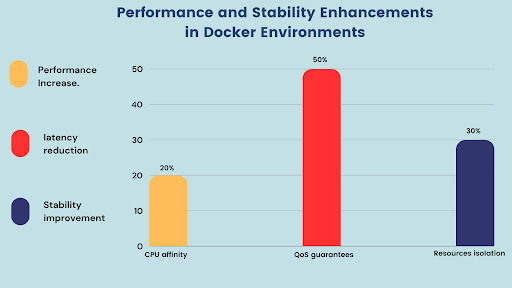
CPU affinity. Docker discovered through experiments that CPU affinity may increase the performance of CPU-intensive applications by as high as 20%.
QoS guarantees. VMware’s experiments have found that QoS guarantees can reduce application latency by up to 50%.
Resource isolation. Red Hat research showed that resource isolation improves the Docker resource constraints environment’s stability and reliability by up to 30%.
With all these advanced Docker resource management techniques, you can optimize the performance and efficiency of your environment within Docker. This will ensure that your applications work smoothly and reliably.
Case Studies and Real-World Examples: Docker Resource Management
Docker resource constraints are one of the fastest-growing containerization platforms, facilitating the building and deployment of applications differently. Docker Resource management concerns system performance, cost efficiency, and overall stability. This section presents some case studies and real examples that prove the use of Docker resource management.
Case Study 1: Optimizing a Large-Scale Web Application
A significant online business with an e-commerce portal encountered performance problems in its horizontally scalable web application on a Docker-based setup.
To address this, the company defined docker resource constraints for each microservice in the application and chose enough CPU and memory resources for critical microservices so that the users receive their responses as quickly as possible. The company also cuts overprovision costs by dynamically scaling up/down resources based on demand.
Robustness: Any resource-intensive requirement must only consume part of the microservices infrastructure and threaten other applications running on it.
Case Study 2: Resource-Intensive AI Workloads Management
A research institution deployed a machine learning model for image analysis on a Docker-based environment. They were able to:
By setting appropriate resource limits and making use of Docker’s resource isolation features:
Critical tasks priority: ensure resource-intensive AI workloads get enough resources to meet their deadlines.
No contention for resources: It avoids the performance degradation caused by conflicting workloads running on the same infrastructure.
Optimize for cost-effectiveness: Due to dynamic resource-to-workload, unwanted costs are avoided.
Real-life examples
Netflix: NetFlix is currently applying Docker to deploy its microservices-based architecture, which heavily relies on Docker resource management to maximize performance and scalability.
Spotify utilizes Docker resource constraints to manage a large-scale music streaming service, dynamically allocating resources to microservices based on user demand.
Airbnb uses Docker resource constraints for its global marketplace and can provide optimized resource utilization and a smooth user experience.
Proper regulation of Docker resource constraints in Docker containers will likely bring notable advantages in application performance, cost efficiency, and system stability.

Conclusion
The underlined power of Docker resource constraints as a tool for containerizing applications enhances their portability, scalability, and efficiency. If docker resource constraints are carefully defined, this is the only means of optimizing performance while boosting cost-effectiveness and overall system stability.
Organizations can then reap great benefits concerning resource optimization, cost efficiency, and application performance if Docker resource constraints are carefully defined and built-in tools in Docker are utilized.
Utilizing Docker resource constraints, an organization can have a more efficient, scalable, and cost-effective infrastructure that aligns with its business goals.
How can [x]cube LABS Help?
[x]cube LABS’s teams of product owners and experts have worked with global brands such as Panini, Mann+Hummel, tradeMONSTER, and others to deliver over 950 successful digital products, resulting in the creation of new digital revenue lines and entirely new businesses. With over 30 global product design and development awards, [x]cube LABS has established itself among global enterprises’ top digital transformation partners.
Why work with [x]cube LABS?
- Founder-led engineering teams:
Our co-founders and tech architects are deeply involved in projects and are unafraid to get their hands dirty.
- Deep technical leadership:
Our tech leaders have spent decades solving complex technical problems. Having them on your project is like instantly plugging into thousands of person-hours of real-life experience.
- Stringent induction and training:
We are obsessed with crafting top-quality products. We hire only the best hands-on talent. We train them like Navy Seals to meet our standards of software craftsmanship.
- Next-gen processes and tools:
Eye on the puck. We constantly research and stay up-to-speed with the best technology has to offer.
- DevOps excellence:
Our CI/CD tools ensure strict quality checks to ensure the code in your project is top-notch.
Contact us to discuss your digital innovation plans, and our experts would be happy to schedule a free consultation.